Examples
These examples aim at giving a wide range of example to enable an easy implementation of common use cases for users of the triggers and action service.
Post all your data streams on elastic cloud
Even though Live Objects offers you the ability to store and explore your data leveraging the power of Elastic Search, you may want to keep your data on your dedicated space on Elastic’s Cloud.
This example will demonstrate how to route all your incoming data into your elastic search instance and store only the value part of the data.
|
Pushing data to elastic search cloud needs to pass credentials through basic auth mechanism. This example will demonstrate how to leverage custom headers mechanism to pass credentials for authentication. |
- Given
-
-
a dedicated Elastic instance at url myinstance.cloud.es.io:9243
-
an elastic cloud username liveobjects with password rocks
-
an elastic search index my_lo_example
-
an elastic search type my_lo_type
-
Endpoint:
POST /api/v1/event2action/actionPolicies
Body:
{
    "name": "push data to elastic cloud",
    "enabled": true,
    "triggers": {
        "dataMessage": {
           "version": 1
        }
    },
    "actions": {
        "httpPush": [
            {
                "webhookUrl": "https://myinstance.cloud.es.io:9243/my_lo_example/my_lo_type",
                "headers": {"Authorization": ["Basic bGl2ZW9iamVjdHM6cm9ja3MK="]},
                "jsonPath": "value"
            }]
    }
}|
Connecting the http push action to a service requiring a JWT token will only need to change the Authorization header to Bearer and pass the token. |
Endpoint:
POST /api/v0/data/streams/my-stream
Body:
{
    "location": {
      "provider": "lora",
      "accuracy": 10,
      "lon": -122.169846,
      "lat": 37.602902},
   "model": "lora_v0",
   "value": {
      "payload": "ae2109000cf6",
      "customMetadata": { "name": "sensor1" }
   },
   "tags": [
      "San Francisco", "Tracker"
     ]
}Curl:
curl -X POST -u liveobjects:rocks https://myinstance.cloud.es.io:9243/my_lo_example/my_lo_type/_search -H 'Content-Type: application/json' -d '{ "query": {"match_all": {}}}'Send a notification to a FIFO when a device is auto-provisioned in Live Objects
This example will demonstrate how to route your device created events to a FIFO queue in order to update your business application device repository when a device is auto-created (here a MQTT device).
-
Provision an action policy to notify the creation of a new device to a FIFO.
-
Get a Live Objects API key with BUS_R role to read the data on the FIFO
-
Get another Live Objects API key with DEVICE_ACCESS role to use with a mqtt device or a mqtt client to simulate a device
-
Connect a mqtt client with the API key with BUS_R role and subscribe to the FIFO. You should receive the device created event message.
-
Connect the mqtt device (or mqtt client) to Live Objects with the API key as password and the device identifier as clientId. The device will be auto-provisioned in Live Objects.
-
Read the deviceCreated message in the FIFO queue.
-
Make a REST API call to retrieve the device detailed information: GET /api/v1/deviceMgt/devices/{deviceId}
These actions can be done in the Live Objects portal, or with the API:
Endpoint:
POST /api/v1/event2action/actionPolicies
Body:
{
    "name": "device_created_notification",
    "enabled": true,
    "triggers": {
       "deviceCreated": {
          "version": 1
       }
    },
    "actions": {
        "fifoPublish": [
            {"fifoName": "your_fifo_name"}
        ]
    }
}
If you want to be notified on both deviceCreated and deviceDeleted events, you can set the 2 triggers in the same action policy.
{
    "name": "device_created_or_deleted_notification",
    "enabled": true,
    "triggers": {
       "deviceCreated": {
          "version": 1
       },
       "deviceDeleted": {
          "version": 1
       }
    },
    "actions": {
        "fifoPublish": [
            {"fifoName": "your_fifo_name"}
        ]
    }
}Endpoint:
POST /api/v0/apiKeys
Body:
{
  "active": true ,
  "parentId":"\{\{parentId\}\}",
  "label": "myFIFOKey",
  "roles": [
    "BUS_R"
  ]
}
\{{parentId}\} can be found in the response of user authentication request POST /api/v0/auth
Endpoint:
POST /api/v0/apiKeys
Body:
{
  "active": true ,
  "parentId":"{{parentId}}",
  "label": "myMqttDeviceKey",
  "roles": [
    "DEVICE_ACCESS"
  ]
}Use your API key with BUS_R role as your mqtt password. * Connect your MQTT client to Live Objects in _application_ mode.
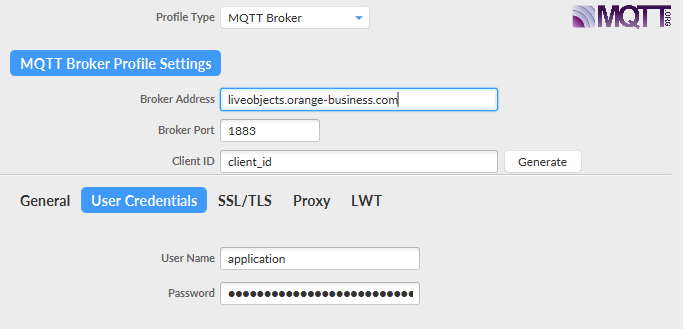
-
Subscribe to fifo/your_fifo_name
-
Use your API key with DEVICE_ACCESS role as your mqtt password.
-
Enter a device identifier in the client ID field.
-
Connect your MQTT client to Live Objects in device mode. The device will be auto-provisioned.
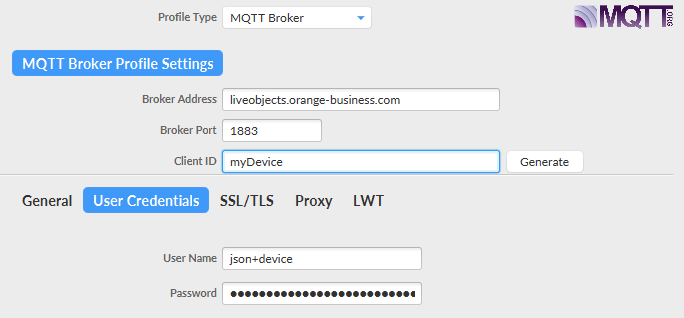
The following event is present in the FIFO.
{
    "type": "deviceCreated",
    "version": 1,
    "timestamp": "2019-12-04T10:40:58.990Z",
    "deviceId": "urn:lo:nsid:mqtt:myDevice"
}Endpoint:
GET /api/v1/deviceMgt/devices/urn:lo:nsid:mqtt:myDevice
Response:
{
  "id": "urn:lo:nsid:mqtt:myDevice",
  "name": "Auto-created device (mqtt / myDevice)",
  "description": "This device was auto registered by the connector [mqtt] with the nodeId [myDevice]",
  "group": {
    "id": "root",
    "path": "/"
  },
  "interfaces": [
    {
      "connector": "mqtt",
      "nodeId": "myDevice",
      "enabled": true,
      "status": "OFFLINE",
      "lastContact": "2019-12-04T10:41:00.701Z",
      "capabilities": {
        "configuration": {
          "available": false
        },
        "command": {
          "available": false
        },
        "resource": {
          "available": false
        }
      },
      "activity": {
        "apiKeyId": "5de77767d5d6e23710cfdd9e",
        "mqttVersion": 4,
        "mqttUsername": "json+device",
        "mqttTimeout": 60,
        "remoteAddress": "/127.0.0.1:55656",
        "lastSessionStartTime": "2019-12-04T10:40:58.875Z",
        "lastSessionEndTime": "2019-12-04T10:41:00.700Z",
        "security" : {
          "secured": true,
          "protocol": "TLSv1.2",
          "cipher": "TLS_ECDHE_RSA_WITH_AES_128_GCM_SHA256",
          "clientCertAuthentication": true,
          "sniHostname": "mqtt.liveobjects.orange-business.com"
        }
      },
      "created": "2019-12-04T10:40:58.942Z",
      "updated": "2019-12-04T10:41:00.714Z"
    }
  ],
  "created": "2019-12-04T10:40:58.944Z",
  "updated": "2019-12-04T10:41:00.714Z",
  "activityState": "NOT_MONITORED"
}
Send a notification to a FIFO on device status modification
How to do the test?
-
Provision an action policy with a FIFO action to be notified if the device has a modification of status
-
Get a Live Objects API key with BUS_READ role to read the data on the FIFO
-
Get a Live Objects API key with DEVICE_ACCESS role to use with a mqtt device or a mqtt client to simulate a device
-
Connect the mqtt device (or mqtt client) to Live Objects with the API key as password and the device identifier as clientId.
-
Disconnect the mqtt device
-
Connect a mqtt client with the API key with BUS_READ role and subscribe to the FIFO. You should receive the event status change message.
Action policy provisioning
To create a new action policy linked with a device event:
Endpoint:
POST /api/v1/event2action/actionPolicies
Body:
{
    "name": "my_device_status_policy",
    "enabled": true,
    "triggers": {
       "deviceStatus": {
          "version": 1,
          "filter": {
            "groupPaths": [{
               "includeSubPath": false,
               "path": "your_group_path"
            }]
          }
       }
    },
    "actions:" {
        "fifoPublish": [
            {"fifoName": "your_fifo_name"}
        ]
    }
}Event:
{
    "type": "deviceStatus",                                             (1)
    "version": 1,                                                       (2)
    "deviceId": "urn:lo:nsid:mqtt:deviceId2",                           (3)
    "updatedInterface": {                                               (4)
        "connector": "mqtt",
        "nodeId": "your_device_identifier",
        "enabled": true,
        "status": {                                                     (5)
            "current": "OFFLINE",
            "previous": "ONLINE"
        }
    },
    "timestamp": "2019-08-29T14:11:58.101Z"
}
Description:
| 1 | event message type |
| 2 | message type format version |
| 3 | device identifier |
| 4 | interface information |
| 5 | the status transition |
Catch the failure commands and publish the events in realtime
Suppose that you have a device fleet and you need, for each device who receive command, catch all registred commands which has been expired then sent all the failure events notifications to an HTTP site as notification target.
To register your action policy:
Endpoint:
POST /api/v1/event2action/actionPolicies
{
    "name": "Command status event to push HTTP",
    "enabled": true,
    "triggers": {
      "commandStatus": {
        "version": 1,
        "filter": {
          "status": [
            "EXPIRED",  <--- filtered status
            "ERROR"
          ]
        }
      }
    },
    "actions": {
      "emails": [],
      "sms": [],
      "httpPush": [
        {
          "webhookUrl": "https://webhook.site/ad4ae2f9-179c-4d8a-ba2f-2b9064a8508c", <-- wehbhookUrl where you push your notification messages
          "headers": {},
          "retryOnFailure": true
        }
      ]
    }
}
When Live Objects command mechanism control detects a final event after processing the command ended with value = EXPIRED or ERROR, the trigger sends the following message to the url above:
Event:
{
  "type": "commandStatus",
  "version": 1,
  "id": "5dd4fa1cff8b5acbd100998b",
  "targetDeviceId": "urn:lo:nsid:bike:vin123",
  "status": "EXPIRED",
  "request": {
    "connector": "mqtt",
    "value": {
      "req": "test",
      "arg": {
        "cmd": "reset"
      }
    }
  }
}
Retrieve the LoRa® network events (specific if you have a LoRa® fleet)
Suppose that you wish to retrieve, in a FIFO queue, the raw data emitted by LoRa® devices in confirmed mode or in unconfirmed mode. You also want the join accept events.
To register your action policy:
Endpoint:
POST /api/v1/event2action/actionPolicies
{
    "name": "my new policy to route lora network events",
    "enabled": true,
    "triggers": {
        "loraNetwork": {
            "version": 1,
            "filter": {
                "messageTypes": [
                    "UNCONFIRMED_DATA_UP",
                    "CONFIRMED_DATA_UP",
                    "JOIN_ACCEPT"
                ]
            }
        }
    },
    "actions": {
        "fifoPublish": [
            {
                "fifoName": "myFIFO1234"
            }
        ]
    }
}