IoT device and data
Concepts
Alarms rules concepts
3 independent features are available for event processing :
-
Simple Event Processing (SEP) : a stateless service aimed at detecting notable single event from the flow of data messages. Example: raise an event when the device temperature is above 25°C.
-
State processing (SP) : a service aimed at detecting changes in "device state" computed from data messages. Example: raise an event when the device temperature status changes from "cold" to "hot". A state is computed by applying a state function to a data Message. A notification is sent by Live Objects each time a state value change.
-
Activity processing (AP) : detect 'silent devices', i.e. the lack of activity of a device. Example: raise an event when the device is not connected or did not send data message since 1 day.
Event processing and State processing services share common concepts :
-
apply rules when receiving a message : matching rules for SEP and state processing rules for SP. The rules are defined using the JsonLogic format.
-
have a common Context repository where you can store useful information for rule definition If your system is observable and periodically send measurement data, you can observe the state changes and notify them by using context repository (ex your device send periodically ambient temperature measurement : "cold" threshold is when data is below 20°C).
-
have a common Geozone repository where you can store the geographical references (polygons) you may use in your rules.
-
generate output events that your business application can consume to initiate downstream action(s) like alarming, execute a business process, etc.
-
limit the number of created rules (matching, firing and state processing) - order of idea is a thousand - in order to ensure high performances. The idea is to create generic rules and if needed, apply device-specific threshold using the Context repository.
Differences between Simple Event processing and State processing :
-
Simple Event Processing provides a stateless detection function (matching rule) while State Processing provides a stateful (the current state of the device is known by the system) detection function which is useful for use cases more complex than normal/alert status. State processing can be seen as a basic state machine where transitions between states are managed by the state function result and events are transition notifications.
-
Simple Event Processing has a frequency function (firing rule) which defines when "fired events" must be generated : ONCE, ALWAYS, SLEEP.
Notifications concepts
The triggers and actions service purpose is to execute an action on a given trigger. This enables to create notifications easily on an event detection or to enable new external downstream action on new data.
|
An email can be sent to one or multiple recipient. The email content and subject can be specified and templated using the event or message as template data context. |
|
| SMS |
An SMS can be sent to one or multiple recipient. The SMS content can be specified and templated using the event or message as template data context. |
| Http Push |
An http push can be triggered to a particular web hook identified by its url. The data can be forwarded as-is or templated to match a particular format. A retry policy can be enabled if needed. |
| Publish in a FIFO queue |
The alarm events are available in a FIFO queue and can be retrieved with a MQTT client. |
| Publish in Azure Event Hubs |
The message can be sent in your Azure Event Hubs service. The data can be forwarded as-is or templated to match a particular format. A retry policy can be enabled if needed. |
Rationale
The role of this service is to provide ability to trigger an action upon a Live Objects message. See message data model Event to Action can enable interesting use cases for the user such as tighter integration of Live Objects to existing communication tools (such as but not limited to Slack, mattermost, HipChat, IFTTT etc.), enable downstream actions on its toolchains (trigger builds or various tasks on jenkins etc.) or enable more complex backend/cloud connectivity.
Simple Event Processing
Concepts
Simple event processing (SEP) service is aimed at detecting notable single event from the flow of data messages.
Simple event processing combines a stateless boolean detection function (matching rule) with a frequency function (firing rule).
It generates fired events as output that your business application can consume to initiate downstream action(s) like alarming, execute a business process, etc.
Processing rules
You can set up Matching rules and Firing rules to define how data messages are processed by the SEP service and how fired events are triggered:
Matching rule
A matching rule is a simple or compound rule that will be applied on each data message to evaluate if a « match » occurs. A matching rule is evaluated as a boolean result. Matching rule supports numeric, string, logic and distance operators and is based on JsonLogic.
Matching context (containing data message and matching rule id, etc.) are processed by the firing rules associated to these matching rules.
Firing rule
A firing rule applies to the matches triggered by one or many matching rules and defines when fired events must be generated.
A firing rule specifies:
-
the list of matching rules associated to this firing rule – when these matching rules match, the firing rule is applied,
-
the frequency of firing: once, sleep and always,
-
optionally, a list of aggregation keys identifying fields to extract from the matching context to identify the firing context.
The firing rule is applied as follow on each matching context:
-
the firing rule generates the firing context from the matching context, by extracting one or multiple fields defined with the aggregation keys,
-
the firing rule then applies the frequency parameter to optionally throttle the triggering of fired events belonging to the same firing context.
If the frequency of the firing rule is defined as ONCE or SLEEP then firing guards are created in the system to prevent new generation of fired events for a given firing context. You can manage the firing guards, and for example, remove a firing guard to re-activate a firing rule for a specific firing context.
As an example, by setting the metadata.source field as aggregation key, if a fired event is generated for a device “A”, a firing guard will prevent new fired event for this device “A” and this firing rule. By the way, fired events could occur for devices “B”, “C”, etc… for this rule.
With SLEEP mode, a duration specifies the minimum time between two fired events. When the duration is elapsed, the firing guards is removed and new fired events could occur. This duration is computed for each element of the tuple composed of firing rule id + aggregation keys + value (firingRuleID:metadata.source:deviceId1 , firingRuleID:metadata.source:deviceId2, …)
|
The sleepDuration is expressed in a iso8601-duration format. |
Fired events consumption
Fired events are accessible with the MQTT API. Your business application must connect using MQTT application mode and subscribe to a FIFO. This FIFO should previously be filled with matchingFired events.
References: MQTT Application mode, Event base trigger and Alarm output model.
This example shows a fired event object triggered by one matching rule and filtered by a firing rule (that will block any other event from occuring unless the guard is lifted). The matching rule check on all published messages if the device location have more than 6 m from the the coordinates (48.800206,2.296565) and the temperature published is more than 99°. The firing rule then trigger the event and filter all messages selected by the source field "metadata.source".
{
  "matchingContext": {
    "matchingRule": {
      "dataPredicate": "{\"and\":[{\">\":[{\"distance\":[{\"var\":\"location.lat\"},{\"var\":\"location.lon\"},48.800206,2.296565]},6]},{\">\":[{\"var\":\"value.temp\"},99]}]}",
      "name": "compound rule with numeric and distance operators Rule",
      "id": "d5f75f5a-4c43-4b12-81e0-0ddff0083c52",
      "enabled": true
    },
    "data": {
      "metadata": {
        "connector": "mqtt",
        "source": "urn:lo:nsid:mqtt:myTest",
        "transformation": {
          "published": {
            "location": {
              "lon": -122.431297,
              "lat": 37.773972
            }
          }
        },
        "group": {
          "path": "/",
          "id": "root"
        },
        "network": {
          "mqtt": {
            "clientId": "urn:lo:nsid:mqtt:myTest"
          }
        }
      },
      "streamId": "urn:lo:nsid:dongle:00-14-22-01-23-45!temperature",
      "extra": {},
      "location": {
        "lon": -122.431297,
        "lat": 37.773972
      },
      "model": "temperatureDevice_v0",
      "value": {
        "temp": 105
      },
      "timestamp": "2021-06-17T13:15:04.165Z",
      "tags": []
    },
    "tenantId": "5c0a6fb49a927971342aea06",
    "timestamp": "2021-06-17T13:15:04.185Z"
  },
  "tenantId": "5c0a6fb49a927971342aea06",
  "timestamp": "2021-06-17T13:15:04.276Z",
  "firingRule": {
    "name": "firing rule test",
    "matchingRuleIds": [
      "d5f75f5a-4c43-4b12-81e0-0ddff0083c52"
    ],
    "id": "04e30d59-82eb-4fb5-9243-6111d188b131",
    "aggregationKeys": [
      "metadata.source"
    ],
    "firingType": "ONCE",
    "enabled": true
  }
}
Examples
Here are some examples of usage of the simple event processing service.
Data message sent by a device with temperature set to 105 and location set at San Francisco (37.773972,-122.431297)
{
  "streamId":"urn:lo:nsid:dongle:00-14-22-01-23-45!temperature",
  "location":{
    "lat":37.773972,
    "lon":-122.431297
  },
  "model":"temperatureDevice_v0",
  "value":{
    "temp":105
  }
}
Matching rule: numeric (temperature higher than 99) and distance operator (distance between data message and Paris (48.800206, 2.296565) must be higher than 6km)
{
  "id": "d5f75f5a-4c43-4b12-81e0-0ddff0083c52",
  "name": "compound rule with numeric and distance operators Rule",
  "enabled": true,
  "dataPredicate": {
    "and": [
        {
            ">": [
            {
                "distance": [
                {
                "var": "location.lat"
                },
                {
                "var": "location.lon"
                },
                48.800206,
                2.296565
                ]
            },
            6000
            ]
        },
        {
        ">": [
           {
             "var": "value.temp"
           },
          99
        ]
      }
    ]
  }
}
Firing rule with frequency ONCE and aggregationKeys based on the source field :
{
    "name": "firing rule test",
    "enabled": true,
    "matchingRuleIds": ["d5f75f5a-4c43-4b12-81e0-0ddff0083c52 --> {matchingRuleId}"],
    "aggregationKeys":["metadata.source"],
    "firingType":"ONCE"
}
Fired event will be generated once for each source sending data with temperature higher than 99 and not located within a radius of 6km of Paris.
Example with other operators ">", "if", "in", "cat" :
{
  ">":[
    {
      "var":{
        "cat":[
          "value.", {
            "if" : [
              {"in": [{"var":"model"}, "v0"]},
              "temp",
              {"in": [{"var":"model"}, "v1"]},
              "temperature",
              "t"
            ]
          }
        ]
      }
    },
    100
  ]
}
This rule allows to specify the field to be compared to the value "100” based on the model of the data message.
If the model value is:
Concepts
State processing (SP) service aims at detecting changes in "device state" computed from data messages.
A state can represent any result computed from Live Objects data messages : geo-zone ("paris-area", "london-area", ..), temperature status ("hot", "cold", ..), availability status ("ok" , "ko"). Each state is identified by a key retrieved from the user-defined json-path in the data message.
stateKeyPath examples : "streamId", "metadata.source"
A state is computed by applying a state function to a data Message. A notification is sent by Live Objects each time a state value change. State processing differs from event processing as it provides stateful rules which is useful for use cases more complex than normal/alert status. State processing can be seen as a basic state machine where transitions between states are managed by the state function result and events are transition notifications.
State Processing rules
You can set up StateProcessing rules to define how data messages are processed by the SP service.
A StateProcessing rule applies to all new data messages.
| field name | required ? | description |
|---|---|---|
enabled |
required |
Defines if the rule should be enabled and applied to new data message. |
filterPredicate |
optional |
Filters data on which the state processing logic should be applied. This boolean function is described in JsonLogic syntax. |
stateKeyPath |
required |
A json-path that will be used to retrieve the state key form the triggering data message. |
stateFunction |
required |
This is the core of the state processing logic. This function takes as input a data message and computes a state associated whith the state key. |
State change events
State change events are accessible with the MQTT API. Your business application must connect using MQTT application mode and subscribe to a FIFO. This FIFO should previously be filled with stateChange events.
References: MQTT Application mode, Event base trigger and Alarm output model.
State processing initialization
When a state is computed for the first time, it generates a state change event with previous state equals null.
Examples
Here are some examples of usage of the state processing.
Temperature monitoring of a device sensor, with 3 temperature ranges.
Temperature State processing logic:
-
if temperature is below 0 degree Celsius, sensor state is cold.
-
if temperature is between 0 and 100 degrees Celsius sensor state is normal.
-
if temperature is higher than 100 degrees Celsius sensor state is hot.
The sensor is identified by the streamId field within the data message.
{
  "name": "temperature state rule",
  "enabled": true,
  "stateKeyPath": "streamId",
  "stateFunction": {
    "if": [
      {"<": [
        {"var": "value.temp"},
        0
      ]},
      "cold",
      {"<=": [
        {"var": "value.temp"},
        100
      ]},
      "normal",
      "hot"
    ]
  }
}
We assume that the current state of the sensor is "normal".
The following data message will generate a state change event from "normal" to "hot" for state key : "urn:lo:nsid:mqtt:myTest".
{
  "streamId":"urn:lo:nsid:dongle:00-14-22-01-23-45!temperature",
  "location":{
    "lat":37.773972,
    "lon":-122.431297
  },
  "model":"temperatureDevice_v0",
  "value":{
    "temp":200
  }
}
State change event :
{
  "stateProcessingRuleId": "75c47213-b7fb-4fd9-8c4a-9d2209236a60",
  "data": {
    "metadata": {
      "connector": "mqtt",
      "source": "urn:lo:nsid:mqtt:myTest",
      "transformation": {
        "published": {
          "location": {
            "lon": -122.431297,
            "lat": 37.773972
          }
        }
      },
      "group": {
        "path": "/",
        "id": "root"
      },
      "network": {
        "mqtt": {
          "clientId": "urn:lo:nsid:mqtt:myTest"
        }
      }
    },
    "streamId": "urn:lo:nsid:dongle:00-14-22-01-23-45!temperature",
    "extra": {},
    "location": {
      "lon": -122.431297,
      "lat": 37.773972
    },
    "model": "temperatureDevice_v0",
    "value": {
      "temp": 200
    },
    "timestamp": "2021-06-17T12:30:16.659Z",
    "tags": []
  },
  "tenantId": "5c0a6fb49a927971342aea06",
  "newState": "hot",
  "previousState": "normal",
  "timestamp": "2021-06-17T12:30:16.708Z",
  "stateProcessingRule": {
    "stateKeyPath": "urn:lo:nsid:dongle:00-14-22-01-23-45!temperature",
    "name": "temperature state rule",
    "stateFunction": "{\"if\":[{\"<\":[{\"var\":\"value.temp\"},0]},\"cold\",{\"<\":[{\"var\":\"value.temp\"},100]},\"normal\",\"hot\"]}",
    "id": "75c47213-b7fb-4fd9-8c4a-9d2209236a60",
    "enabled": true,
    "filterPredicate": "null"
  }
}
Activity Processing
Concepts
Activity processing (AP) service aims at detecting devices that have no activity.
All of the following 'activities' are monitored :
-
'connected' event sent by the device
-
new data sent with the deviceId as 'metadata.source'
-
command response from this device
-
setParam response from this device
Activity rules
You can set up Activity rules to define how devices activity should be monitored.
You can target a list of deviceIds or a list of groups. All devices of these groups will be targeted. You can target a group with its path, including or not the subPath.
If a device is targeted by several rules, then several activity events can be thrown for this device.
| field name | required ? | description |
|---|---|---|
enabled |
required |
Defines if the rule should be activated or not. |
name |
required |
Name of the rule that can be used to ease rule management, must be unique and not empty. |
silentPolicy |
required |
Define the duration of device inactivity before throwing an event. This duration will be reused when the device will be active once again. |
targets |
required |
List of deviceIds and/or devices groups that targeted by the rule. At least 1 deviceId or 1 group must be set. |
tags |
optional |
A list of tags can be set : they will be recorded in all events triggered by this rule. This can ease event search and management. |
When an activityRule is updated, all activity states linked to this rule are reset to a specific 'UNKNOWN' state.
Activity States
An activity state is unique for a couple 'activity rule id + device id', it holds :
-
the state 'ACTIVE', 'SILENT' or 'UNKNOWN' of the device for this rule. As a device can be targeted by several rules with different silent duration, at a specific moment, 1 device can have several activity states, with different states. 'UNKNOWN' is specific to the initial state after activity rule creation or update.
-
the last activity timestamp of the device.
-
the timestamp of the next alarm that will be sent if there is no device activity until then. It can be triggered by the silent duration or repeatInterval duration depending on the current state (respectively ACTIVE or SILENT).
-
the number of times a reminder has been sent for the current state.
Activity Events
Activity events are accessible with the MQTT API. Your business application must connect using MQTT application mode and subscribe to a FIFO. This FIFO should previously be filled with deviceActivity events.
References: MQTT Application mode, Event base trigger and Alarm output model.
Example
Here is one example of usage of the activity processing.
ActivityRule targeting the group path '/france/lyon' an all its sub path. The silent trigger is 1 day and the repeat alarm interval is 12 hours.
{
  "name": "devices in Lyon",
  "enabled": true,
  "silentPolicy": {
    "duration" : "P1D",
    "repeatInterval" : "PT12H"
  },
  "targets": {
    "groupPaths" : [
      {
        "path" : "/france/lyon",
        "includeSubPath" : true
      }
    ]
  }
}
If the device does not connect nor send any data for 1 day, then the following event will be sent:
{
  "deviceId": "urn:lo:nsid:dongle:00-14-22-01-23-45",
  "deviceAdditionalInfo": {
    "deviceName": "myDongle001",
    "groupPath": "/france/lyon"
  },
  "state":"SILENT",
  "numberOfAlarmReminders": 0,
  "timestamp": "2018-04-24T08:29:49.029Z",
  "activityRule": {
    "id": "d16b4319-a486-4cb8-a10e-b4a452cda4be",
    "name": "devices in Lyon",
    "enabled": true,
    "silentPolicy": {
      "duration" : "P1D",
      "repeatInterval" : "PT12H"
    },
    "targets": {
      "groupPaths" : [
        {
          "path" : "/france/lyon",
          "includeSubPath" : true
        }
      ]
    }
  }
}
12 hours later, if the device is still silent, the event will be sent again with 'numberOfAlarmReminders' incremented by 1:
{
  "deviceId": "urn:lo:nsid:dongle:00-14-22-01-23-45",
  "deviceAdditionalInfo": {
    "deviceName": "myDongle001",
    "groupPath": "/france/lyon"
  },
  "state":"SILENT",
  "numberOfAlarmReminders": 1,
  "timestamp": "2018-04-24T20:29:49.029Z",
  "activityRule": {
    "id": "d16b4319-a486-4cb8-a10e-b4a452cda4be",
    "name": "devices in Lyon",
    "enabled": true,
    "silentPolicy": {
      "duration" : "P1D",
      "repeatInterval" : "PT12H"
    },
    "targets": {
      "groupPaths" : [
        {
          "path" : "/france/lyon",
          "includeSubPath" : true
        }
      ]
    }
  }
}
Alarm configuration
To configure your event rules and process data message of your streams, you must configure :
-
Your context repositoy to set a data which can met the criteria of your rules.
-
Your matching and firing rules or your state processing rules or your activity processing rules.
-
Your action policies (your triggers and associated actions), when the alarm occurred the service run your chosen action (notification).
Context repository
Definition
The context repository is a database that allows storing user data that could be useful in the event rules definition and not present in the data messages. The context may include, for instance, thresholds definition, geographical zones, a list of device identifiers, a user preference, a group of contexts. The context has a key-value format. The key is a string and the value can be a primitive (string, numeric…), a JSON object or an array. Optional tags are available to ease the search among the tenant contexts.
| for geographical zones, a dedicated geozone database is provided. Once the user has provisioned his geozones, they are automatically available in the user context. |
Context provisioning
The Live Objects API to manage context provisioning are described in the swagger documentation (Event processing - Context section) : https://liveobjects.orange-business.com/swagger-ui/index.html.
See a simple context example.
Context groups
A context value may reference other context keys. Instead of referencing each context individually, the rule can then reference the context group.
Example: See a context groups example.
|
extract context key
A context key is not necessarily hard coded in your rule. For instance, it can be extracted from your data message (using tags or device identifier). Here, the context key is generated with the concatenation of the value.streamId field and a string.
Here, the context key is extracted from the value.tags field.
|
Geozone repository
Definition
The Geozone repository is a database that allows the user to save his geographical sites/zones of interest. The geozones are stored as polygons (array of geopoints coordinates in decimal degrees). Meta information like a description and tags can be stored with the geozone.
|
Format:
Example of polygon : |
Provisioning
The Live Objects API to manage geozone provisioning are described in the swagger documentation (Event processing - Geozone section) : https://liveobjects.orange-business.com/swagger-ui/index.html.
Example:
PUT liveobjects.orange-business.com/api/v0/eventprocessing/geozones/grand-orleans
{
  "description": "my geozone grand Orleans",
  "geometry": {
    "coordinates": [[
        [1.780892, 48.091452],
        [2.301382, 48.000565],
        [2.281961, 47.509630],
        [1.252634, 47.729556],
        [1.780892, 48.091452]
        ]],
    "type": "Polygon"
  },
  "tags": ["zone-nord"]
}-
Once a geozone is provisioned, it is available in the user context. Hence, it can be referenced in event processing rules or in groups of context.
-
When a geozone is updated, the modifications are immediately taken into account by the contexts or rules referencing the geozone.
Rules and JsonLogic syntax
A rule is a function applied on a data message in order to detect any significant change in the data (exceeding threshold, state modification, change of location). The rules in Simple Event Processsing and State Processing are defined within Live Objects plateform with the JsonLogic syntax.
| the JsonLogic log operator has been deactivated. |
Additional operators
In addition to the existing JsonLogic operators (logic and boolean operators, numeric operators, string operators, array operators), Live Objects provides geographic operators (distance, inside, insideindex, closeto, closetoindex), context operator (ctx) and miscellaneous operators (get, currentstate).
| Name |
|---|
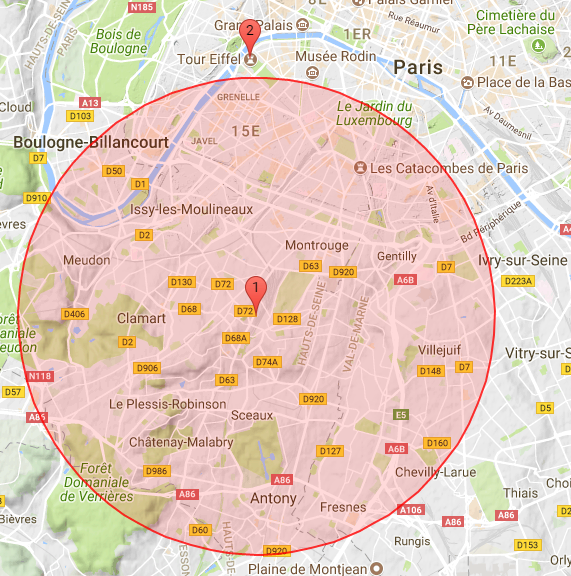
distance |
Description |
Geographical operator. Returns the distance in meters between two points, given their latitude and longitude in decimal degrees. |
Parameters |
lon1, lat1, lon2, lat2 in decimal degrees |
Logic |
|
Data |
Eiffel Tower |
|
Result |
|
| Name |
|---|
ctx |
Description |
Retrieve, from the context repository, one or several values using a key or an array of keys. Several ctx operators can be nested (group of contexts). |
Parameters |
key or array of keys |
Context |
In the following example, "freezingThreshold" and "liquidThreshold" must have been provisioned in the tenant context before being used. |
Logic |
|
Pre-requisite |
Data |
|
Result |
|
| Name |
|---|
currentstate |
Description |
Retrieve the current state of a device when applying a stateProcessing function. For state processing rules only. In the following example, current state can be "cold", "normal" or "hot". The example following logic function is an hysteresis : if current state is not hot, transition to hot if value.temp > 100 if current state is hot, transition to normal if value.temp < 80 if value.temp < 0 transition to cold |
Logic |
|
Data |
|
Result |
|
| Name |
|---|
get |
Description |
Returns the element at the specified position in an array. |
Parameters |
array, index in the array |
Context |
In the following example, an array containing latitude and longitude values must have been provisioned in the tenant context : |
Logic |
|
Data |
|
Result |
|
| Name |
|---|
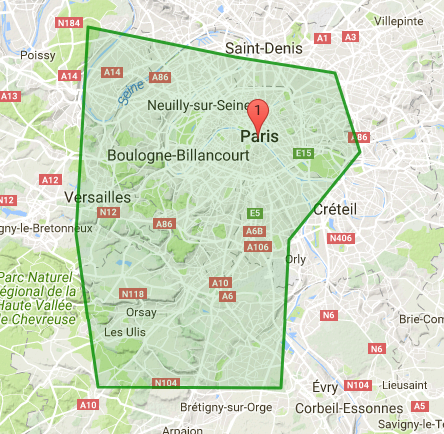
inside |
Description |
Checks if a point defined by its latitude and longitude is inside a polygon (or at least one polygon if an array of polygons is provided as input parameter). |
Parameters |
longitude, latitude in decimal degrees for the point to be tested, polygon(s) defined by the coordinates of their vertices (lon, lat in decimal degrees). |
Logic |
|
Data |
|
|
Result |
|
| Name |
|---|
insideindex |
Description |
Checks if a point is inside an array of polygons. Returns the index of the first matching polygon. Returns -1 if no matching was found. This operator is usually in conjunction with the "get" operator which will return the matching polygon. |
Parameters |
longitude, latitude in decimal degrees for the point to be tested, array of polygons defined by the coordinates of their vertices (lon, lat in decimal degrees). |
Context |
In the example, an array containing latitude and longitude values must have been provisioned in the tenant context : |
Logic |
|
Data |
|
Result |
|
| Name |
|---|
closeto |
Description |
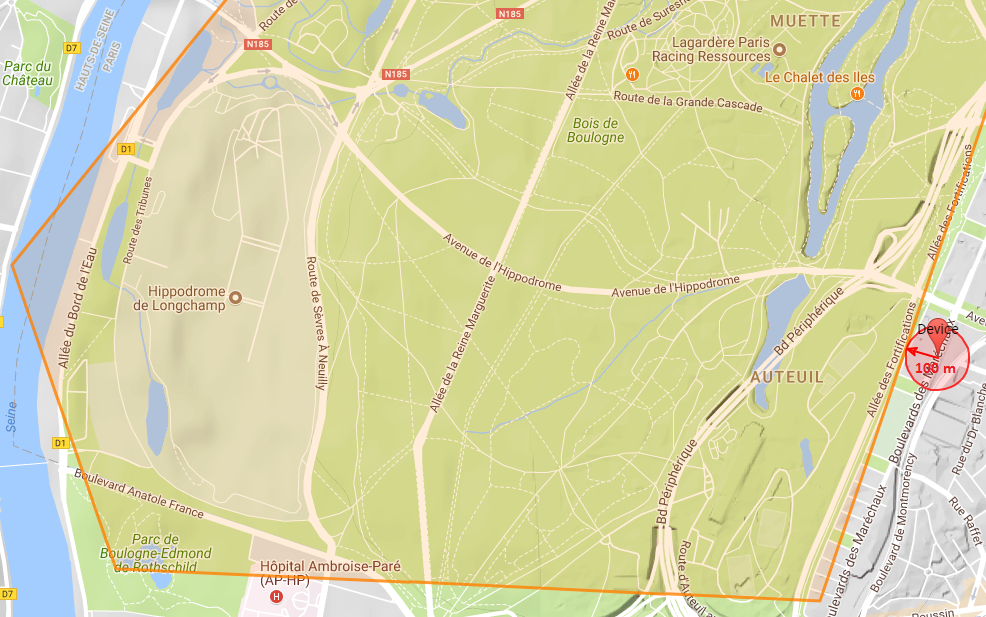
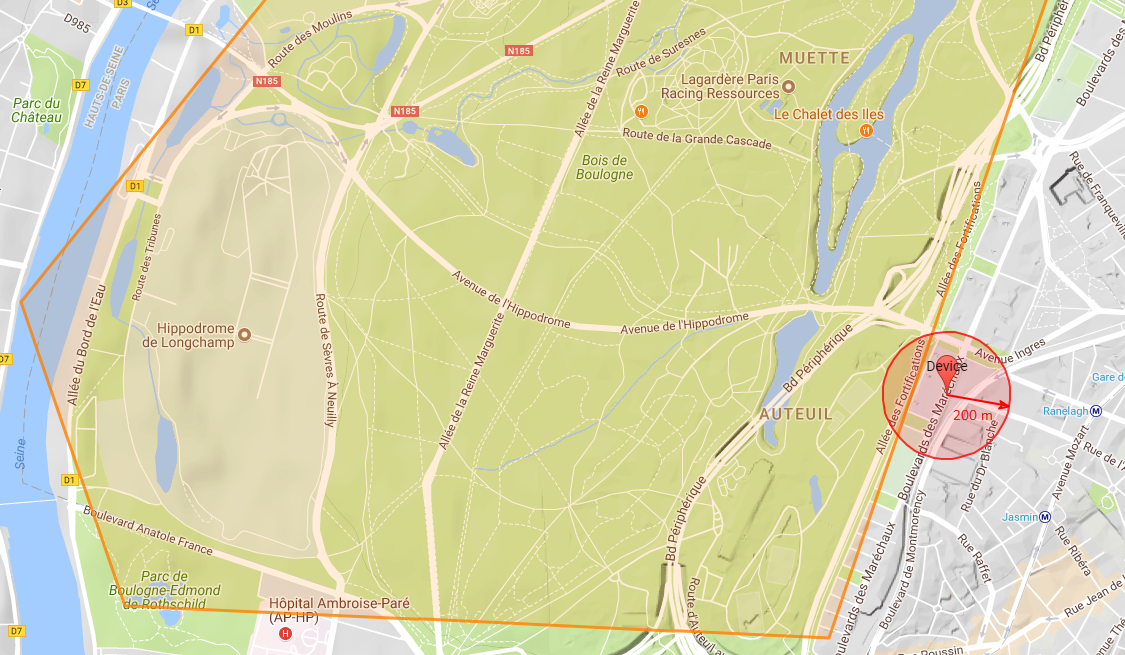
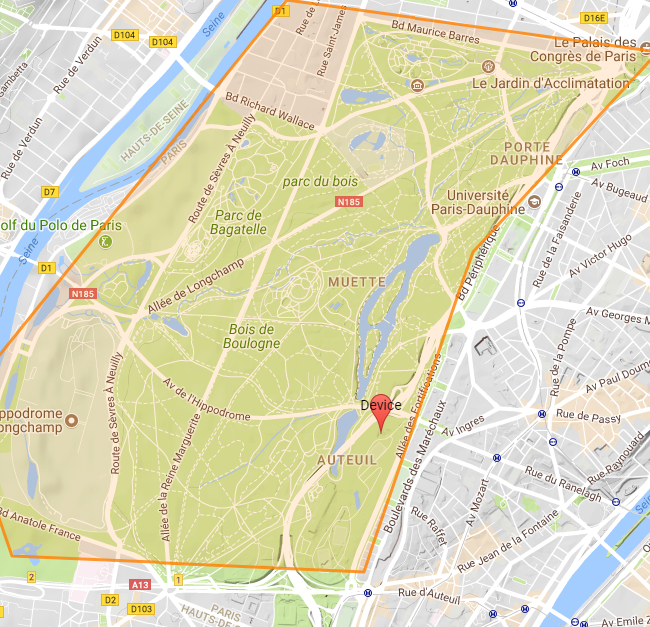
Checks if a circle is close to a polygon or at least one of the polygons (polygon array). |
Parameters |
longitude, latitude (in decimal degrees for the circle center), circle radius, polygon or array of polygons |
Logic |
|
Data1 : circle center outside polygons, the circle does not intersect any polygon. |
|
|
Result1 |
|
Data2 : circle center outside polygons, the circle intersects one polygon. |
|
|
Result2 |
|
Data3 : a point inside one of the polygons. |
|
Result3 |
|
| Name |
|---|
closetoindex |
Description |
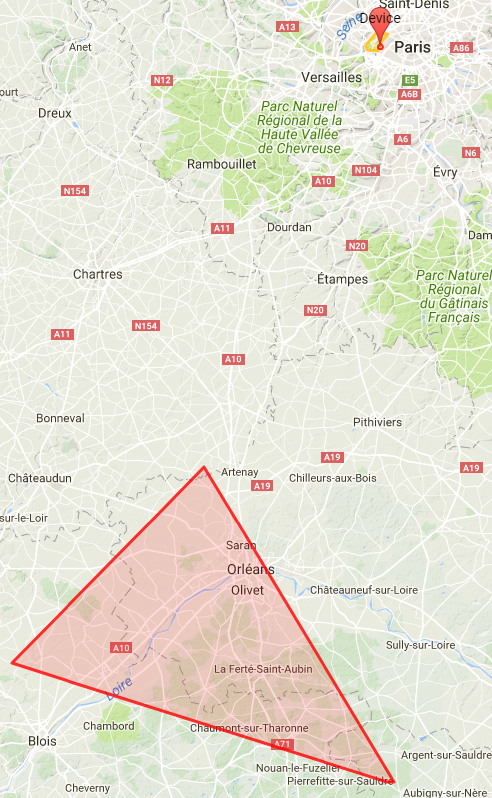
Checks if a circle is close to an array of polygons. Returns the index of the first matching polygon (first index in the array is 0). Returns -1 if no matching was found. |
Parameters |
longitude, latitude (in decimal degrees for the circle center), circle radius, array of polygons |
Logic |
N.B.: first polygon in the array is the Orleans area; 2nd polygon is the Paris area. |
Data |
|
|
Result |
|
| Name |
|---|
now_utc |
Description |
Returns the processing time as ISO 8601 string. Similar to javaScript new Date().toISOString() |
Parameters |
none |
Logic |
|
Data |
|
Result |
true if processing hour is between 0 and 12 |
| Name |
|---|
get_utc_hours |
Description |
Returns the hour of the ISO 8601 provided parameter . Similar to javaScript new Date(param).getUTCHours() |
Parameters |
ISO 8601 String |
Logic |
|
Data |
|
Result |
13 |
| Name |
|---|
|
Description |
Returns the minutes of the ISO 8601 provided parameter . Similar to javaScript new Date(param).getUTCMinutes() |
Parameters |
ISO 8601 String |
Logic |
|
Data |
|
Result |
1 |
| Name |
|---|
|
Description |
Returns the day of the week of the ISO 8601 provided parameter . Similar to javaScript new Date(param).getUTCDay() |
Parameters |
ISO 8601 String |
Logic |
|
Data |
|
Result |
4 |
| Name |
|---|
|
Description |
Returns the day of the month of the ISO 8601 provided parameter . Similar to javaScript new Date(a).getUTCDate() |
Parameters |
ISO 8601 String |
Logic |
|
Data |
|
Result |
15 |
| Name |
|---|
|
Description |
Returns epoch (milliseconds) of the ISO 8601 provided parameter . Similar to javaScript new Date(a).getTime() |
Parameters |
ISO 8601 String |
Logic |
|
Data |
|
Result |
1516021237290.0 |
Action policy
Events related to the alarming on device activity/state change/event processing can be notified by email or sms. The notification triggering and actions are defined in an action policy, provisioned in Live Objects.
Provisioning
Please see the dedicated action policy swagger
To create a new action policy linked with an event rule :
Endpoint:
POST /api/v1/event2action/actionPolicies
{
    "id": "6c95837b-251d-41d8-95f1-42facdf8e71e"
    "name": "name-aea80c1d-5777-4e20-822c-5e6871f428e5",
    "enabled": true,
    "triggers": {
        "stateChange": {
            "version": 1,
            "filter": {
                "ruleIds": ["state-change-event-3422c5ac-de95-4727-855a-39d43902b7b3"]
            }
       }
    },
    "actions:" {
        "emails": [{
           "to": ["notification@orange.com"],
           "cc": ["cc@orange.com"],
           "cci": ["cci@orange.com"],
           "subjectTemplate": "State change for {{stateKey}}",
           "contentTemplate": "{{stateKey}} change from state {{previousState}} to state {{newState}} at {{timestamp}}"
        }],
        "sms": [{
            "destinationPhoneNumbers": ["+33601234567"],
            "contentTemplate": "{{stateKey}} new state {{newState}} at {{timestamp}}"
        }],
        "httpPush": [{
            "webhookUrl": "https://hooks.myservice.com/services/SOMEWEBHOOKREFERENCE",
            "headers": {"authorization": ["Bearer 00000000-0000-0000-0000-000000000000"]},
            "retryOnFailure": true,
            "content": "{\"text\": \"Devices {{deviceIds}} activity change triggered by activity rule: {{ruleIds}} : at {{timestamp}}\"}"
        }],
        "fifoPublish": [{
            "fifoName": "myFifo",
            "noRetention": false
        }],
        "azureEventHubs":[{
            "eventHubsNamespace": "myEventHubsNamespace",
            "eventHubName":"myEventHubName",
            "sharedAccessKeyName":"mySharedAccessKeyName",
            "sharedAccessKey":"mySharedAccessKey",
            "content":"{\"text\": \"Devices {{deviceIds}} activity change triggered by activity rule: {{ruleIds}} : at {{timestamp}}\"}",
            "retryOnFailure":false
        }]
      }
    }
}
The field id is auto generated by Live Objects and added in the POST response object.
| field name | is required | description |
|---|---|---|
name |
optional |
Defines a user friendly name for the action policy |
enable |
required |
Enables or disables the action policy |
triggers |
required |
Defines the type of trigger that will start an action. It can be one of the following :
Note: triggers object should have exactly one trigger defined. |
actions |
required |
Object that defines the action that will be started upon a trigger activation |
actions.emails |
optional |
A collection of Email actions (see Email notification section) |
actions.sms |
optional |
A collection of SMS actions (see SMS notification section) |
actions.httpPush |
optional |
A collection of HTTP push actions (see HTTP Push notification section) |
actions.fifoPublish |
optional |
A collection of FIFO publish actions (see FIFO notification section) |
actions.azureEventHubs |
optional |
A collection of Azure Event Hubs actions (see Azure Event Hubs notification section) |
To retrieve your action policy:
Endpoint:
GET /api/v1/event2action/actionPolicies/{policyId}
Triggers
There are three kinds of rule event based triggers. You can either trigger an action on a fired event, a state changed event or a device activity event. This allows you to write complex matching, filtering, state or activity processing rules on your data and route chosen data to the desired actions.
An event trigger is represented by the id of the rule that will emit the corresponding event. You can specify multiple rule identifiers as trigger for one action policy.
Format
| Type | Triggered | Filtering criteria |
|---|---|---|
deviceActivity |
on device activity event (example : activity state transition from "SILENT" to "ACTIVE") |
"deviceIds": a list of device identifiers (as String) to be monitored, |
matchingFired |
on simple event processing firing event |
"ruleIds": a list of firing rule identifiers (as String) |
stateChange |
on state change event |
"ruleIds": a list of state processing rule identifiers (as String) |
| When several criterias are present in a filter, they are combined with a AND boolean logic. OR operator is applied between each elements inside filter’s list. |
Examples
{
    "id": "6c95837b-251d-41d8-95f1-42facdf8e71e",
    "name": "some_user_friendly_name",
    "enabled": true,
    "triggers": {
        "deviceActivity": {
            "version": 1,
            "filter": {
                "deviceIds" :["device_identifier"],
                "ruleIds": ["activity-change-event-e64528bd-490e-405f-9c7f-0b80eda62ce5"]
            }
        }
    },
    "actions": {
        "emails": [{
            "to": ["to@orange.com"],
            "contentTemplate": "Event for Rule {{activityRule.name}} and device {{deviceAdditionalInfo.deviceName}}"
        }],
        "sms": [],
        "httpPush": [],
        "fifoPublish": []
    }
}{
"type": "deviceActivity",
"version": 1,
"deviceId": "device_identifier",
"deviceAdditionalInfo": {
"deviceName": "deviceName",
"groupPath": "groupPath"
},
"activityRule": {
"id": "activity-change-event-e64528bd-490e-405f-9c7f-0b80eda62ce5",
"name": "name"
},
"state": "SILENT",
"timestamp": "2019-08-26T00:00:00.000Z",
"numberOfAlarmReminders": 0
}{
"id": "6c95837b-251d-41d8-95f1-42facdf8e71e",
"name": "some_user_friendly_name",
"enabled": true,
"triggers": {
"stateChange": {
"version": 1,
"filter": {
"ruleIds": ["state-change-event-6a9a1b48-72da-4405-a65e-7e482abbe826"]
}
},
"actions": {
...
}
}{
"type": "stateChange",
"version": 1
"tenantId": "it-2f2ab8e7-bd58-4423-adc1-efcba36faaa8",
"stateKey": "stateKey",
"previousState": "previousState",
"newState": "newState",
"timestamp": "2019-09-02T14:08:04.337Z",
"stateProcessingRuleId": "state-change-event-6a9a1b48-72da-4405-a65e-7e482abbe826",
"data": {
"streamId": "streamId",
"timestamp": "2019-09-02T14:08:04.334Z",
"value": {
"string": "input",
"integer": 0
},
"type": "dataMessage",
"version": 1
}
}{
"id": "6c95837b-251d-41d8-95f1-42facdf8e71e",
"name": "some_user_friendly_name",
"enabled": true,
"triggers": {
"matchingFired": {
"version": 1,
"filter": {
"ruleIds": [
"firing-event-961a4bb5-c244-4df8-88cd-80c4e03c42b9", "10000000-0000-0000-0000-000000000001"
]
}
},
"actions": {
...
}
}{
"type": "matchingFired",
"version": 1,
"tenantId": "it-cbe67009-7653-4c5e-9762-58b2afe0240d",
"timestamp": "2019-09-02T13:55:17.433Z",
"firingRule": {
"id": "firing-event-961a4bb5-c244-4df8-88cd-80c4e03c42b9"
},
"matchingContext": {
"tenantId": "it-cbe67009-7653-4c5e-9762-58b2afe0240d",
"timestamp": "2019-09-02T13:55:17.433Z",
"matchingRule": {
"id": "cc76a37a-1b18-45f9-8356-7733d9ccbc3b"
},
"data": {
"streamId": "streamId",
"timestamp": "2019-09-02T13:55:17.426Z",
"value": {
"string": "debug",
"integer": 100
},
"type": "dataMessage",
"version": 1
}
}
}Actions
An action, within an action policy, will define what to do upon trigger activation. An action is always passed the data message or the event that triggered it as datacontext for templating purpose or cherry picking a particular field within that data. Some actions give you the ability to template their output. The templating language used is Mustache. You can use fields of your triggering data (event or message) by leveraging the mustache variable mechanism.
Email notification
This action serves the purpose of sending email to one or multiple recipients when a trigger is activated.
{
    "to": [] of String,
    "cc": [] of String,
    "cci": [] of String,
    "subjectTemplate": String,
    "contentTemplate": String
}
to |
A List of String each representing a valid email |
cc |
A List of String each representing a valid email |
cci |
A List of String each representing a valid email |
subjectTemplate |
A string representing a Mustache template. This will be use to render the email subject. |
contentTemplate |
A string representing a Mustache template. This will to render the email content. |
{
    "id": "6c95837b-251d-41d8-95f1-42facdf8e71e",
    "name": "some_user_friendly_name",
    "enabled": true,
    "triggers": {
        "stateChange": {
            "filter": {
                "ruleIds": ["22222222-2222-2222-2222-222222222222"]
            },
            "version": 1
        }
    },
    "actions":
    {
        "emails": [{
            "to": ["notification@orange.com"],
            "cc": ["cc@orange.com"],
            "cci": ["cci@orange.com"],
            "subjectTemplate": "State change for {{stateKey}}",
            "contentTemplate": "{{stateKey}} change from state {{previousState}} to state {{newState}} at {{timestamp}}"
    }
}
In this example, the fields stateKey, previousState, newState, timestamp are referencing the event message which generates the notification. The event message is available in the data context of the notification process.
SMS notification
This action serves the purpose of sending sms to one or multiple recipients (MSISDNs) when a trigger is activated.
{
    "destinationPhoneNumbers": [] of String,
    "contentTemplate": String
}
destinationPhoneNumbers |
a collection of string representing each a recipient msisdn |
contentTemplate |
A string representing a Mustache template. It will be rendered as the sms content. |
{
    "id": "6c95837b-251d-41d8-95f1-42facdf8e71e",
    "name": "some_user_friendly_name",
    "enabled": true,
    "triggers": {
        "matchingFired": {
            "filter": {
                "ruleIds": ["22222222-2222-2222-2222-222222222222"]
            },
            "version": 1
        }
    },
    "actions":
    {
        "sms": [{
                "destinationPhoneNumbers": ["+33123456789"],
                "contentTemplate": "Event fired at {{timestamp}} with value : {{value}}"
            }]
    }
}
HTTP Push notification
This action serves the purpose of sending a message to a webhook server when a trigger is activated.
{
    "id": "6c95837b-251d-41d8-95f1-42facdf8e71e",
    "name": "some_user_friendly_name",
    "enabled": true,
    "triggers": {
        "deviceActivity": {
            "filter": {
                "deviceIds": ["urn:lo:nsid:sensor:temp001"],
                "ruleIds": ["22222222-2222-2222-2222-222222222222"]
            },
            "version": 1
        }
    },
    "actions": {
        "httpPush": [{
            "webhookUrl": "https://hooks.myservice.com/services/SOMEWEBHOOKREFERENCE",
            "headers": {"authorization": ["Bearer 00000000-0000-0000-0000-000000000000"]},
            "retryOnFailure": true,
            "content": "{\"text\": \"Devices {{deviceIds}} activity change triggered by activity rule: {{ruleIds}} : at {{timestamp}}\"}"
        }]
    }
}
FIFO notification
This action serves the purpose of sending a message to a FIFO when a trigger is activated.
{
    "fifoName": String,
    "noRetention": Boolean
}
fifoName |
Name of the FIFO to send the message to. See FIFO usage to consume messages |
noRetention |
If true, messages will be immediately dropped if there is no active subscription to the FIFO at the time of message publication. If false, messages will be persisted on disk until consumed or expired based on the expiration delay defined in your offer settings. |
{
    "id": "6c95837b-251d-41d8-95f1-42facdf8e71e",
    "name": "some_user_friendly_name",
    "enabled": true,
    "triggers": {
       "deviceStatus": {
          "version": 1,
          "filter": {
             "connectors": ["mqtt"],
             "groupPaths": [{"path": "/lyon", "includeSubPath": true}]
          }
       }
    },
    "actions": {
        "fifoPublish": [{
            "fifoName": "myFifo",
            "noRetention": false
        }]
    }
}
Azure Event Hubs notification
This action serves the purpose of sending a message to an Azure Event Hub instance when a trigger is activated.
{
   "name": "some_user_friendly_name",
   "enabled": true,
   "triggers": {
      "dataMessage": {
         "version": 1
      }
   },
   "actions": {
      "azureEventHubs": [
         {
            "eventHubsNamespace": "myEventHubsNamespace",
            "eventHubName": "myEventHubName",
            "sharedAccessKeyName": "mySharedAccessKeyName",
            "sharedAccessKey": "mySharedAccessKey",
            "content": "{\"text\": \"new message sent by device {{metadata.source}} at {{timestamp}}\"}",
            "retryOnFailure": false
         }
      ]
   }
}Alarms and notifications examples
Use case 1: Motion detection during the night
Description
We assume that in a factory, several motion sensors are installed in specific areas where usually, there is no activity during the night.
A new detection can be suspicious and a guard must check the place.
The motion sensor publishes a Data message in Live Objects using MQTT protocol each time there is detection with a minimum of 10 sec interval between two detections.
The night time is from 20h to 06h (24h UTC time).
Live Objects features
For this use case, we will use:
-
Alarming: a Simple Event Processing rule associated with a Firing rule
-
Notifications: Triggers & Actions with a SMS notification
Step 1: identifying the Data message format
The Data message sent by the device follows this format:
{
   "location": {
      "provider": "gps",
      "lon": 2.99616,
      "lat": 50.21142
   },
   "model": "demoDevGuide",
   "value": {
      "motionSensorDetection": 1,
       "type":"alert",
       "typeId":4,
       "version": "1.2.4"
   },
   "timestamp": "2019-09-06T08:58:10.953Z",
   "tags": [
      "last_version","areaSouth"
   ]
}
Details about Data message format: see Data model section
The Data message after internal Live Objects enrichment follows this format:
{
  "metadata": {
    "connector": "mqtt",
    "source": "urn:lo:nsid:mqtt:myTest",
    "transformation": {
      "published": {
        "location": {
          "provider": "gps",
          "lon": 2.99616,
          "lat": 50.21142
        }
      }
    },
    "group": {
      "path": "/",
      "id": "root"
    },
    "network": {
      "mqtt": {
        "clientId": "urn:lo:nsid:mqtt:myTest"
      }
    }
  },
  "streamId": "urn:lo:nsid:mqtt:myTest",
  "created": "2021-06-17T14:21:34.036Z",
  "extra": {},
  "location": {
    "provider": "gps",
    "alt": null,
    "accuracy": null,
    "lon": 2.99616,
    "lat": 50.21142
  },
  "model": "demoDevGuide",
  "id": "60cb5a6e2b9f5a61388d3fb7",
  "value": {
    "motionSensorDetection": 1,
    "typeId": 4,
    "type": "alert",
    "version": "1.2.4"
  },
  "timestamp": "2021-06-17T14:21:34.026Z",
  "tags": [
    "last_version",
    "areaSouth"
  ]
}
Details about Live Objects enricher: see Data enrichment process
Step 2: set the matching rule
The matching rule is using the additional “get_utc_hours” jsonLogic operator to extract the hour value of the timestamp.
{
   "name":"matching rule with time condition",
   "enabled":true,
   "dataPredicate":{
      "and":[
         {
            "==":[
               {
                  "var":"value.motionSensorDetection"
               },
               1
            ]
         },
         {
            "or":[
               {
                  ">=":[
                     {
                        "get_utc_hours":[
                           {
                              "var":"timestamp"
                           }
                        ]
                     },
                     20
                  ]
               },
               {
                  "<":[
                     {
                        "get_utc_hours":[
                           {
                              "var":"timestamp"
                           }
                        ]
                     },
                     6
                  ]
               }
            ]
         }
      ]
   }
}
Details about additional operators: see Additional operators
Step 3: set the firing rule
As the minimum interval is 10 sec between two data messages in case of motion detection, to avoid SMS spam, we define here a firing rule with SLEEP mode in order to repeat the notification with a larger time interval. Here the sleep duration is set to 2 minutes.
{
   "name":"firing rule with sleep mode to avoid flooding",
   "enabled":true,
   "matchingRuleIds":[
      "my_matching_rule_id"
   ],
   "aggregationKeys":["metadata.source"],
   "firingType":"SLEEP",
   "sleepDuration":"PT2M"
}
Step 4: set the notification using triggers and actions policy
Here you can find an action policy with the trigger type "matchingFired" linked with the ruleId = the firingRuleId of the rule created in the previous step.
{
   "name":"notification by sms for a motion detection during the night",
   "enabled":true,
   "triggers":{
      "matchingFired":{
         "version":1,
         "filter":{
            "ruleIds":[
               "my_firing_rule_id"
            ]
         }
      }
   },
   "actions":{
      "sms":[
         {
            "destinationPhoneNumbers":[
               "+33612345667"
            ],
            "contentTemplate":"Motion detection! Sensor: {{matchingContext.data.metadata.network.mqtt.clientId}} at {{matchingContext.data.timestamp}}"
         }
      ]
   }
}
Details about Triggers and actions feature: see Notification
Test it! With this data message from the device: detection at 23:58 UTC:
{
   "location": {
      "provider": "gps",
      "lon": 2.99616,
      "lat": 50.21142
   },
   "model": "demoDevGuide",
   "value": {
      "motionSensorDetection": 1,
       "type":"alert",
       "typeId":4,
       "version": "1.2.4"
   },
   "timestamp": "2019-09-06T23:58:10.953Z",
   "tags": [
      "last_version","areaSouth"
   ]
}
A SMS is sent:
"Motion detection! Sensor: 1234qfre at 2019-09-06T23:58:10.953Z"
Use case 2: geozone supervision of a tracker
|
Pre-requisites:
|
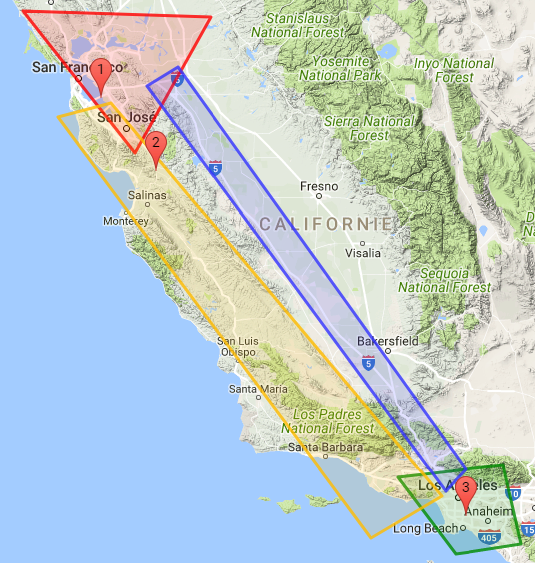
Use case description: tracking of package between the shipment zone, transportation zone and delivery zone.
A truck leaves San Francisco with its shipment. A tracker is embedded in the shipment. The truck may take Highway 101 or Route 5 to Los Angeles. A state change event will be sent when the tracker changes of zone.
-
Shipment zone (red) = San Francisco GPS polygon (lat, lon): (38.358596, -123.019952) (38.306889, -120.954523) (37.124990, -121.789484)
-
Delivery zone (green) = LA GPS polygon: (34.238622, -118.909873) (34.346562, -117.747086) (33.620728, -117.551111) (33.533648, -118.269687)
-
Transportation zone 1 (yellow) = 101 Highway: (37.561997, -122.05261237) (34.059617, -118.154639) (34.102708, -119.203276) (37.440666, -122.641996)
-
Transportation zone 2 (blue) = Route 5: (37.8705177, -121.3220217) (34.309766, -118.027739) (33.679366, -118.377685) (37.714244, -121.662597)
Steps
First you need to create the 4 geozones you would like to monitor.
|
PUT liveobjects.orange-business.com/api/v0/eventprocessing/geozones/san-francisco
In the request body:
{
  "description": "San Francisco zone",
  "geometry": {
    "coordinates": [[
        [-123.019952, 38.358596],[-120.954523, 38.306889],
        [-121.789484, 37.124990],[-123.019952, 38.358596]
    ]],
    "type": "Polygon"
  },
  "tags": [
    "SF-area", "shipment"
  ]
}
PUT liveobjects.orange-business.com/api/v0/eventprocessing/geozones/los-angeles
{
  "description": "Los Angeles zone",
  "geometry": {
    "coordinates": [[
      [-118.909873, 34.238622],[-117.747086, 34.346562],
      [-117.551111, 33.620728],[-118.269687, 33.533648],[-118.909873, 34.238622]
    ]],
    "type": "Polygon"
  },
  "tags": [
    "LA-area", "delivery"
  ]
}
PUT liveobjects.orange-business.com/api/v0/eventprocessing/geozones/transportation1
{
  "description": "Transportation zone Highway 101",
  "geometry": {
    "coordinates": [[
      [-122.05261237, 37.561997],[-118.154639, 34.059617],
      [-119.203276, 34.102708],[-122.641996, 37.440666],[-122.05261237, 37.561997]
    ]],
    "type": "Polygon"
  },
  "tags": [
    "transportation"
  ]
}
PUT liveobjects.orange-business.com/api/v0/eventprocessing/geozones/transportation2
{
  "description": "Transportation zone Route 5",
  "geometry": {
    "coordinates": [[
      [-121.3220217, 37.8705177],[-118.027739, 34.309766],
      [-118.377685, 33.679366],[-121.662597, 37.714244],[-121.3220217, 37.8705177]
    ]],
    "type": "Polygon"
  },
  "tags": [
    "transportation"
  ]
}
Once the geozones are provisioned, they are available in your user context and can be referenced in your rules.
-
There are 2 transportation zones. You can group them into a single transportation context which will be used in your rule.
-
If you want to apply the rule only to a specific tracking device (the one present in the truck), you can create a device-group context containing the device identifier.
-
You can use the geozones san-francisco and los-angeles in your rule definition. But you probably do not want to reference directly the city names in the rule in order to be able to change the shipment and delivery zones without modifying the rule. Hence, you create an indirection in the context (san-francisco→shipment; los-angeles→delivery).
PUT liveobjects.orange-business.com/api/v0/eventprocessing/context/transportation
{
  "contextData": ["transportation1","transportation2"],
  "tags": [
    "transportation","zone","california"
  ]
}
PUT liveobjects.orange-business.com/api/v0/eventprocessing/context/device-group
{
  "contextData": ["urn:lo:nsid:lora:0020B20000000101"],
  "tags": [
    "device","truck"
  ]
}
PUT liveobjects.orange-business.com/api/v0/eventprocessing/context/shipment
{
  "contextData": "san-francisco",
  "tags": [
    "geozone"
  ]
}
PUT liveobjects.orange-business.com/api/v0/eventprocessing/context/delivery
{
  "contextData": "los-angeles",
  "tags": [
    "geozone"
  ]
}
-
This example is aimed at detecting a change in the device state, so you have to create a state processing rule which will be applied only to the monitored device (in the truck).
-
An event will be raised when the truck moves from one zone to the next one (shipment→transportation or transportation→delivery).
Before provisioning the state processing rule, it is useful to run the state processing function on a test data message.
POST liveobjects.orange-business.com/api/v0/eventprocessing/stateprocessing-rule/test
{
  "currentState": {},
  "data": {
    "metadata": {
      "connector": "http",
      "source": "urn:lo:nsid:lora:0020B20000000101"
   },
   "streamId": "urn:lo:nsid:lora:0020B20000000101",
    "location": {
      "provider": "lora",
      "accuracy": 10,
      "lon": -122.169846,
      "lat": 37.602902
   },
   "model": "lora_v0",
   "value": {
      "payload": "ae2109000cf3"
   }
  },
  "stateProcessingFunction": {
    "if": [
      {
        "inside": [
          {
            "var": "location.lon"
          },
          {
            "var": "location.lat"
          },
          {
            "ctx": {"ctx":"shipment"}
          }
        ]
      },
      "shipment_zone",
      {
        "inside": [
          {
            "var": "location.lon"
          },
          {
            "var": "location.lat"
          },
          {
            "ctx": {"ctx":["transportation"]}
          }
        ]
      },
      "transportation_zone",
      {
        "inside": [
          {
            "var": "location.lon"
          },
          {
            "var": "location.lat"
          },
          {
            "ctx": {"ctx":"delivery"}
          }
        ]
      },
      "delivery_zone",
      "unknown_zone"
    ]
  }
}
Response:
{
    "stateFunctionValid": true,
    "dataValid": true,
    "stateFunctionResult": "shipment_zone"
}
Now that the state function is tested, you can provision the state processing rule.
Geo tracking state processing rule:
POST liveobjects.orange-business.com/api/v0/eventprocessing/stateprocessing-rule
{
  "name": "geo tracking", (1)
  "enabled": true,
  "stateFunction": { (2)
    "if": [
      {
        "inside": [
          {"var": "location.lon"},
          {"var": "location.lat"},
          {"ctx": {"ctx":"shipment"}}
        ]
      },
      "shipment_zone",
      {
        "inside": [
          {"var": "location.lon"},
          {"var": "location.lat"},
          {"ctx": {"ctx":["transportation"]}}
        ]
      },
      "transportation_zone",
      {
        "inside": [
          {"var": "location.lon"},
          {"var": "location.lat"},
          {"ctx": {"ctx":"delivery"}}
        ]
      },
      "delivery_zone",
      "unknown_zone"
    ]
  },
  "filterPredicate": {
    "in": [ (3)
      {"var": "metadata.source"},
      {"ctx": "device-group"}
    ]
  },
  "stateKeyPath": "metadata.source" (4)
}| 1 | state rule name |
| 2 | state processing function in Jsonlogic format |
| 3 | the rule will be used only on the devices defined in the device-group |
| 4 | the current state will be stored using the "metadata.source" field. |
You can simulate, with the Live Objects REST API, the data messages sent by the tracker.
POST liveobjects.orange-business.com/api/v0/data/streams/urn:lo:nsid:lora:0020B20000000101
{
  "metadata": {
    "connector": "http",
    "source": "urn:lo:nsid:lora:0020B20000000101"
  },
  "location": {
    "provider": "lora",
    "accuracy": 10,
    "lon": -122.169846,
    "lat": 37.602902
  },
  "model": "lora_v0",
  "value": {
    "payload": "ae2109000cf3"
  },
  "timestamp": "2017-07-26T08:32:44.034Z",
  "tags": [
    "San Francisco", "Tracker"
  ]
}
The first data message in the SF area will generate an event with no previous state.
{
  "stateProcessingRuleId": "78063026-51e2-4c3e-aaf5-99efc4ee0255",
  "data": {
    "metadata": {
      "connector": "http",
      "source": "urn:lo:nsid:lora:0020B20000000101"
    },
    "streamId": "urn:lo:nsid:lora:0020B20000000101",
    "location": {
      "provider": "lora",
      "accuracy": 10,
      "lon": -121.562765,
      "lat": 36.969311
    },
    "model": "lora_v0",
    "value": {
      "payload": "ae2109000cf3"
    },
    "timestamp": "2017-07-26T08:32:44.034Z",
    "tags": [
      "Highway 101",
      "Tracker"
    ]
  },
  "tenantId": "5c0a6fb49a927971342aea06",
  "newState": "transportation_zone",
  "stateKey": "urn:lo:nsid:lora:0020B20000000101",
  "previousState": "null",
  "timestamp": "2021-06-17T13:57:36.637Z",
  "stateProcessingRule": {
    "stateKeyPath": "metadata.source",
    "name": "geo tracking",
    "stateFunction": "{\"if\":[{\"inside\":[{\"var\":\"location.lon\"},{\"var\":\"location.lat\"},{\"ctx\":{\"ctx\":\"shipment\"}}]},\"shipment_zone\",{\"inside\":[{\"var\":\"location.lon\"},{\"var\":\"location.lat\"},{\"ctx\":{\"ctx\":[\"transportation\"]}}]},\"transportation_zone\",{\"inside\":[{\"var\":\"location.lon\"},{\"var\":\"location.lat\"},{\"ctx\":{\"ctx\":\"delivery\"}}]},\"delivery_zone\",\"unknown_zone\"]}",
    "id": "78063026-51e2-4c3e-aaf5-99efc4ee0255",
    "enabled": true,
    "filterPredicate": "{\"in\":[{\"var\":\"metadata.source\"},{\"ctx\":\"device-group\"}]}"
  }
}
Any other message in SF area will not generate event, because the state would remain unchanged.
Now, you can send a second data message, located this time on Highway 101.
POST liveobjects.orange-business.com/api/v0/data/streams/urn:lo:nsid:lora:0020B20000000101
{
  "metadata": {
    "connector": "http",
    "source": "urn:lo:nsid:lora:0020B20000000101"
  },
  "location": {
    "provider": "lora",
    "accuracy": 10,
    "lon": -121.562765,
    "lat": 36.969311},
  "model": "lora_v0",
  "value": {
    "payload": "ae2109000cf3"
  },
  "timestamp": "2017-07-26T08:32:44.034Z",
  "tags": [
    "Highway 101", "Tracker"
  ]
}
The message in Highway 101 area will generate the following event. Any other message in Highway 101 area would not generate event because state would be unchanged.
{
  "stateProcessingRuleId": "78063026-51e2-4c3e-aaf5-99efc4ee0255",
  "data": {
    "metadata": {
      "connector": "http",
      "source": "urn:lo:nsid:lora:0020B20000000101"
    },
    "streamId": "urn:lo:nsid:lora:0020B20000000101",
    "location": {
      "provider": "lora",
      "accuracy": 10,
      "lon": -121.562765,
      "lat": 36.969311
    },
    "model": "lora_v0",
    "value": {
      "payload": "ae2109000cf3"
    },
    "timestamp": "2017-07-26T08:32:44.034Z",
    "tags": [
      "Highway 101",
      "Tracker"
    ]
  },
  "tenantId": "5c0a6fb49a927971342aea06",
  "newState": "transportation_zone",
  "stateKey": "urn:lo:nsid:lora:0020B20000000101",
  "previousState": "null",
  "timestamp": "2021-06-17T13:57:36.637Z",
  "stateProcessingRule": {
    "stateKeyPath": "metadata.source",
    "name": "geo tracking",
    "stateFunction": "{\"if\":[{\"inside\":[{\"var\":\"location.lon\"},{\"var\":\"location.lat\"},{\"ctx\":{\"ctx\":\"shipment\"}}]},\"shipment_zone\",{\"inside\":[{\"var\":\"location.lon\"},{\"var\":\"location.lat\"},{\"ctx\":{\"ctx\":[\"transportation\"]}}]},\"transportation_zone\",{\"inside\":[{\"var\":\"location.lon\"},{\"var\":\"location.lat\"},{\"ctx\":{\"ctx\":\"delivery\"}}]},\"delivery_zone\",\"unknown_zone\"]}",
    "id": "78063026-51e2-4c3e-aaf5-99efc4ee0255",
    "enabled": true,
    "filterPredicate": "{\"in\":[{\"var\":\"metadata.source\"},{\"ctx\":\"device-group\"}]}"
  }
}POST liveobjects.orange-business.com/api/v0/data/streams/urn:lo:nsid:lora:0020B20000000101
{
  "metadata": {
    "connector": "http",
    "source": "urn:lo:nsid:lora:0020B20000000101"
  },
  "location": {
    "provider": "lora",
    "accuracy": 10,
    "lon": -118.154555,
    "lat": 33.881571},
  "model": "lora_v0",
  "value": {
    "payload": "ae2109000cf3"
  },
  "timestamp": "2017-07-26T08:32:44.034Z",
  "tags": ["Los Angeles", "Tracker"]
}
The third message in LA area will generate the following event. Any other message in LA area would not generate event because state would remain unchanged.
{
  "stateProcessingRuleId": "78063026-51e2-4c3e-aaf5-99efc4ee0255",
  "data": {
    "metadata": {
      "connector": "http",
      "source": "urn:lo:nsid:lora:0020B20000000101"
    },
    "streamId": "urn:lo:nsid:lora:0020B20000000101",
    "location": {
      "provider": "lora",
      "accuracy": 10,
      "lon": -118.154555,
      "lat": 33.881571
    },
    "model": "lora_v0",
    "value": {
      "payload": "ae2109000cf3"
    },
    "timestamp": "2017-07-26T08:32:44.034Z",
    "tags": [
      "Los Angeles",
      "Tracker"
    ]
  },
  "tenantId": "5c0a6fb49a927971342aea06",
  "newState": "delivery_zone",
  "stateKey": "urn:lo:nsid:lora:0020B20000000101",
  "previousState": "transportation_zone",
  "timestamp": "2021-06-17T14:01:48.004Z",
  "stateProcessingRule": {
    "stateKeyPath": "metadata.source",
    "name": "geo tracking",
    "stateFunction": "{\"if\":[{\"inside\":[{\"var\":\"location.lon\"},{\"var\":\"location.lat\"},{\"ctx\":{\"ctx\":\"shipment\"}}]},\"shipment_zone\",{\"inside\":[{\"var\":\"location.lon\"},{\"var\":\"location.lat\"},{\"ctx\":{\"ctx\":[\"transportation\"]}}]},\"transportation_zone\",{\"inside\":[{\"var\":\"location.lon\"},{\"var\":\"location.lat\"},{\"ctx\":{\"ctx\":\"delivery\"}}]},\"delivery_zone\",\"unknown_zone\"]}",
    "id": "78063026-51e2-4c3e-aaf5-99efc4ee0255",
    "enabled": true,
    "filterPredicate": "{\"in\":[{\"var\":\"metadata.source\"},{\"ctx\":\"device-group\"}]}"
  }
}
Use case 3: air quality monitoring
|
Pre-requisites:
|
Use case description :
-
Monitor 2 pollutants (NO2 and PM10)
-
Trigger INFO or ALERT events when thresholds are reached.
-
Trigger daily pollution level state change events for each pollutant.
This example includes SIMPLE EVENT PROCESSING rules and STATE PROCESSING rules.
Air quality information is available for every monitoring station in a city. 3 different types of message are available:
-
hourly pollution level for each pollutant (data message sent every hour).
-
pollution level for the last 3 hours for each pollutant (data message sent every hour).
-
daily average level for each pollutant (data message once a day at 0 a.m.).
|
For NO2, the threshold to trigger the ALERT is lower if the daily state for the previous day is MEDIUM or HIGH. The daily calculated state for NO2 must be stored by your application in the tenant context. Example: PUT liveobjects.orange-business.com/api/v0/eventprocessing/context/no2-previous-day-medium-level-reached |
Event triggering on air quality:
-
6-hour INFO: when the information level is reached in a monitoring station for NO2 or PM10. Then, wait for 6 hours before getting any new "information level reached" event.
-
real-time ALERT
-
when the alert level is reached in a monitoring station for NO2 or PM10.
-
when the information level is reached in a monitoring station for NO2 and the daily pollution level for previous day was MEDIUM or HIGH
-
-
daily pollution level:when the daily pollution level changes, like for example: LOW→MEDIUM or MEDIUM→HIGH
Streams of messages
A stream of data messages is attached to a monitoring station. The messages from the "paris-centre" monitoring station will be sent in a distinct stream from the "place de l’Opéra" monitoring station.
-
hourly pollution level (sent every hour)
{
   "streamId": "paris-centre-hourly",
    "location": {
        "lon":2.2945, "lat": 48.8584
   },
   "model": "model_hourly",
   "value": {
      "type":"hourly",
      "NO2":450,
      "PM10":17,
      "monitoring-station":"paris-centre"
   },
   "timestamp": "2017-07-27T13:00:00Z"
}-
hourly pollution level for the last 3 hours (sent every hour)
{
   "streamId":  "paris-centre-last-3-hours",
    "location": {
        "lon":2.2945, "lat": 48.8584
   },
   "model": "model_last_three_hours",
   "value": {
      "type":"last_three_hours",
      "data1": {"value":{"NO2":420,"PM10":16},"timestamp":"2017-07-27T11:00:00Z"},
      "data2": {"value": {"NO2":401,"PM10":14},"timestamp":"2017-07-27T12:00:00Z"},
      "data3": {"value": {"NO2":450,"PM10":17},"timestamp":"2017-07-27T13:00:00Z"},
      "monitoring-station":"paris-centre"
   },
   "timestamp":"2017-07-27T13:00:00Z"
}-
daily average (sent once a day)
{
   "streamId": "paris-centre-daily",
    "location": {
        "lon":2.2945, "lat": 48.8584
   },
   "model": "model_daily",
   "value": {
      "type":"daily",
      "avg-NO2":250,
      "avg-PM10":53,
      "monitoring-station":"paris-centre"
   },
   "timestamp":"2017-07-28T00:00:00Z"
}
Test steps
-
Create the information/alert levels for each pollutant.
PUT liveobjects.orange-business.com/api/v0/eventprocessing/context/no2-alert-threshold-1
{
  "contextData": 400,
  "tags": [
    "threshold","alert","no2"
  ]
}
For the provisioning of the other thresholds, please check the postman requests.
-
Once the threshold levels are provisioned in the context, the rules need to be provisioned:
-
For events on exceeding thresholds, use Simple Event Processing (matching rules to check if an event should be triggered + firing rule for the frequency of triggering).
-
For events on daily pollution state change, use State Processing.
-
Before provisioning the state processing rule, it is useful to run the state processing function on a test data message.
POST liveobjects.orange-business.com/api/v0/eventprocessing/stateprocessing-rule/test
{
  "currentState": {},
  "data": {
    "metadata": {
      "connector": "http"
      },
    "streamId": "paris-centre-daily",
    "location": {
        "lon":2.2945, "lat": 48.8584
    },
    "model": "model_daily",
    "value": {
      "type":"daily",
      "avg-NO2":9,
      "avg-PM10":9,
      "monitoring-station":"paris-centre"
    },
    "timestamp":"2017-07-27T00:00:00Z"
  },
  "stateProcessingFunction": {
    "if": [
      {
        "and":
          [
            { "<": [
              { "var": "value.avg-NO2"},
              {"ctx": "no2-alert-threshold-2"}
            ]},
            {"==": [{ "var": "value.type"}, "daily"]}
          ]
      },
      "LOW",
      {
        "and":
          [
            { "<": [
              {"ctx": "no2-alert-threshold-2"},
              { "var": "value.avg-NO2"},
              {"ctx": "no2-alert-threshold-1"}
            ]},
            {"==": [{ "var": "value.type"}, "daily"]}
          ]
        },
      "MEDIUM",
      {
        "and":
          [
            { ">": [
              { "var": "value.avg-NO2"},
              {"ctx": "no2-alert-threshold-1"}
            ]},
            {"==": [{ "var": "value.type"}, "daily"]}
          ]
      },
      "HIGH"
    ]
  }
}
Response:
{
    "stateFunctionValid": true,
    "dataValid": true,
    "stateFunctionResult": "LOW"
}
The test endpoint expects, as input, the current state, a data message and the state function. The response returns the function status (valid or not), the data status (valid or not) and the result of the state function applied to the data.
The threshold values are retrieved from the tenant context (ctx).
Now that the state function is tested, you can provision the state processing rule.
Daily pollution state processing rule:
POST liveobjects.orange-business.com/api/v0/eventprocessing/stateprocessing-rule
{
  "name": "NO2 daily pollution level",
  "enabled": true,
  "stateFunction": {
    "if": [
      {
        "and":
          [
            { "<": [
              { "var": "value.avg-NO2"},
              {"ctx": "no2-alert-threshold-2"}
            ]},
            {"==": [{ "var": "value.type"}, "daily"]}
          ]
      },
      "LOW",
      {
        "and":
          [
            { "<": [
              {"ctx": "no2-alert-threshold-2"},
              { "var": "value.avg-NO2"},
              {"ctx": "no2-alert-threshold-1"}
            ]},
            {"==": [{ "var": "value.type"}, "daily"]}
          ]
      },
      "MEDIUM",
      {
        "and":
          [
            { ">": [
              { "var": "value.avg-NO2"},
              {"ctx": "no2-alert-threshold-1"}
            ]},
            {"==": [{ "var": "value.type"}, "daily"]}
          ]
      },
      "HIGH"
    ]
  },
  "stateKeyPath": "streamId"
}
For the PM10 pollutant, the process is the same to create the state processing rule.
-
Example: for NO2, if the previous day ended with a "MEDIUM" or "HIGH" level, the ALERT threshold level is 200 microgram/m3 instead of 400. When receiving the daily pollution state change event every night, your application must store it in the context (key name in the context: "no2-previous-day-medium-level-reached" and "no2-previous-day-high-level-reached", value: true or false) in order to be used in the real-time alerts.
-
the previous day state is set in the tenant context every night, by your application, based on the daily state event sent by the state processing rule.
More info on matching rules.
A testing point is available to prepare the matching rule and test it on a data message.
POST liveobjects.orange-business.com/api/v0/eventprocessing/matching-rule/test
{
  "data": {
    "metadata": {
      "connector": "http"
      },
   "streamId": "paris-centre-hourly",
    "location": {
        "lon":2.2945, "lat": 48.8584
   },
   "model": "model_hourly",
   "value": {
      "type":"hourly",
      "NO2":201,
      "PM10":15,
      "monitoring-station":"paris-centre"
   },
   "timestamp":"2017-07-27T02:00:00Z"
  },
  "dataPredicate": {
    "and": [
      {
        ">": [{"var": "value.NO2"}, {"ctx": "no2-alert-threshold-2" }]
      },
      {
        "or": [
          {"==": [{"ctx": "no2-previous-day-medium-level-reached"},true]},
          {"==": [{"ctx": "no2-previous-day-high-level-reached"},true]}
        ]
      },
      {
        "==": [{"var": "value.type"},"hourly"]
      }
    ]
  }
}
Response:
{
    "dataPredicateValid": true,
    "dataValid": true,
    "dataPredicateResult": true
}
Now, provision the matching-rule:
POST liveobjects.orange-business.com/api/v0/eventprocessing/matching-rule
{
  "name": "no2-alert-level-reached-threshold2",
  "dataPredicate": {
    "and": [
      {
        ">": [{"var": "value.NO2"}, {"ctx": "no2-alert-threshold-2" }]
      },
      {
        "or": [
          {"==": [{"ctx": "no2-previous-day-medium-level-reached"},true]},
          {"==": [{"ctx": "no2-previous-day-high-level-reached"},true]}
        ]
      },
      {
        "==": [{"var": "value.type"},"hourly"]
      }
    ]
  },
  "enabled": true
}
Response:
{
  "id": "0476993c-b7cc-49a7-9a86-87431ead76e7",
  "name": "no2-alert-level-reached-threshold2",
  "enabled": true,
  "dataPredicate": {
    "and": [
      {
        ">": [{"var": "value.NO2"}, {"ctx": "no2-alert-threshold-2"}]
      },
      {
        "or": [
          {"==": [{"ctx": "no2-previous-day-medium-level-reached"}, true]},
          {"==": [{"ctx": "no2-previous-day-high-level-reached"}, true]}
        ]
      },
      {
        "==": [{"var": "value.type"}, "hourly"]
      }
    ]
  }
}-
When the matching rule is ready, a firing rule must be provisioned in order to set the frequency for event triggering (ONCE, ALWAYS, SLEEP).
-
For the matching rule described in the previous step, an event is sent everytime the ALERT threshold is reached in a monitoring station.
POST liveobjects.orange-business.com/api/v0/eventprocessing/firing-rule
{
  "aggregationKeys": [
    "streamId"
  ],
  "enabled": true,
  "firingType": "ALWAYS",
  "matchingRuleIds": [
    "0476993c-b7cc-49a7-9a86-87431ead76e7"
  ],
  "name": "firing NO2 alert 200"
}
Another example of firing rule: for the PM10/NO2 INFO event, for a monitoring station, when an event is triggered, we do not want to receive any other INFO event in the next 6 hours. The firingType is set to SLEEP:
POST liveobjects.orange-business.com/api/v0/eventprocessing/firing-rule
{
  "aggregationKeys": [
    "streamId"
  ],
  "enabled": true,
  "firingType": "SLEEP",
  "matchingRuleIds": [
    "4578993c-b7cc-49a7-9a86-87431ead96a9"
  ],
  "name": "firing PM10 INFO",
    "sleepDuration": "PT6H"
}|
The sleepDuration is expressed in a iso8601-duration format. |
For the provisioning of the other SEP rules, please check the postman requests.
-
In this test, the data messages are sent using Live Objects REST http API.
POST liveobjects.orange-business.com/api/v0/data/streams/paris-centre-hourly
{
   "location": {
        "lon":2.2945, "lat": 48.8584
   },
   "model": "model_hourly",
   "value": {
      "type":"hourly",
      "NO2": 250,
      "PM10":45,
      "monitoring-station":"paris-centre"
   },
   "timestamp": "2017-07-27T14:00:00Z"
}POST liveobjects.orange-business.com/api/v0/data/streams/paris-centre-last-3-hours
{
    "location": {
        "lon":2.2945, "lat": 48.8584
   },
   "model": "model_last_three_hours",
   "value": {
      "type":"last_three_hours",
      "data1": {"value":{"NO2":420,"PM10":16},"timestamp":"2017-07-27T11:00:00Z"},
      "data2": {"value": {"NO2":401,"PM10":14},"timestamp":"2017-07-27T12:00:00Z"},
      "data3": {"value": {"NO2":450,"PM10":17},"timestamp":"2017-07-27T13:00:00Z"},
      "monitoring-station":"paris-centre"
   },
   "timestamp":"2017-07-27T13:00:00Z"
}POST liveobjects.orange-business.com/api/v0/data/streams/paris-centre-daily
{
    "location": {
        "lon":2.2945, "lat": 48.8584
   },
   "model": "model_daily",
   "value": {
      "type":"daily",
      "avg-NO2":92,
      "avg-PM10":20,
      "monitoring-station":"paris-centre"
   },
   "timestamp":"2017-07-28T00:00:00Z"
}|
In this example, the daily average is calculated in another system. Another option would be to calculate it in a recurrent query on the hourly stream, and then create the daily data message. POST liveobjects.orange-business.com/api/v0/data/search response: |
-
The tenant can be notified of the triggered events. The events are also stored in a dedicated stream which can be requested using the Datamanagement data search API.
POST liveobjects.orange-business.com/api/v0/data/search
{
  "from": 0,
  "size": 10,
  "query": {
    "filtered": {
      "filter": {
        "bool":{
          "must": [
            {
              "term": {
                "streamId": "event:paris-centre-hourly"
              }
            },
            {
              "range": {
                "timestamp": {
                  "gte":"2017-08-03",
                  "lt":"2017-08-07"
                }
              }
            }
          ]
        }
      }
    }
  }
}
The response contains the list of events on the hourly stream for the "paris-centre" monitoring station.
{
  "took": 22,
  "hits": {
    "total": 2,
    "hits": [
      {
        "_source": {
          "metadata": null,
          "streamId": "event:paris-centre-hourly",
          "created": "2017-08-07T11:16:01.920Z",
          "location": {
            "provider": null,
            "alt": null,
            "accuracy": null,
            "lon": 2.2945,
            "lat": 48.8584
          },
          "model": "event:model_hourly",
          "id": "59884bf1e9cf83391a49ee61",
          "value": {
            "tenantId": "597f812389179c3436edf332",
            "matchingContext": {
              "matchingRule": {
                "dataPredicate": "{
                  \"and\":[
                    {\">\":[
                      {\"var\":\"value.NO2\"},
                      {\"ctx\":\"no2-info-threshold-1\"}
                    ]},
                    {\"==\":[
                      {\"var\":\"value.type\"},
                      \"hourly\"
                    ]}
                  ]
                }",
                "name": "no2-info-level-reached",
                "id": "84b1cbd7-5184-4460-b05e-41236fbfe770",
                "enabled": true
              },
              "data": {
                "metadata": {
                  "connector": "http"
                },
                "streamId": "paris-centre-hourly",
                "location": {
                  "lon": 2.2945,
                  "lat": 48.8584
                },
                "model": "model_hourly",
                "value": {
                  "NO2": 450,
                  "PM10": 41,
                  "type": "hourly",
                  "monitoring-station": "paris-centre"
                },
                "timestamp": "2017-07-27T14:00:00Z"
              },
              "tenantId": "597f812389179c3436edf332",
              "timestamp": "2017-08-07T11:16:04.859Z"
            },
            "timestamp": "2017-08-07T11:16:04.875Z",
            "firingRule": {
              "name": "firing NO2 INFO",
              "matchingRuleIds": [
                "84b1cbd7-5184-4460-b05e-41236fbfe770"
              ],
              "sleepDuration": "PT6H",
              "id": "f1dfc01d-a236-4bf6-b8a7-fdb2aa6a4e10",
              "aggregationKeys": [
                "streamId"
              ],
              "firingType": "SLEEP",
              "enabled": true
            }
          },
          "timestamp": "2017-08-07T11:16:04.875Z",
          "tags": [
            "event"
          ]
        }
      }
...
}|
The events can also be retrieved with MQTT on a specific topic. |
Account metrics monitoring
The Account metrics monitoring feature enables proactive monitoring and alerting capabilities on your account. It allows you to define alarm rules that monitor specific conditions and trigger notifications through configured notification channels when those conditions are met.
Supported alarms
| Alarm type | Functional category | Trigger type | Description |
|---|---|---|---|
actionSuspended |
Routing |
event |
This alarm is triggered when a routing action is automatically suspended following a prolonged malfunction of this action (e.g. the http push error rate is too high for 7 consecutive days) |
messageDeliverySuccessRatio |
Routing |
metric evaluation |
This alarm is triggered when the success ratio of message delivery to your servers deteriorates on a routing action. The success ratio is calculated as the percentage of messages successfully delivered (at the first try or after retry) over the total number of messages to be delivered within a specified evaluation window. For more details on the underlying counters, see the message delivery counters section below. To avoid false alarms on low-traffic or newly created routing actions, the delivery ratio is only evaluated when at least 20 messages have been processed within the evaluation window. If this threshold is not reached, the alarm is not triggered regardless of the delivery outcome. |
Event based alarms
Event-based alarms are triggered immediately when a specific event occurs within the platform.
  {
    "enabled": true,
    "type": "actionSuspended",
    "name": "Automatic suspension",
    "notifications": {
      "notificationChannelIds": [
        "default"
      ]
    }
}| Field | Description |
|---|---|
enabled |
Whether the alarm rule is enabled or not |
type |
Defines which event is monitored |
name |
User-defined name for the rule |
notifications |
Notifications configuration |
notifications.notificationChannelIds |
IDs of notification channels that define the recipients of the alarm |
Metric based alarms
Metric-based alarms are triggered when a metric meets a specific condition.
  {
    "enabled": true,
    "type": "messageDeliverySuccessRatio",
    "name": "Delivered message degradation",
    "throttle": {
      "muteDuration": "P1D"
    },
    "trigger": {
      "condition": {
        "comparisonOperator": "lessThanOrEqualTo",
        "threshold": 90.0,
        "evaluationWindow": "P1D"
      }
    },
    "notifications": {
      "notificationChannelIds": [
        "default"
      ]
    }
}| Field | Description |
|---|---|
enabled |
Whether the alarm rule is enabled or not |
type |
Defines which metric is monitored |
name |
User-defined name for the rule |
throttle.muteDuration |
The duration for which notifications for the same alarm are muted after being sent. During this period, additional notifications for the same alarm will not be sent, even if the alarm is repeatedly triggered |
trigger.condition |
Conditions that must be met to trigger the alarm. |
trigger.condition.comparisonOperator |
The type of operator used for comparison (e.g. ≤) |
trigger.condition.threshold |
The threshold value that the metric must meet to trigger the alarm (as a percentage in the example) |
trigger.condition.evaluationWindow |
The time window (as an ISO 8601 duration) over which the data will be aggregated and evaluated |
notifications |
Notifications configuration |
notifications.notificationChannelIds |
IDs of notification channels that define the recipients of the alarm |
Alarm evaluation
Data is aggregated and evaluated over hourly-aligned buckets:
-
Alarm rules are evaluated once every hour, during the first 30 minutes of the hour.
-
Each evaluation considers data from a window that ends exactly at the beginning of the current hour.
-
For example, an evaluation at 15:15 with a 24-hour window uses data from 15:00 (previous day) to 15:00 (current day).
This diagram illustrates how an alarm rule with a 24-hour sliding evaluation window is processed. At the bottom, message delivery rate shows normal traffic (~10 req/s), then drops during an incident period (shaded in red), and eventually recovers with retry traffic. Multiple delivery ratio timelines show how each hourly evaluation captures a different 24-hour slice—ratios progressively degrade as more of the incident falls within the window. The alarm triggers when ratios fall below 95%, and notifications are sent accordingly.
Alarm muting
To prevent notification overload, you can configure your alarm rule with a mute duration:
-
After an alarm triggers and a notification and a alarmEvent are sent, subsequent notifications and alarmEvents for the same alarm are suppressed during the mute period.
-
The alarm continues to be evaluated, but notifications are not sent until the mute duration expires.
-
Once the mute period ends, if the alarm condition is still met, a new notification will be sent.
This diagram illustrates how the mute duration feature prevents notification flooding. With a 1-hour evaluation window and interval, the system evaluates the delivery ratio every hour. When the ratio drops to 80% (below the 90% threshold), an alarm triggers and a notification is sent. The 6-hour mute duration then suppresses subsequent notifications, even though the alarm condition persists across evaluations.
Metric definitions
Message delivery counters
For message delivery success ratio alarms, the following counters feed the delivery ratio. They are calculated per routing action and aggregated per hour.
HTTP Push and Azure Event Hubs routing actions
| Counter | Description |
|---|---|
processed |
Total number of messages to be delivered through this routing action (i.e. already delivered, still pending or failed) |
delivered |
Number of messages successfully delivered on the first attempt |
deliveredWithRetry |
Number of messages successfully delivered after one or more retry attempts |
The message delivery ratio is defined as:
100 × (delivered + deliveredWithRetry) / processed
FIFO routing actions
| Counter | Description |
|---|---|
processed |
Total number of messages to be delivered through this routing action (i.e. pushed to the FIFO queue, regardless of whether they were consumed through MQTT) |
delivered |
Number of messages delivered through a MQTT SUB connection |
The message delivery ratio is defined as:
100 × delivered / processed
Metric timestamping
A message is counted in the hourly bucket corresponding to the time the Live Objects platform collected it (e.g. the field created of a data message) triggered it (e.g. the timestamp of a device status change event), not when it was delivered to your application or when a final delivery failure was established — refer to routed messages for other message types.
This means that the metrics for a given hour may include messages that were delivered (or failed) in a later hour.
|
As a consequence, the delivery ratio for a past evaluation window may increase retroactively after an alarm is triggered. If failures were caused by a transient issue (e.g. your HTTP endpoint was temporarily unavailable), messages that were retried and successfully delivered will be retroactively attributed to their original hourly bucket — so inspecting the same evaluation window later (e.g. via the Live Objects web portal) may show a higher ratio than when the alarm was triggered, potentially reaching 100%. Despite this, the incident can still be confirmed via the Live Objects web portal. For HTTP Push and Azure Event Hubs routing actions, two indicators remain reliable even after the ratio has recovered:
|
Default alarm rules
A set of default alarm rules is automatically provisioned on your account. These default rules use the default notification channel to alert the main user of your account.
Default alarm rules can be modified or disabled according to your needs.
Notification channels
Notification channels define the target endpoint (email only for now) used to deliver alarm notifications.
  {
    "name": "OPS Team",
    "language": "en",
    "emails": {
      "to": [
        "to1@example.com",
        "to2@example.com"
      ],
      "cc": [
        "cc@example.com"
      ],
      "bcc": [
        "bcc@example.com"
      ]
    }
}| Field | Description |
|---|---|
name |
User-defined name for the notification channel |
language |
Language to use for this notification channel |
emails |
Email recipients configuration |
emails.to |
List of primary recipient email addresses |
emails.cc |
List of CC recipient email addresses |
emails.bcc |
List of BCC recipient email addresses |
Alarm events
Alarm events have the same logic of muting as notifications for account metrics monitoring and are integrated with LiveObjects 'Message routing' capabilities. Whenever Live Objects triggers an alarm related to account metrics monitoring, it generates an alarm event. This event is subject to the same muting logic. This event is routed to the destination defined in the action policy. For the alarm event format and examples, see Alarm event.