Alarms and notifications examples
Use case 1: Motion detection during the night
Description
We assume that in a factory, several motion sensors are installed in specific areas where usually, there is no activity during the night.
A new detection can be suspicious and a guard must check the place.
The motion sensor publishes a Data message in Live Objects using MQTT protocol each time there is detection with a minimum of 10 sec interval between two detections.
The night time is from 20h to 06h (24h UTC time).
Live Objects features
For this use case, we will use:
-
Alarming: a Simple Event Processing rule associated with a Firing rule
-
Notifications: Triggers & Actions with a SMS notification
Step 1: identifying the Data message format
The Data message sent by the device follows this format:
{
   "location": {
      "provider": "gps",
      "lon": 2.99616,
      "lat": 50.21142
   },
   "model": "demoDevGuide",
   "value": {
      "motionSensorDetection": 1,
       "type":"alert",
       "typeId":4,
       "version": "1.2.4"
   },
   "timestamp": "2019-09-06T08:58:10.953Z",
   "tags": [
      "last_version","areaSouth"
   ]
}
Details about Data message format: see Data model section
The Data message after internal Live Objects enrichment follows this format:
{
  "metadata": {
    "connector": "mqtt",
    "source": "urn:lo:nsid:mqtt:myTest",
    "transformation": {
      "published": {
        "location": {
          "provider": "gps",
          "lon": 2.99616,
          "lat": 50.21142
        }
      }
    },
    "group": {
      "path": "/",
      "id": "root"
    },
    "network": {
      "mqtt": {
        "clientId": "urn:lo:nsid:mqtt:myTest"
      }
    }
  },
  "streamId": "urn:lo:nsid:mqtt:myTest",
  "created": "2021-06-17T14:21:34.036Z",
  "extra": {},
  "location": {
    "provider": "gps",
    "alt": null,
    "accuracy": null,
    "lon": 2.99616,
    "lat": 50.21142
  },
  "model": "demoDevGuide",
  "id": "60cb5a6e2b9f5a61388d3fb7",
  "value": {
    "motionSensorDetection": 1,
    "typeId": 4,
    "type": "alert",
    "version": "1.2.4"
  },
  "timestamp": "2021-06-17T14:21:34.026Z",
  "tags": [
    "last_version",
    "areaSouth"
  ]
}
Details about Live Objects enricher: see Data enrichment process
Step 2: set the matching rule
The matching rule is using the additional “get_utc_hours” jsonLogic operator to extract the hour value of the timestamp.
{
   "name":"matching rule with time condition",
   "enabled":true,
   "dataPredicate":{
      "and":[
         {
            "==":[
               {
                  "var":"value.motionSensorDetection"
               },
               1
            ]
         },
         {
            "or":[
               {
                  ">=":[
                     {
                        "get_utc_hours":[
                           {
                              "var":"timestamp"
                           }
                        ]
                     },
                     20
                  ]
               },
               {
                  "<":[
                     {
                        "get_utc_hours":[
                           {
                              "var":"timestamp"
                           }
                        ]
                     },
                     6
                  ]
               }
            ]
         }
      ]
   }
}
Details about additional operators: see Additional operators
Step 3: set the firing rule
As the minimum interval is 10 sec between two data messages in case of motion detection, to avoid SMS spam, we define here a firing rule with SLEEP mode in order to repeat the notification with a larger time interval. Here the sleep duration is set to 2 minutes.
{
   "name":"firing rule with sleep mode to avoid flooding",
   "enabled":true,
   "matchingRuleIds":[
      "my_matching_rule_id"
   ],
   "aggregationKeys":["metadata.source"],
   "firingType":"SLEEP",
   "sleepDuration":"PT2M"
}
Step 4: set the notification using triggers and actions policy
Here you can find an action policy with the trigger type "matchingFired" linked with the ruleId = the firingRuleId of the rule created in the previous step.
{
   "name":"notification by sms for a motion detection during the night",
   "enabled":true,
   "triggers":{
      "matchingFired":{
         "version":1,
         "filter":{
            "ruleIds":[
               "my_firing_rule_id"
            ]
         }
      }
   },
   "actions":{
      "sms":[
         {
            "destinationPhoneNumbers":[
               "+33612345667"
            ],
            "contentTemplate":"Motion detection! Sensor: {{matchingContext.data.metadata.network.mqtt.clientId}} at {{matchingContext.data.timestamp}}"
         }
      ]
   }
}
Details about Triggers and actions feature: see Notification
Test it! With this data message from the device: detection at 23:58 UTC:
{
   "location": {
      "provider": "gps",
      "lon": 2.99616,
      "lat": 50.21142
   },
   "model": "demoDevGuide",
   "value": {
      "motionSensorDetection": 1,
       "type":"alert",
       "typeId":4,
       "version": "1.2.4"
   },
   "timestamp": "2019-09-06T23:58:10.953Z",
   "tags": [
      "last_version","areaSouth"
   ]
}
A SMS is sent:
"Motion detection! Sensor: 1234qfre at 2019-09-06T23:58:10.953Z"
Use case 2: geozone supervision of a tracker
|
Pre-requisites:
|
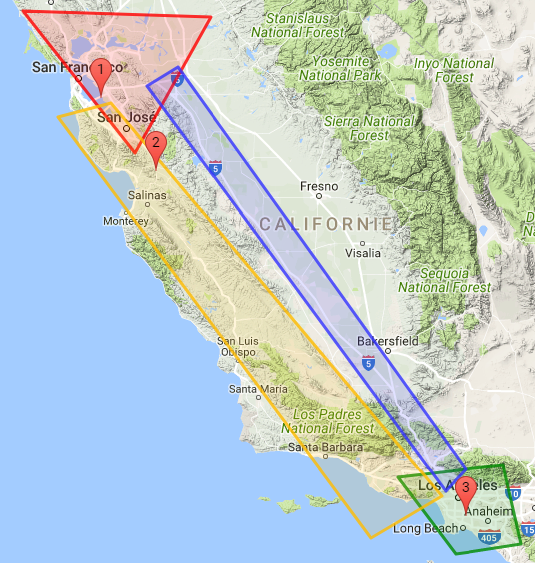
Use case description: tracking of package between the shipment zone, transportation zone and delivery zone.
A truck leaves San Francisco with its shipment. A tracker is embedded in the shipment. The truck may take Highway 101 or Route 5 to Los Angeles. A state change event will be sent when the tracker changes of zone.
-
Shipment zone (red) = San Francisco GPS polygon (lat, lon): (38.358596, -123.019952) (38.306889, -120.954523) (37.124990, -121.789484)
-
Delivery zone (green) = LA GPS polygon: (34.238622, -118.909873) (34.346562, -117.747086) (33.620728, -117.551111) (33.533648, -118.269687)
-
Transportation zone 1 (yellow) = 101 Highway: (37.561997, -122.05261237) (34.059617, -118.154639) (34.102708, -119.203276) (37.440666, -122.641996)
-
Transportation zone 2 (blue) = Route 5: (37.8705177, -121.3220217) (34.309766, -118.027739) (33.679366, -118.377685) (37.714244, -121.662597)
Steps
First you need to create the 4 geozones you would like to monitor.
|
PUT liveobjects.orange-business.com/api/v0/eventprocessing/geozones/san-francisco
In the request body:
{
  "description": "San Francisco zone",
  "geometry": {
    "coordinates": [[
        [-123.019952, 38.358596],[-120.954523, 38.306889],
        [-121.789484, 37.124990],[-123.019952, 38.358596]
    ]],
    "type": "Polygon"
  },
  "tags": [
    "SF-area", "shipment"
  ]
}
PUT liveobjects.orange-business.com/api/v0/eventprocessing/geozones/los-angeles
{
  "description": "Los Angeles zone",
  "geometry": {
    "coordinates": [[
      [-118.909873, 34.238622],[-117.747086, 34.346562],
      [-117.551111, 33.620728],[-118.269687, 33.533648],[-118.909873, 34.238622]
    ]],
    "type": "Polygon"
  },
  "tags": [
    "LA-area", "delivery"
  ]
}
PUT liveobjects.orange-business.com/api/v0/eventprocessing/geozones/transportation1
{
  "description": "Transportation zone Highway 101",
  "geometry": {
    "coordinates": [[
      [-122.05261237, 37.561997],[-118.154639, 34.059617],
      [-119.203276, 34.102708],[-122.641996, 37.440666],[-122.05261237, 37.561997]
    ]],
    "type": "Polygon"
  },
  "tags": [
    "transportation"
  ]
}
PUT liveobjects.orange-business.com/api/v0/eventprocessing/geozones/transportation2
{
  "description": "Transportation zone Route 5",
  "geometry": {
    "coordinates": [[
      [-121.3220217, 37.8705177],[-118.027739, 34.309766],
      [-118.377685, 33.679366],[-121.662597, 37.714244],[-121.3220217, 37.8705177]
    ]],
    "type": "Polygon"
  },
  "tags": [
    "transportation"
  ]
}
Once the geozones are provisioned, they are available in your user context and can be referenced in your rules.
-
There are 2 transportation zones. You can group them into a single transportation context which will be used in your rule.
-
If you want to apply the rule only to a specific tracking device (the one present in the truck), you can create a device-group context containing the device identifier.
-
You can use the geozones san-francisco and los-angeles in your rule definition. But you probably do not want to reference directly the city names in the rule in order to be able to change the shipment and delivery zones without modifying the rule. Hence, you create an indirection in the context (san-francisco→shipment; los-angeles→delivery).
PUT liveobjects.orange-business.com/api/v0/eventprocessing/context/transportation
{
  "contextData": ["transportation1","transportation2"],
  "tags": [
    "transportation","zone","california"
  ]
}
PUT liveobjects.orange-business.com/api/v0/eventprocessing/context/device-group
{
  "contextData": ["urn:lo:nsid:lora:0020B20000000101"],
  "tags": [
    "device","truck"
  ]
}
PUT liveobjects.orange-business.com/api/v0/eventprocessing/context/shipment
{
  "contextData": "san-francisco",
  "tags": [
    "geozone"
  ]
}
PUT liveobjects.orange-business.com/api/v0/eventprocessing/context/delivery
{
  "contextData": "los-angeles",
  "tags": [
    "geozone"
  ]
}
-
This example is aimed at detecting a change in the device state, so you have to create a state processing rule which will be applied only to the monitored device (in the truck).
-
An event will be raised when the truck moves from one zone to the next one (shipment→transportation or transportation→delivery).
Before provisioning the state processing rule, it is useful to run the state processing function on a test data message.
POST liveobjects.orange-business.com/api/v0/eventprocessing/stateprocessing-rule/test
{
  "currentState": {},
  "data": {
    "metadata": {
      "connector": "http",
      "source": "urn:lo:nsid:lora:0020B20000000101"
   },
   "streamId": "urn:lo:nsid:lora:0020B20000000101",
    "location": {
      "provider": "lora",
      "accuracy": 10,
      "lon": -122.169846,
      "lat": 37.602902
   },
   "model": "lora_v0",
   "value": {
      "payload": "ae2109000cf3"
   }
  },
  "stateProcessingFunction": {
    "if": [
      {
        "inside": [
          {
            "var": "location.lon"
          },
          {
            "var": "location.lat"
          },
          {
            "ctx": {"ctx":"shipment"}
          }
        ]
      },
      "shipment_zone",
      {
        "inside": [
          {
            "var": "location.lon"
          },
          {
            "var": "location.lat"
          },
          {
            "ctx": {"ctx":["transportation"]}
          }
        ]
      },
      "transportation_zone",
      {
        "inside": [
          {
            "var": "location.lon"
          },
          {
            "var": "location.lat"
          },
          {
            "ctx": {"ctx":"delivery"}
          }
        ]
      },
      "delivery_zone",
      "unknown_zone"
    ]
  }
}
Response:
{
    "stateFunctionValid": true,
    "dataValid": true,
    "stateFunctionResult": "shipment_zone"
}
Now that the state function is tested, you can provision the state processing rule.
Geo tracking state processing rule:
POST liveobjects.orange-business.com/api/v0/eventprocessing/stateprocessing-rule
{
  "name": "geo tracking", (1)
  "enabled": true,
  "stateFunction": { (2)
    "if": [
      {
        "inside": [
          {"var": "location.lon"},
          {"var": "location.lat"},
          {"ctx": {"ctx":"shipment"}}
        ]
      },
      "shipment_zone",
      {
        "inside": [
          {"var": "location.lon"},
          {"var": "location.lat"},
          {"ctx": {"ctx":["transportation"]}}
        ]
      },
      "transportation_zone",
      {
        "inside": [
          {"var": "location.lon"},
          {"var": "location.lat"},
          {"ctx": {"ctx":"delivery"}}
        ]
      },
      "delivery_zone",
      "unknown_zone"
    ]
  },
  "filterPredicate": {
    "in": [ (3)
      {"var": "metadata.source"},
      {"ctx": "device-group"}
    ]
  },
  "stateKeyPath": "metadata.source" (4)
}| 1 | state rule name |
| 2 | state processing function in Jsonlogic format |
| 3 | the rule will be used only on the devices defined in the device-group |
| 4 | the current state will be stored using the "metadata.source" field. |
You can simulate, with the Live Objects REST API, the data messages sent by the tracker.
POST liveobjects.orange-business.com/api/v0/data/streams/urn:lo:nsid:lora:0020B20000000101
{
  "metadata": {
    "connector": "http",
    "source": "urn:lo:nsid:lora:0020B20000000101"
  },
  "location": {
    "provider": "lora",
    "accuracy": 10,
    "lon": -122.169846,
    "lat": 37.602902
  },
  "model": "lora_v0",
  "value": {
    "payload": "ae2109000cf3"
  },
  "timestamp": "2017-07-26T08:32:44.034Z",
  "tags": [
    "San Francisco", "Tracker"
  ]
}
The first data message in the SF area will generate an event with no previous state.
{
  "stateProcessingRuleId": "78063026-51e2-4c3e-aaf5-99efc4ee0255",
  "data": {
    "metadata": {
      "connector": "http",
      "source": "urn:lo:nsid:lora:0020B20000000101"
    },
    "streamId": "urn:lo:nsid:lora:0020B20000000101",
    "location": {
      "provider": "lora",
      "accuracy": 10,
      "lon": -121.562765,
      "lat": 36.969311
    },
    "model": "lora_v0",
    "value": {
      "payload": "ae2109000cf3"
    },
    "timestamp": "2017-07-26T08:32:44.034Z",
    "tags": [
      "Highway 101",
      "Tracker"
    ]
  },
  "tenantId": "5c0a6fb49a927971342aea06",
  "newState": "transportation_zone",
  "stateKey": "urn:lo:nsid:lora:0020B20000000101",
  "previousState": "null",
  "timestamp": "2021-06-17T13:57:36.637Z",
  "stateProcessingRule": {
    "stateKeyPath": "metadata.source",
    "name": "geo tracking",
    "stateFunction": "{\"if\":[{\"inside\":[{\"var\":\"location.lon\"},{\"var\":\"location.lat\"},{\"ctx\":{\"ctx\":\"shipment\"}}]},\"shipment_zone\",{\"inside\":[{\"var\":\"location.lon\"},{\"var\":\"location.lat\"},{\"ctx\":{\"ctx\":[\"transportation\"]}}]},\"transportation_zone\",{\"inside\":[{\"var\":\"location.lon\"},{\"var\":\"location.lat\"},{\"ctx\":{\"ctx\":\"delivery\"}}]},\"delivery_zone\",\"unknown_zone\"]}",
    "id": "78063026-51e2-4c3e-aaf5-99efc4ee0255",
    "enabled": true,
    "filterPredicate": "{\"in\":[{\"var\":\"metadata.source\"},{\"ctx\":\"device-group\"}]}"
  }
}
Any other message in SF area will not generate event, because the state would remain unchanged.
Now, you can send a second data message, located this time on Highway 101.
POST liveobjects.orange-business.com/api/v0/data/streams/urn:lo:nsid:lora:0020B20000000101
{
  "metadata": {
    "connector": "http",
    "source": "urn:lo:nsid:lora:0020B20000000101"
  },
  "location": {
    "provider": "lora",
    "accuracy": 10,
    "lon": -121.562765,
    "lat": 36.969311},
  "model": "lora_v0",
  "value": {
    "payload": "ae2109000cf3"
  },
  "timestamp": "2017-07-26T08:32:44.034Z",
  "tags": [
    "Highway 101", "Tracker"
  ]
}
The message in Highway 101 area will generate the following event. Any other message in Highway 101 area would not generate event because state would be unchanged.
{
  "stateProcessingRuleId": "78063026-51e2-4c3e-aaf5-99efc4ee0255",
  "data": {
    "metadata": {
      "connector": "http",
      "source": "urn:lo:nsid:lora:0020B20000000101"
    },
    "streamId": "urn:lo:nsid:lora:0020B20000000101",
    "location": {
      "provider": "lora",
      "accuracy": 10,
      "lon": -121.562765,
      "lat": 36.969311
    },
    "model": "lora_v0",
    "value": {
      "payload": "ae2109000cf3"
    },
    "timestamp": "2017-07-26T08:32:44.034Z",
    "tags": [
      "Highway 101",
      "Tracker"
    ]
  },
  "tenantId": "5c0a6fb49a927971342aea06",
  "newState": "transportation_zone",
  "stateKey": "urn:lo:nsid:lora:0020B20000000101",
  "previousState": "null",
  "timestamp": "2021-06-17T13:57:36.637Z",
  "stateProcessingRule": {
    "stateKeyPath": "metadata.source",
    "name": "geo tracking",
    "stateFunction": "{\"if\":[{\"inside\":[{\"var\":\"location.lon\"},{\"var\":\"location.lat\"},{\"ctx\":{\"ctx\":\"shipment\"}}]},\"shipment_zone\",{\"inside\":[{\"var\":\"location.lon\"},{\"var\":\"location.lat\"},{\"ctx\":{\"ctx\":[\"transportation\"]}}]},\"transportation_zone\",{\"inside\":[{\"var\":\"location.lon\"},{\"var\":\"location.lat\"},{\"ctx\":{\"ctx\":\"delivery\"}}]},\"delivery_zone\",\"unknown_zone\"]}",
    "id": "78063026-51e2-4c3e-aaf5-99efc4ee0255",
    "enabled": true,
    "filterPredicate": "{\"in\":[{\"var\":\"metadata.source\"},{\"ctx\":\"device-group\"}]}"
  }
}POST liveobjects.orange-business.com/api/v0/data/streams/urn:lo:nsid:lora:0020B20000000101
{
  "metadata": {
    "connector": "http",
    "source": "urn:lo:nsid:lora:0020B20000000101"
  },
  "location": {
    "provider": "lora",
    "accuracy": 10,
    "lon": -118.154555,
    "lat": 33.881571},
  "model": "lora_v0",
  "value": {
    "payload": "ae2109000cf3"
  },
  "timestamp": "2017-07-26T08:32:44.034Z",
  "tags": ["Los Angeles", "Tracker"]
}
The third message in LA area will generate the following event. Any other message in LA area would not generate event because state would remain unchanged.
{
  "stateProcessingRuleId": "78063026-51e2-4c3e-aaf5-99efc4ee0255",
  "data": {
    "metadata": {
      "connector": "http",
      "source": "urn:lo:nsid:lora:0020B20000000101"
    },
    "streamId": "urn:lo:nsid:lora:0020B20000000101",
    "location": {
      "provider": "lora",
      "accuracy": 10,
      "lon": -118.154555,
      "lat": 33.881571
    },
    "model": "lora_v0",
    "value": {
      "payload": "ae2109000cf3"
    },
    "timestamp": "2017-07-26T08:32:44.034Z",
    "tags": [
      "Los Angeles",
      "Tracker"
    ]
  },
  "tenantId": "5c0a6fb49a927971342aea06",
  "newState": "delivery_zone",
  "stateKey": "urn:lo:nsid:lora:0020B20000000101",
  "previousState": "transportation_zone",
  "timestamp": "2021-06-17T14:01:48.004Z",
  "stateProcessingRule": {
    "stateKeyPath": "metadata.source",
    "name": "geo tracking",
    "stateFunction": "{\"if\":[{\"inside\":[{\"var\":\"location.lon\"},{\"var\":\"location.lat\"},{\"ctx\":{\"ctx\":\"shipment\"}}]},\"shipment_zone\",{\"inside\":[{\"var\":\"location.lon\"},{\"var\":\"location.lat\"},{\"ctx\":{\"ctx\":[\"transportation\"]}}]},\"transportation_zone\",{\"inside\":[{\"var\":\"location.lon\"},{\"var\":\"location.lat\"},{\"ctx\":{\"ctx\":\"delivery\"}}]},\"delivery_zone\",\"unknown_zone\"]}",
    "id": "78063026-51e2-4c3e-aaf5-99efc4ee0255",
    "enabled": true,
    "filterPredicate": "{\"in\":[{\"var\":\"metadata.source\"},{\"ctx\":\"device-group\"}]}"
  }
}
Use case 3: air quality monitoring
|
Pre-requisites:
|
Use case description :
-
Monitor 2 pollutants (NO2 and PM10)
-
Trigger INFO or ALERT events when thresholds are reached.
-
Trigger daily pollution level state change events for each pollutant.
This example includes SIMPLE EVENT PROCESSING rules and STATE PROCESSING rules.
Air quality information is available for every monitoring station in a city. 3 different types of message are available:
-
hourly pollution level for each pollutant (data message sent every hour).
-
pollution level for the last 3 hours for each pollutant (data message sent every hour).
-
daily average level for each pollutant (data message once a day at 0 a.m.).
|
For NO2, the threshold to trigger the ALERT is lower if the daily state for the previous day is MEDIUM or HIGH. The daily calculated state for NO2 must be stored by your application in the tenant context. Example: PUT liveobjects.orange-business.com/api/v0/eventprocessing/context/no2-previous-day-medium-level-reached |
Event triggering on air quality:
-
6-hour INFO: when the information level is reached in a monitoring station for NO2 or PM10. Then, wait for 6 hours before getting any new "information level reached" event.
-
real-time ALERT
-
when the alert level is reached in a monitoring station for NO2 or PM10.
-
when the information level is reached in a monitoring station for NO2 and the daily pollution level for previous day was MEDIUM or HIGH
-
-
daily pollution level:when the daily pollution level changes, like for example: LOW→MEDIUM or MEDIUM→HIGH
Streams of messages
A stream of data messages is attached to a monitoring station. The messages from the "paris-centre" monitoring station will be sent in a distinct stream from the "place de l’Opéra" monitoring station.
-
hourly pollution level (sent every hour)
{
   "streamId": "paris-centre-hourly",
    "location": {
        "lon":2.2945, "lat": 48.8584
   },
   "model": "model_hourly",
   "value": {
      "type":"hourly",
      "NO2":450,
      "PM10":17,
      "monitoring-station":"paris-centre"
   },
   "timestamp": "2017-07-27T13:00:00Z"
}-
hourly pollution level for the last 3 hours (sent every hour)
{
   "streamId":  "paris-centre-last-3-hours",
    "location": {
        "lon":2.2945, "lat": 48.8584
   },
   "model": "model_last_three_hours",
   "value": {
      "type":"last_three_hours",
      "data1": {"value":{"NO2":420,"PM10":16},"timestamp":"2017-07-27T11:00:00Z"},
      "data2": {"value": {"NO2":401,"PM10":14},"timestamp":"2017-07-27T12:00:00Z"},
      "data3": {"value": {"NO2":450,"PM10":17},"timestamp":"2017-07-27T13:00:00Z"},
      "monitoring-station":"paris-centre"
   },
   "timestamp":"2017-07-27T13:00:00Z"
}-
daily average (sent once a day)
{
   "streamId": "paris-centre-daily",
    "location": {
        "lon":2.2945, "lat": 48.8584
   },
   "model": "model_daily",
   "value": {
      "type":"daily",
      "avg-NO2":250,
      "avg-PM10":53,
      "monitoring-station":"paris-centre"
   },
   "timestamp":"2017-07-28T00:00:00Z"
}
Test steps
-
Create the information/alert levels for each pollutant.
PUT liveobjects.orange-business.com/api/v0/eventprocessing/context/no2-alert-threshold-1
{
  "contextData": 400,
  "tags": [
    "threshold","alert","no2"
  ]
}
For the provisioning of the other thresholds, please check the postman requests.
-
Once the threshold levels are provisioned in the context, the rules need to be provisioned:
-
For events on exceeding thresholds, use Simple Event Processing (matching rules to check if an event should be triggered + firing rule for the frequency of triggering).
-
For events on daily pollution state change, use State Processing.
-
Before provisioning the state processing rule, it is useful to run the state processing function on a test data message.
POST liveobjects.orange-business.com/api/v0/eventprocessing/stateprocessing-rule/test
{
  "currentState": {},
  "data": {
    "metadata": {
      "connector": "http"
      },
    "streamId": "paris-centre-daily",
    "location": {
        "lon":2.2945, "lat": 48.8584
    },
    "model": "model_daily",
    "value": {
      "type":"daily",
      "avg-NO2":9,
      "avg-PM10":9,
      "monitoring-station":"paris-centre"
    },
    "timestamp":"2017-07-27T00:00:00Z"
  },
  "stateProcessingFunction": {
    "if": [
      {
        "and":
          [
            { "<": [
              { "var": "value.avg-NO2"},
              {"ctx": "no2-alert-threshold-2"}
            ]},
            {"==": [{ "var": "value.type"}, "daily"]}
          ]
      },
      "LOW",
      {
        "and":
          [
            { "<": [
              {"ctx": "no2-alert-threshold-2"},
              { "var": "value.avg-NO2"},
              {"ctx": "no2-alert-threshold-1"}
            ]},
            {"==": [{ "var": "value.type"}, "daily"]}
          ]
        },
      "MEDIUM",
      {
        "and":
          [
            { ">": [
              { "var": "value.avg-NO2"},
              {"ctx": "no2-alert-threshold-1"}
            ]},
            {"==": [{ "var": "value.type"}, "daily"]}
          ]
      },
      "HIGH"
    ]
  }
}
Response:
{
    "stateFunctionValid": true,
    "dataValid": true,
    "stateFunctionResult": "LOW"
}
The test endpoint expects, as input, the current state, a data message and the state function. The response returns the function status (valid or not), the data status (valid or not) and the result of the state function applied to the data.
The threshold values are retrieved from the tenant context (ctx).
Now that the state function is tested, you can provision the state processing rule.
Daily pollution state processing rule:
POST liveobjects.orange-business.com/api/v0/eventprocessing/stateprocessing-rule
{
  "name": "NO2 daily pollution level",
  "enabled": true,
  "stateFunction": {
    "if": [
      {
        "and":
          [
            { "<": [
              { "var": "value.avg-NO2"},
              {"ctx": "no2-alert-threshold-2"}
            ]},
            {"==": [{ "var": "value.type"}, "daily"]}
          ]
      },
      "LOW",
      {
        "and":
          [
            { "<": [
              {"ctx": "no2-alert-threshold-2"},
              { "var": "value.avg-NO2"},
              {"ctx": "no2-alert-threshold-1"}
            ]},
            {"==": [{ "var": "value.type"}, "daily"]}
          ]
      },
      "MEDIUM",
      {
        "and":
          [
            { ">": [
              { "var": "value.avg-NO2"},
              {"ctx": "no2-alert-threshold-1"}
            ]},
            {"==": [{ "var": "value.type"}, "daily"]}
          ]
      },
      "HIGH"
    ]
  },
  "stateKeyPath": "streamId"
}
For the PM10 pollutant, the process is the same to create the state processing rule.
-
Example: for NO2, if the previous day ended with a "MEDIUM" or "HIGH" level, the ALERT threshold level is 200 microgram/m3 instead of 400. When receiving the daily pollution state change event every night, your application must store it in the context (key name in the context: "no2-previous-day-medium-level-reached" and "no2-previous-day-high-level-reached", value: true or false) in order to be used in the real-time alerts.
-
the previous day state is set in the tenant context every night, by your application, based on the daily state event sent by the state processing rule.
More info on matching rules.
A testing point is available to prepare the matching rule and test it on a data message.
POST liveobjects.orange-business.com/api/v0/eventprocessing/matching-rule/test
{
  "data": {
    "metadata": {
      "connector": "http"
      },
   "streamId": "paris-centre-hourly",
    "location": {
        "lon":2.2945, "lat": 48.8584
   },
   "model": "model_hourly",
   "value": {
      "type":"hourly",
      "NO2":201,
      "PM10":15,
      "monitoring-station":"paris-centre"
   },
   "timestamp":"2017-07-27T02:00:00Z"
  },
  "dataPredicate": {
    "and": [
      {
        ">": [{"var": "value.NO2"}, {"ctx": "no2-alert-threshold-2" }]
      },
      {
        "or": [
          {"==": [{"ctx": "no2-previous-day-medium-level-reached"},true]},
          {"==": [{"ctx": "no2-previous-day-high-level-reached"},true]}
        ]
      },
      {
        "==": [{"var": "value.type"},"hourly"]
      }
    ]
  }
}
Response:
{
    "dataPredicateValid": true,
    "dataValid": true,
    "dataPredicateResult": true
}
Now, provision the matching-rule:
POST liveobjects.orange-business.com/api/v0/eventprocessing/matching-rule
{
  "name": "no2-alert-level-reached-threshold2",
  "dataPredicate": {
    "and": [
      {
        ">": [{"var": "value.NO2"}, {"ctx": "no2-alert-threshold-2" }]
      },
      {
        "or": [
          {"==": [{"ctx": "no2-previous-day-medium-level-reached"},true]},
          {"==": [{"ctx": "no2-previous-day-high-level-reached"},true]}
        ]
      },
      {
        "==": [{"var": "value.type"},"hourly"]
      }
    ]
  },
  "enabled": true
}
Response:
{
  "id": "0476993c-b7cc-49a7-9a86-87431ead76e7",
  "name": "no2-alert-level-reached-threshold2",
  "enabled": true,
  "dataPredicate": {
    "and": [
      {
        ">": [{"var": "value.NO2"}, {"ctx": "no2-alert-threshold-2"}]
      },
      {
        "or": [
          {"==": [{"ctx": "no2-previous-day-medium-level-reached"}, true]},
          {"==": [{"ctx": "no2-previous-day-high-level-reached"}, true]}
        ]
      },
      {
        "==": [{"var": "value.type"}, "hourly"]
      }
    ]
  }
}-
When the matching rule is ready, a firing rule must be provisioned in order to set the frequency for event triggering (ONCE, ALWAYS, SLEEP).
-
For the matching rule described in the previous step, an event is sent everytime the ALERT threshold is reached in a monitoring station.
POST liveobjects.orange-business.com/api/v0/eventprocessing/firing-rule
{
  "aggregationKeys": [
    "streamId"
  ],
  "enabled": true,
  "firingType": "ALWAYS",
  "matchingRuleIds": [
    "0476993c-b7cc-49a7-9a86-87431ead76e7"
  ],
  "name": "firing NO2 alert 200"
}
Another example of firing rule: for the PM10/NO2 INFO event, for a monitoring station, when an event is triggered, we do not want to receive any other INFO event in the next 6 hours. The firingType is set to SLEEP:
POST liveobjects.orange-business.com/api/v0/eventprocessing/firing-rule
{
  "aggregationKeys": [
    "streamId"
  ],
  "enabled": true,
  "firingType": "SLEEP",
  "matchingRuleIds": [
    "4578993c-b7cc-49a7-9a86-87431ead96a9"
  ],
  "name": "firing PM10 INFO",
    "sleepDuration": "PT6H"
}|
The sleepDuration is expressed in a iso8601-duration format. |
For the provisioning of the other SEP rules, please check the postman requests.
-
In this test, the data messages are sent using Live Objects REST http API.
POST liveobjects.orange-business.com/api/v0/data/streams/paris-centre-hourly
{
   "location": {
        "lon":2.2945, "lat": 48.8584
   },
   "model": "model_hourly",
   "value": {
      "type":"hourly",
      "NO2": 250,
      "PM10":45,
      "monitoring-station":"paris-centre"
   },
   "timestamp": "2017-07-27T14:00:00Z"
}POST liveobjects.orange-business.com/api/v0/data/streams/paris-centre-last-3-hours
{
    "location": {
        "lon":2.2945, "lat": 48.8584
   },
   "model": "model_last_three_hours",
   "value": {
      "type":"last_three_hours",
      "data1": {"value":{"NO2":420,"PM10":16},"timestamp":"2017-07-27T11:00:00Z"},
      "data2": {"value": {"NO2":401,"PM10":14},"timestamp":"2017-07-27T12:00:00Z"},
      "data3": {"value": {"NO2":450,"PM10":17},"timestamp":"2017-07-27T13:00:00Z"},
      "monitoring-station":"paris-centre"
   },
   "timestamp":"2017-07-27T13:00:00Z"
}POST liveobjects.orange-business.com/api/v0/data/streams/paris-centre-daily
{
    "location": {
        "lon":2.2945, "lat": 48.8584
   },
   "model": "model_daily",
   "value": {
      "type":"daily",
      "avg-NO2":92,
      "avg-PM10":20,
      "monitoring-station":"paris-centre"
   },
   "timestamp":"2017-07-28T00:00:00Z"
}|
In this example, the daily average is calculated in another system. Another option would be to calculate it in a recurrent query on the hourly stream, and then create the daily data message. POST liveobjects.orange-business.com/api/v0/data/search response: |
-
The tenant can be notified of the triggered events. The events are also stored in a dedicated stream which can be requested using the Datamanagement data search API.
POST liveobjects.orange-business.com/api/v0/data/search
{
  "from": 0,
  "size": 10,
  "query": {
    "filtered": {
      "filter": {
        "bool":{
          "must": [
            {
              "term": {
                "streamId": "event:paris-centre-hourly"
              }
            },
            {
              "range": {
                "timestamp": {
                  "gte":"2017-08-03",
                  "lt":"2017-08-07"
                }
              }
            }
          ]
        }
      }
    }
  }
}
The response contains the list of events on the hourly stream for the "paris-centre" monitoring station.
{
  "took": 22,
  "hits": {
    "total": 2,
    "hits": [
      {
        "_source": {
          "metadata": null,
          "streamId": "event:paris-centre-hourly",
          "created": "2017-08-07T11:16:01.920Z",
          "location": {
            "provider": null,
            "alt": null,
            "accuracy": null,
            "lon": 2.2945,
            "lat": 48.8584
          },
          "model": "event:model_hourly",
          "id": "59884bf1e9cf83391a49ee61",
          "value": {
            "tenantId": "597f812389179c3436edf332",
            "matchingContext": {
              "matchingRule": {
                "dataPredicate": "{
                  \"and\":[
                    {\">\":[
                      {\"var\":\"value.NO2\"},
                      {\"ctx\":\"no2-info-threshold-1\"}
                    ]},
                    {\"==\":[
                      {\"var\":\"value.type\"},
                      \"hourly\"
                    ]}
                  ]
                }",
                "name": "no2-info-level-reached",
                "id": "84b1cbd7-5184-4460-b05e-41236fbfe770",
                "enabled": true
              },
              "data": {
                "metadata": {
                  "connector": "http"
                },
                "streamId": "paris-centre-hourly",
                "location": {
                  "lon": 2.2945,
                  "lat": 48.8584
                },
                "model": "model_hourly",
                "value": {
                  "NO2": 450,
                  "PM10": 41,
                  "type": "hourly",
                  "monitoring-station": "paris-centre"
                },
                "timestamp": "2017-07-27T14:00:00Z"
              },
              "tenantId": "597f812389179c3436edf332",
              "timestamp": "2017-08-07T11:16:04.859Z"
            },
            "timestamp": "2017-08-07T11:16:04.875Z",
            "firingRule": {
              "name": "firing NO2 INFO",
              "matchingRuleIds": [
                "84b1cbd7-5184-4460-b05e-41236fbfe770"
              ],
              "sleepDuration": "PT6H",
              "id": "f1dfc01d-a236-4bf6-b8a7-fdb2aa6a4e10",
              "aggregationKeys": [
                "streamId"
              ],
              "firingType": "SLEEP",
              "enabled": true
            }
          },
          "timestamp": "2017-08-07T11:16:04.875Z",
          "tags": [
            "event"
          ]
        }
      }
...
}|
The events can also be retrieved with MQTT on a specific topic. |