LwM2M protocol
Introduction
LwM2M, for Lightweight Machine 2 Machine, is a communication protocol standard from the Open Mobile Alliance. It was designed specifically for remote device management and telemetry within the Internet of Things. Unlike MQTT, LwM2M fully specifies the application layer for device management and provides an extensive set of standard objects for telemetry data, enabling interoperability between objects and platforms from different vendors. LwM2M supports also optimized protocol headers and payload encodings to reduce bandwidth consumption and extend sensor’s battery lifetime.
Currently Live Objects LwM2M connector uses CoAPs for the message transfer by using IP connectivity and DTLS secure connections. In the future more connectivities and more security mechanisms will be available (TLS, OSCORE).
Live Objects implements 1.1 version of the protocol which includes the main features (the older version 1.0 of LwM2M protocol is also supported), in addition includes the specific features of device management and data management.
Live Objects provide the following features:
-
LwM2M standard features coming from the specification, which are the standardized interfaces between a lwm2m device and a lwm2m server (LiveObjects).
-
Higher Level features (mainly Device Twin) specific to LiveObjects which allows an advanced and industrial management of LwM2M devices and data, and which allows to benefit from all LiveObjects features also for lwm2m devices.
LwM2M protocol support
In the LwM2M common features, we find the main ones as specified in the OMA 1.0 and 1.1 specifications, here is the supported features as specified in LWM2M specifications.
Supported network stack
| Layer | Supported protocol |
|---|---|
Transport |
UDP |
Security |
DTLS 1.2 (using PSK identity + PSK key) |
Session |
|
Application |
LwM2M 1.0 supported features
| Legend | |
|---|---|
☑ |
Fully implemented |
☐ |
Not applicable |
⛔ |
Not implemented |
🚧 |
On roadmap |
Client registration
| Feature | Live objects implementation |
|---|---|
Register |
☑ |
Register update |
☑ |
De-register |
☑ |
Device Management
| Feature | Live objects implementation |
|---|---|
Read |
☑ |
Write |
☑ |
Execute |
☑ |
Create |
⛔ |
Delete |
⛔ |
Write attributes |
🚧 |
Discover |
⛔ |
Information Reporting
| Feature | Live objects implementation |
|---|---|
Observe |
☑ |
Passive cancel observation |
☑ |
Active cancel observation |
☑ |
Notify |
☑ |
Supported format
| Feature | Live objects implementation |
|---|---|
Plain-text |
☑ |
Opaque |
☑ |
Tlv |
☑ |
Json |
☑ |
Resource Model
| Feature | Live objects implementation |
|---|---|
Object |
☑ |
Object instance |
☑ |
Single Resource |
☑ |
Multi-instance Resource |
☑ |
Object Version |
☑ |
Security
| Feature | Live objects implementation |
|---|---|
NoSec |
🚧 |
Pre-Shared-Key |
☑ |
Raw-Public-Key |
⛔ |
X.509 |
⛔ |
Est |
⛔ |
Transport binding and mode
| Feature | Live objects implementation |
|---|---|
Udp |
☑ |
Queue Mode |
☑ |
Sms |
⛔ |
Access Control
| Feature | Live objects implementation |
|---|---|
Access Control |
☐ |
Attributes
| Feature | Live objects implementation |
|---|---|
Version |
☑ |
Dimension |
☑ |
Minimum Period |
☑ |
Maximum Period |
☑ |
GreateThan |
☑ |
LessThan |
☑ |
Step |
☑ |
LwM2M 1.1 supported features
| Legend | |
|---|---|
☑ |
Fully implemented |
☐ |
Non applicable |
⛔ |
Not implemented |
🚧 |
On roadmap |
Device Management
| Feature | Live objects implementation |
|---|---|
Read-Composite |
☑ |
Write-Composite |
☑ |
| Registration | Live objects implementation |
|---|---|
Supported content format (ct=<format>) |
☑ |
Information Reporting
| Feature | Live objects implementation |
|---|---|
Send |
☑ |
Observe-Composite |
☑ |
Cancel-Observe-Composite |
☑ |
Resource Instance Operation
| Registration | Live objects implementation |
|---|---|
Read |
☑ |
Write |
☑ |
Observe |
☑ |
Cancel observe |
☑ |
Write attributes |
☑ |
Supported additional formats
| Resource instance codec | tlv | txt | json | opaque | cbor | senml-json | senml-cbor |
|---|---|---|---|---|---|---|---|
encoding |
☑ |
☑ |
☑ |
☑ |
☑ |
☑ |
☑ |
decoding |
☑ |
☑ |
☑ |
☑ |
☑ |
☑ |
☑ |
| New data type | tlv | txt | json | cbor | senml-json | senml-cbor |
|---|---|---|---|---|---|---|
Unsigned Integer |
☑ |
☑ |
☑ |
☑ |
☑ |
☑ |
coreLnk |
⛔ |
⛔ |
⛔ |
⛔ |
⛔ |
⛔ |
| New Data Formats | Live objects implementation |
|---|---|
CBOR |
☑ |
senML-JSON |
☑ |
senML-CBOR |
☑ |
Resource Model
| New Attributes | Live objects implementation |
|---|---|
short server id |
☑ |
server URI |
☑ |
enabler version |
☑ |
epmin/epmax |
☑ |
Security
| Encryption type | Live objects implementation |
|---|---|
OSCORE |
🚧 |
Certificate Usage |
⛔ |
Transport binding and mode
| Protocol stack | Live objects implementation |
|---|---|
Tcp |
⛔ |
LoRa® |
⛔ |
CIoT |
🚧 |
Live Objects integration features
Additionally, the Live Objects service provides the LwM2M device management and specific device representation implemented behind the LwM2M device interface (Live objects connector):
-
Live Objects integration features
-
LwM2M devices are included in the unified inventory API (covering all connectivities : LwM2M, MQTT, SMS, LoRa, external connector). LwM2M connectivity configuration (include multi-connectivity).
-
Twin capability management service to manage the LwM2M device objects and stores the latest LwM2M device ressource values.
-
Custom object management to define and register the OMA owners objects.
-
-
Specific features
-
Live Objects exposes an API that can managing the operations on a given device and monitoring the results of each operation.
-
To improve the usage in a disturbed network environment, retrieving a device representation of a resource and keep this representation updated by the server over a period of time is persistent. when this happens, and after a device re-register, the OBSERVE operations are automatically reactivated then persisted by the TWIN service.
-
In the other hand, RFC 7641 tries to sync the "most recent state" and doesn’t care about a "complete history". But in Live Objects the complete /part history can be retrieved using the DataRule. The user can configure a datarule, when triggering, the rule generate and store the uplink message sended by the device.
-
In a bad network environment, the retrieval of resource values from a device and their updating by the server over a period of time can be affected. The resources objects are persistent even when there are many disconnections or packet loss due bad network QOS. When this happens, and after a device re-register, Live Objects automatically reactivate the OBSERVE operations which are then persisted by the TWIN service.
-
-
Common features used in the Live Objects environment
-
LwM2M datamessage stream management (Uplink).
-
LwM2M datamessage decoding.
-
Firmware update.
-
Telemetry data sampling in time series, enrichment and pushing to multiple platforms using Live Objects Custom Pipelines and Datamessage Routing.
-
Telemetry data vizualisation widgets using Live Objects Data Store & Search.
-
Alarms and notifications on LwM2M device behavior and telemetry data.
-
Data formats
Live Objects supports all data formats defined in the LwM2M v1.1 specification.
A client supporting LwM2M v1.0 must support TLV as stated in the LwM2M V1.0 specification (chapter 6.4). A client supporting LwM2M v1.1 must support Plain Text, Opaque, CoRE Link and at least one of SenML CBOR or SenML JSON.
If supporting optional data formats a LwM2M client may inform the server by including them in the Register operation.
When sending a Write Request or a Composite Request, Live Objects encodes the payload with a data format selected from those that are mandatory for the client and those that are declared as supported by the client (sent in the Register operation). The following rules apply:
| LwM2M version | request on a singular resource* | request on multiple resources* | composite request |
|---|---|---|---|
v1.0 |
|
|
N/A |
v1.1 |
|
|
|
The preferred response data format can be specified by Live Objects for Read, Observe, and their composite variants. If not specified, the client uses its own preferred format. The following rules apply:
| LwM2M version | request on a singular resource* | request on multiple resources* | composite request |
|---|---|---|---|
v1.0 |
not specified |
not specified |
N/A |
v1.1 |
not specified |
not specified |
|
- *Request on a singular resource
-
Request targeting a single Resource (ex: /3442/0/110) or a multiple Resource Instance (ex: /3442/0/1110/0).
- *Request on multiple resources
-
Request targeting either an Object Instance (ex: /3442/0) or a multiple Resource (ex: /3442/0/1110).
LwM2M endpoints
CoAP server URI
For the LwM2M protocol, only secured CoAP binding is supported using DTLS Pre-Shared Key (PSK). The command bellow will bind the Live objects LwM2M server to the server CoAP interface. It known as Live objects LwM2M server URI.
coaps://lwm2m.liveobjects.orange-business.com:5684Device identifier : Endpoint Name
Known as endpoint client name in OMA specifications. It should be provided to the LwM2M Server during Registration, also should be provided to LwM2M Bootstrap-Server when executing the Bootstrap procedure when is available. This identifier must respect the URN format.
Bootstrap server URI
For the LwM2M protocol, only secured CoAP binding is supported using DTLS Pre-Shared Key (PSK). The command bellow will bind the Live objects LwM2M bootstrap server to the server CoAP interface. It known as Live objects Bootstrap LwM2M server URI.
coaps://bootstrap.lwm2m.liveobjects.orange-business.com:5684Secure your LwM2M connection
Security and encryption
To securing CoAP and due to using UDP with datagram packets without connexion, we optimize the computing effort on the device side (power low consumption), the CoAP transport layer uses the DTLS with a Pre-Shared Key (PSK) to secure the communications between Live Objects and the device fleets. This includes the paired "PSK identity" and shared secret to be used with the Live Objects platform.
|
DTLS 1.2 is used, to provision and configure your device, you need:
To learn more, see this section. |
As specified in the CoAP rfc7252 specifications, devices should support the Server Name Indication (SNI) to indicate their authority in the SNI HostName field as defined in section 3 of RFC6066. This is needed so that when a host that acts as a virtual server for multiple authorities receives a new DTLS connection, it knows which keys to use for initialise the DTLS session.
DTLS Ciphers suite
During a device register steps, a DTLS session (1.2) use a PSK (Pre-Shared Key) mode. In this case, the device need a mandatory-to-implement cipher suites as specified in the CoAP rfc7252 specifications.
|
Supported ciphers are (static list) :
|
LwM2M device register simulation
Once the identity provisioned, the device can perform a register on the server, which mean that the device is ready to receive a LwM2M messages (CoAP). During this request, the device presents its supported object definitions.
The following sample will provide a simulator in Java:
-
Prerequisites : Java development kit installed on your system (JDK), A PSK and PSK identity correctly generated then provisioned in the device interface.
-
Download the Leshan client demo artifact.
-
To register the device in Live Objects, run the following commands :
java -jar leshan-demo-client.jar -u lwm2m.liveobjects.orange-business.com:5684 -n <endpoint LWM2M> -i <PSK_identity> -p <PSK_KEY>
| Where : -n <endpoint LWM2M>, -i <PSK_identity>, -p <PSK_KEY> hex format. |
-
You should see the DeviceTwin in the Parc menu (select LwM2M device twin tab) of your portal.
-
You should be able to apply the operations ( read,write,execute) on a device and see the results in the Parc menu (select LwM2M operation tab) of your portal.
-
If your device can reports value changes while sending data, under certain conditions, you can see the generated data messages in the data menu (select Data messages tab) of your portal.
|
LwM2M bootstrap
Principle
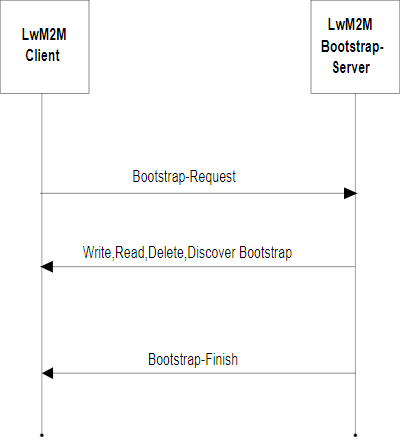
The Bootstrap is used to provision essential information (like LwM2M server URIs, credentials to authenticate to the LwM2M servers, etc.) into the LwM2M Client to enable it to register with one or more LwM2M Servers. This Bootstrap information is retrieved from the LwM2M Bootstrap Server.
For more information, please refer to the LwM2M specification.
Bootstrap Configuration
A Bootstrap Configuration defines the bootstrap strategy for a set of Bootstrap Entry:
-
RunServers
-
Run’s key management policy
-
Optionally, additional write operations to bootstrap objects other than /0, /1, /2 and /21.
Example of a Bootstrap Config:
{
    "id": "637d00aedca4b9489573de68",
    "name": "BootstrapConfig",
    "description": "This is a bootstrap config",
    "runServers": [
        {
            "id": "myServer",
            "useLiveObjects": false,
            "lwm2mDefinition": {
                "security": {
                    "shortServerId": 1,
                    "lwm2mServerUri": "coaps://myserver:5684",
                    "securityMode": 1
                },
                "server": {
                    "shortServerId": 1,
                    "lifetime": 200,
                    "binding": "S"
                }
            }
        }
    ],
    "additionalOperations": {
        "externalConfigServer": {
            "url": "https://lwm2m.myserver.com/bootstrapconfig/",
            "headers": [
                "applicationName": ["LiveObjects"],
                "myServerApiKey": ["azertyuiop"]
            ]
        },
        "objectVersionUrns": [
            "urn:oma:lwm2m:ext:3300:1.1",
            "urn:oma:lwm2m:ext:36050:1.0"
        ],
        "writeOperations": [
            {
                "path": "/3300/1/5750",
                "value": "VOC Index"
            },
            {
                "path": "/3300/1/5602",
                "value": "0.0"
            },
            {
                "path": "/36050/0/0",
                "value": "192837465"
            }
        ]
    }
    "created": "2022-11-22T17:02:38.944Z",
    "updated": "2022-11-22T17:02:38.944Z"
}| Field | Description |
|---|---|
id |
(mandatory) Generated Bootstrap configuration unique identifier. Is used to link the configuration to a Bootstrap Entry. |
name |
(mandatory) User-defined name for the bootstrap config, must not be empty. |
description |
(optional) User-defined description for the bootstrap config. |
runServers |
(mandatory) The run servers configuration. |
runServers.id |
(mandatory) Run server unique identifier. Will be used also in Bootstrap Entry |
runServers.useLiveObjects |
(optional) If true, the LiveObjects LwM2M URI will be used as lwm2mServerUri and PSK as the securityMode. If false, they have to be defined. (default: false) |
runServers.renewSecurityOnBootstrap |
(optional) If true, new credentials (e.g. the PSK identity and secret) will be generated at each Bootstrap. Can be set only if useLiveObjects is true. (default: false) |
runServers.autoProvisionDeviceOnBootstrap.enabled |
(optional) If true, the LwM2M device will be automatically created or updated in the Device Inventory on bootstrap, based on its Entry definition, even if it has not been provisioned beforehand. Can be set only if useLiveObjects is true. (default: false) |
runServers.lwm2mDefinition |
(mandatory) The LwM2M configuration. |
runServers.lwm2mDefinition.security |
(mandatory) The configuration for the |
runServers.lwm2mDefinition.security.settings |
(optional) Settings for this Security Object (for example, on which instance to write it). |
runServers.lwm2mDefinition.security.settings.objectInstanceId |
(optional) The instance ID that will be used for this Object. If not specified, the ID is automatically assigned incrementally from 0 for the first Run Server in the list. The Security Object instance used for the Bootstrap Server is avoided (a Discover operation is performed to identify the ID used). |
runServers.lwm2mDefinition.security.lwm2mServerUri |
(mandatory if useLiveObjects is false) Uniquely identifies the LwM2M Server or LwM2M Bootstrap-Server. Present if and only if useLiveObjects is false. |
runServers.lwm2mDefinition.security.securityMode |
(mandatory if useLiveObjects is false) Determines what credentials are being used by the LwM2M Client and the LwM2M Server. Present if and only if useLiveObjects is false. Allowed values : - - - - - |
runServers.lwm2mDefinition.security.serverPublicKey |
(optional) Stores the LwM2M Server’s, respectively LwM2M Bootstrap-Server’s, certificate, public key (RPK mode) or trust anchor. The Certificate Mode Resource determines the content of this resource. Present if and only if useLiveObjects is false. |
runServers.lwm2mDefinition.security.smsSecurityMode |
(optional) Determines which SMS security mode is used: - - - - - - - |
runServers.lwm2mDefinition.security.lwm2mServerSmsNumber |
(optional) MSISDN used by the LwM2M Client to send messages to the LwM2M Server via the SMS binding. |
runServers.lwm2mDefinition.security.shortServerId |
(mandatory) This identifier uniquely identifies each LwM2M Server configured for the LwM2M Client. |
runServers.lwm2mDefinition.security.clientHoldOffTime |
(optional) The number of seconds to wait before initiating a Client Initiated Bootstrap once the LwM2M Client has determined it should initiate this bootstrap mode. |
runServers.lwm2mDefinition.security.bootstrapServerAccountTimeout |
(optional) The LwM2M Client MUST purge the LwM2M Bootstrap-Server Account after the timeout value given by this resource. |
runServers.lwm2mDefinition.security.matchingType |
(optional) The Matching Type Resource specifies how the certificate or raw public key in the Server Public Key is presented. Four values are currently defined: - - - - |
runServers.lwm2mDefinition.security.sni |
(optional) This resource holds the value of the Server Name Indication (SNI) value to be used during the TLS handshake. When this resource is present then the LwM2M Server URI acts as the address of the service while the SNI value is used for matching a presented certificate, or PSK identity. |
runServers.lwm2mDefinition.security.certificateUsage |
(optional) The Certificate Usage Resource specifies the semantic of the certificate or raw public key stored in the Server Public Key Resource, which is used to match the certificate presented in the TLS/DTLS handshake. The currently defined values are 0 for "CA constraint", 1 for "service certificate constraint", 2 for "trust anchor assertion", and 3 for "domain-issued certificate". When this resource is absent, value (3) for domain issued certificate mode is assumed. More details about the semantic of each value can be found in the security consideration section of the LwM2M specification. Present if and only if useLiveObjects is false. |
runServers.lwm2mDefinition.security.dtlsTlsCiphersuite |
(optional) When this resource is present it instructs the TLS/DTLS client to propose the indicated ciphersuite(s) in the ClientHello of the handshake. A ciphersuite is indicated as a 32-bit integer value. The IANA TLS ciphersuite registry is maintained at https://www.iana.org/assignments/tls-parameters/tls-parameters.xhtml. As an example, the TLS_PSK_WITH_AES_128_CCM_8 ciphersuite is represented with the following string "0xC0,0xA8". To form an integer value the two values are concatenated. In this example, the value is 0xc0a8 or 49320. |
runServers.lwm2mDefinition.server |
(mandatory) The configuration for the |
runServers.lwm2mDefinition.server.settings |
(optional) Settings for this Server Object (for example, on which instance to write it). |
runServers.lwm2mDefinition.server.settings.objectInstanceId |
(optional) The instance ID that will be used for this Object. If not specified, the ID is automatically assigned incrementally from 0 for the first Run Server in the list. |
runServers.lwm2mDefinition.server.shortServerId |
(mandatory) Used as link to associate server Object Instance. |
runServers.lwm2mDefinition.server.lifetime |
(optional) Specify the lifetime of the registration in seconds. |
runServers.lwm2mDefinition.server.defaultMinimumPeriod |
(optional) The default value the LwM2M Client should use for the Minimum Period of an Observation |
runServers.lwm2mDefinition.server.defaultMaximumPeriod |
(optional) The default value the LwM2M Client should use for the Maximum Period of an Observation |
runServers.lwm2mDefinition.server.disableTimeout |
(optional) A period to disable the Server. After this period, the LwM2M Client MUST perform registration process to the Server. |
runServers.lwm2mDefinition.server.notificationStoringWhenDisabledOrOffline |
(optional) If true, the LwM2M Client stores “Notify” operations to the LwM2M Server while the LwM2M Server account is disabled or the LwM2M Client is offline |
runServers.lwm2mDefinition.server.binding |
(optional) Defines the transport binding configured for the LwM2M Client. It is a list composed of the following elements: - - - - - |
runServers.lwm2mDefinition.server.apnLink |
(optional) If this resource is defined, it provides a link to the APN connection profile Object Instance (OMNA registered Object ID:11) to be used to communicate with this server. The instance id must be provided. |
runServers.lwm2mDefinition.server.registrationPriorityOrder |
(optional) The LwM2M Client sequences the LwM2M Server registrations in increasing order of this value. If this value is not defined, registration attempts to this server are not impacted by other server registrations. |
runServers.lwm2mDefinition.server.initialRegistrationDelayTimer |
(optional) The delay before registration is attempted for this LwM2M Server based upon the completion of registration of the previous LwM2M Server in the registration order. This is only applied until the first successful registration after a successful bootstrapping sequence. |
runServers.lwm2mDefinition.server.registrationFailureBlock |
(optional) When set to true and registration to this LwM2M server fails, the LwM2M Client blocks registration to other servers in the order. When set to false, the LwM2M Client proceeds with registration to the next server in the order. |
runServers.lwm2mDefinition.server.bootstrapOnRegistrationFailure |
(optional) If set to true, this indicates that the LwM2M Client should re-bootstrap when either registration is explicitly rejected by the LwM2M Server or registration is considered as failing as dictated by the other resource settings. If set to false, the LwM2M Client will continue with the registration attempts as dictated by the other resource settings. |
runServers.lwm2mDefinition.server.communicationRetryCount |
(optional) The number of successive communication attempts before which a communication sequence is considered as failed. |
runServers.lwm2mDefinition.server.communicationRetryTimer |
(optional) The delay between successive communication attempts in a communication sequence. This value is multiplied by two to the power of the communication retry attempt minus one (2**(retry attempt-1)) to create an exponential back-off. |
runServers.lwm2mDefinition.server.communicationSequenceDelayTimer |
(optional) The delay between successive communication sequences. A communication sequence is defined as the exhaustion of the Communication Retry Count and Communication Retry Timer values. A communication sequence can be applied to server registrations or bootstrapping attempts. MAX_VALUE means do not perform another communication sequence. |
runServers.lwm2mDefinition.server.communicationSequenceRetryCount |
(optional) The number of successive communication sequences before which a registration attempt is considered as failed. |
runServers.lwm2mDefinition.server.trigger |
(optional) Using the Trigger Resource a LwM2M Client can indicate whether it is reachable over SMS (value set to 'true') or not (value set to 'false') |
runServers.lwm2mDefinition.server.preferredTransport |
(optional) Only a single transport binding SHALL be present. When the LwM2M client supports multiple transports, it MAY use this transport to initiate a connection. This resource can also be used to switch between multiple transports e.g. a non-IP device can switch to UDP transport to perform firmware updates. |
runServers.lwm2mDefinition.server.muteSend |
(optional) If true or the Resource is not present, the LwM2M Client Send command capability is de-activated. If false, the LwM2M Client Send Command capability is activated. |
additionalOperations.objectVersionUrns |
(optional) The list of objects versions, in urn format. The version of all objects used in writeOperations must be declared here. |
additionalOperations.writeOperations.path |
(optional) The path of the write operation. They must not target /0, /1, /2 or /21. |
additionalOperations.writeOperations.value |
(optional) The value of the write operation. |
additionalOperations.externalConfigServer.url |
(optional) The url of an external server that will be called to provide additional write operations (restricted to port 443). See Bootstrap Config External Server. |
additionalOperations.externalConfigServer.headers |
(optional) The headers that will be put in the HTTP request toward the external server. |
Note : runServers.lwm2mDefinition.security.shortServerId and runServers.lwm2mDefinition.server.shortServerId must be equal.
Bootstrap Configuration with External Server
If your use case needs it, you can define an external server that will be called to add Bootstrap Configuration operations on each device bootstrap (whose entry is linked to this config).
In that case, Live Objects will make a POST HTTP call toward the url and with the headers defined.
The expected response is similar to the operations field of Bootstrap Configuration.
If the server returns an invalid response body, or other than a 2xx response code, then the device bootstrap will fail.
{
    "tenantId": "637d00aedca4b9489573de68",
    "endpointName": "my_endpoint",
    "bootstrapConfigId": "637d00cfdca4b9489573de69"
}| Field | Description |
|---|---|
tenantId |
(mandatory) Your account identifier. |
endpointName |
(mandatory) The endpoint client name that is bootstraping. |
bootstrapConfigId |
(mandatory) The identifier of the Bootstrap Config that was setup with this server url. |
{
    "objectVersionUrns": [
        "urn:oma:lwm2m:ext:3300:1.1",
        "urn:oma:lwm2m:ext:36050:1.0"
    ],
    "writeOperations": [
        {
            "path": "/3300/1/5750",
            "value": "VOC Index"
        },
        {
            "path": "/3300/1/5602",
            "value": "0.0"
        },
        {
            "path": "/36050/0/0",
            "value": "192837465"
        }
    ]
}| Field | Description |
|---|---|
objectVersionUrns |
(mandatory) the list of objects versions, in urn format. The version of all objects used in writeOperations must be declared here. |
writeOperations.path |
(mandatory) The path of the write operation. |
writeOperations.value |
(mandatory) The value of the write operation. |
|
All objects used in writeOperations will first be deleted before applying the write operation. |
|
If other writeOperations have been setup in the operations field of the Bootstrap Config, then all the writeOperations will be merged, with priority to the ones returned by the external server. |
Bootstrap Entry
A Bootstrap Entry is link to a Bootstrap Config and contains:
-
the credentials used to authenticate to the LwM2M Bootstrap server
-
the parameters of the Bootstrap Config specific to an endpoint, namely the credentials used to authenticate to the LwM2M Run server
-
information about past Bootstrap sessions
Example of a Bootstrap Entry:
{
    "endpointName": "my_endpoint",
    "security": {
        "mode": "PSK",
        "pskInfo": {
            "identity": "my_endpoint",
            "secret": "0123456789ABCDEF0123456789ABCDEF"
        }
    },
    "definition": {
        "bootstrapConfigId": "637d00cfdca4b9489573de69",
        "runServers": [
            {
                "id": "LOServer",
                "security": {
                    "pskInfo": {
                        "identity": "my_endpoint",
                        "secret": "0123456789ABCDEF0123456789ABCDEF"
                    }
                }
            }
        ]
    },
    "activity": {
        "status": "FINISHED",
        "endpointBootstrapConfig": {
            "runServers": [
                {
                    "security": {
                        "shortServerId": 1,
                        "lwm2mServerUri": "coaps://lwm2m.liveobjects.orange-business.com:5684",
                        "securityMode": 0,
                        "publicKeyOrIdentity": "urn:imei:000000000000000",
                        "secretKey": "***",
                        "clientHoldOffTime": 0,
                        "bootstrapServerAccountTimeout": 0
                    },
                    "server": {
                        "shortServerId": 1,
                        "lifetime": 3600,
                        "defaultMinimumPeriod": 0,
                        "defaultMaximumPeriod": 500,
                        "disableTimeout": 0,
                        "notificationStoringWhenDisabledOrOffline": true,
                        "binding": "U"
                    }
                }
            ]
        },
        "bootstrapRequestCount": 6,
        "lastBootstrapRequestDate": "2023-01-13T11:50:28.086Z",
        "bootstrapFinishCount": 4,
        "lastBootstrapFinishDate": "2023-01-13T11:50:36.221Z"
    },
    "created": "2023-01-11T17:53:57.021Z",
    "updated": "2023-01-13T11:50:36.227Z"
}| Field | Description |
|---|---|
endpointName |
(mandatory) The endpoint client name. |
security |
(mandatory) The security information to authenticate to the LwM2M Bootstrap server. |
security.mode |
(mandatory) The security mode used to authenticate to the LwM2M Bootstrap server. |
security.pskInfo |
(mandatory) The Pre-Shared Key (PSK) information to authenticate to the LwM2M Bootstrap server. |
security.pskInfo.identity |
(mandatory) The "bootstrap" PSK Identity. |
security.pskInfo.secret |
(mandatory) The "bootstrap" PSK secret key. |
masterEntry |
(optional) Information about the linked Bootstrap Master Entry. Present only if the Bootstrap Entry was created automatically via a Bootstrap Master Entry. |
masterEntry.id |
(optional) The Bootstrap Master Entry identifier. |
definition |
(optional) The Bootstrap Config parameters for the endpoint (must be defined for the Bootstrap to work). |
definition.bootstrapConfigId |
(optional) The identifier of the Bootstrap Config to use for the endpoint (must be defined for the Bootstrap to work). |
definition.runServers |
(optional) The parameters for the runServers defined in Bootstrap Config (depending on the Bootstrap config it can be required for the Bootstrap to work). |
definition.runServers.id |
(mandatory) The identifier of the runServer defined in Bootstrap Config. |
definition.runServers.security |
(optional) The security information to authenticate to the LwM2M Run server (depending on the Bootstrap config it can be required for the Bootstrap to work). |
definition.runServers.security.pskInfo |
(mandatory) The Pre-Shared Key (PSK) information to authenticate to this LwM2M Run server. |
definition.runServers.security.pskInfo.identity |
(optional) The "run" PSK Identity. If it is not defined, the Identity of the PSK used to authenticate to the LwM2M Bootstrap server is used. |
definition.runServers.security.pskInfo.secret |
(mandatory) The "run" PSK secret key. |
activity |
(read only) Information about past Bootstrap session. |
activity.status |
(read only) status regarding the Bootstrap |
activity.endpointBootstrapConfig |
(read only) The last Bootstrap configuration that was sent to the LwM2M client. Refer to the Bootstrap Config for the description of each parameter except for publicKeyOrIdentity and secretKey described below. |
activity.endpointBootstrapConfig.publicKeyOrIdentity |
(read only) The LwM2M Client’s certificate, public key (RPK mode) or PSK Identity (PSK mode). |
activity.endpointBootstrapConfig.secretKey |
(read only) The secret key (PSK mode) or private key (RPK or certificate mode). |
activity.bootstrapRequestCount |
(read only) The number of times a Bootstrap sequence has been initiated (a Bootstrap-Request has been received by the LwM2M server). |
activity.lastBootstrapRequestDate |
(read only) The last time a Bootstrap sequence was initiated (a Bootstrap-Request has been received by the LwM2M server). |
activity.bootstrapFinishCount |
(read only) The number of times a Bootstrap sequence has been successfully completed (a Bootstrap-Finish has been sent by the LwM2M server). |
activity.lastBootstrapFinishDate |
(read only) The last time a Bootstrap sequence has been successfully completed (a Bootstrap-Finish has been sent by the LwM2M server). |
created |
(read only) Date on which the Bootstrap Entry was created. |
updated |
(read only) Date on which the Bootstrap Entry was last updated. |
Bootstrap Master Entry
Bootstrap Master Entries are an extension of Bootstrap Entries that can be used for a set of endpoints without having to provision credentials for each endpoint. They contain:
-
An ID to be used in the psk identity (see Endpoint Credentials)
-
The master secret from which the secrets used by endpoints to authenticate to the LwM2M Bootstrap server are derived (see Endpoint Credentials)
-
A link to a Bootstrap Config. The config must have useLiveObjects, renewSecurityOnBootstrap, and autoProvisionDeviceOnBootstrap.enabled set to true.
-
Information about past Bootstrap sessions of endpoints using this Bootstrap Master Entry
When an endpoint bootstraps using a Bootstrap Master Entry, a Bootstrap Entry is automatically created for that endpoint. See the bootstrap sequence for more information.
Example of a Bootstrap Master Entry:
{
  "id": "Kl77BbLBwh",
  "name": "My Master Entry",
  "security": {
    "mode": "PSK",
    "pskInfo": {
      "secret": "5adc592c900f4dae08dc7d68984bd262689f931c0329ceffe3ad374368f20708"
    }
  },
  "definition": {
    "bootstrapConfigId": "686287c6babc0e5f6fe43e8a"
  },
  "activity": {
    "bootstrapRequestCount": 1,
    "lastBootstrapRequestDate": "2025-06-30T12:56:44.182Z",
    "bootstrapFinishCount": 1,
    "lastBootstrapFinishDate": "2025-06-30T12:56:46.604Z"
  },
  "created": "2025-06-30T12:49:16.794Z",
  "updated": "2025-06-30T12:56:46.606Z"
}| Field | Description |
|---|---|
id |
(mandatory) The Bootstrap Master Entry ID. It is generated and must be used in endpoints PSK identity, see Endpoint Credentials. |
name |
(mandatory) The Bootstrap Master Entry name. It is user-defined. |
security |
(mandatory) The security information to authenticate to the LwM2M Bootstrap server. |
security.mode |
(mandatory) The security mode used to authenticate to the LwM2M Bootstrap server. PSK (Pre-Shared Key) is the only mode available currently. |
security.pskInfo |
(mandatory) The master Pre-Shared Key (PSK) information to authenticate to the LwM2M Bootstrap server. The endpoint PSK secret is derived from it, see Endpoint Credentials. |
security.pskInfo.secret |
(mandatory) The PSK master secret key, as a hex-encoded string. It is generated. See Endpoint Credentials |
definition |
(optional) The Bootstrap Config parameters for the endpoints (must be defined for the Bootstrap to work). |
definition.bootstrapConfigId |
(optional) The identifier of the Bootstrap Config to use for the endpoints (must be defined for the Bootstrap to work). |
activity |
(read only) Information about past Bootstrap sessions of endpoints using this Bootstrap Master Entry. |
activity.bootstrapRequestCount |
(read only) The number of times a Bootstrap sequence has been initiated (a Bootstrap-Request has been received by the LwM2M server). |
activity.lastBootstrapRequestDate |
(read only) The last time a Bootstrap sequence was initiated (a Bootstrap-Request has been received by the LwM2M server). |
activity.bootstrapFinishCount |
(read only) The number of times a Bootstrap sequence has been successfully completed (a Bootstrap-Finish has been sent by the LwM2M server). |
activity.lastBootstrapFinishDate |
(read only) The last time a Bootstrap sequence has been successfully completed (a Bootstrap-Finish has been sent by the LwM2M server). |
created |
(read only) Date on which the Bootstrap Master Entry was created. |
updated |
(read only) Date on which the Bootstrap Master Entry was last updated. |
Endpoint credentials
The PSK identity must have the following format:
<endpointName>@<masterEntryId>Where:
-
endpointName: The endpoint name used in the Bootstrap Request. -
masterEntryId: The Bootstrap Master Entry ID.
Replace <endpointName> and <masterEntryId> with your actual values (do not include the angle brackets).
|
Only alphanumeric characters (a-z, A-Z, 0-9) and special characters among : - _ are allowed in the endpointName.
|
The PSK secret is derived from the master secret and the endpoint name using HMAC-SHA256.
openssl:# ==================
# Linux
# ==================
endpointName=urn:android:device:9774d56d682e549c
masterSecret=efd9a6f6b82b9ecf8ef32cd08f681274e1cd17bfd2adc830d41d2d36d261b270
echo -n $endpointName | openssl dgst -sha256 -mac HMAC -macopt hexkey:$masterSecret
# ==================
# Windows (Commands)
# ==================
(echo|set /p="urn:android:device:9774d56d682e549c") | openssl dgst -sha256 -mac HMAC -macopt hexkey:efd9a6f6b82b9ecf8ef32cd08f681274e1cd17bfd2adc830d41d2d36d261b270
# Replace urn:android:device:9774d56d682e549c and efd9a6f6b82b9ecf8ef32cd08f681274e1cd17bfd2adc830d41d2d36d261b270 with your actual valuesThe derived secret with the example input values (in hexadecimal format):
e9a6992bd98f629d31cd12980fa1adaed011220cec2d81c2f59ae5ff07037f29Where:
-
endpointName: The endpoint name used in the Bootstrap Request. -
masterSecret: The Bootstrap Master Entry PSK secret, in hexadecimal format.
Bootstrap Sequence
General case
Before being able to bootstrap a device, it is necessary to provision a Bootstrap Entry for the device and link it to a Bootstrap Config.
The Bootstrap sequence starts with the device sending a Bootstrap-Request (preceded by a DTLS Handshake). If the instance IDs to use for the Security Objects are not defined in the Bootstrap Config, a Bootstrap-Discover is sent by LiveObjects to be able to know which Security Object instance holds the Bootstrap server information and avoid it. The Security, Server and OSCORE Objects are deleted. The Security and Server Objects are then written using the parameters defined in the Bootstrap Config and the credentials defined in the Bootstrap Entry.
The Bootstrap sequence ends with LiveObjects sending a Bootstrap-Finish. The device can then register to the LwM2M Run servers.
The Bootstrap status is visible in the Bootstrap Entry. The status evolves as follows during the Bootstrap sequence:
Using LiveObjects as Run Server
To use LiveObjects as Run Server, the Bootstrap Config must be created with the parameter useLiveObjects set to true. Refer to this Bootstrap Config creation example.
|
A device must be created in your account (with the same endpoint name as the Bootstrap Entry) before the bootstrap takes place. However, if you use the autoProvisionDeviceOnBootstrap.enabled=true setting in the config.RunServer definition, you can skip this device pre-provisioning: the device will be automatically created in the device inventory of the Bootstrap Entry’s customer account. |
The device can be declared as being managed by the LiveObjects Bootstrap Server (bootstrap.managed = true and w/o security info) or not (bootstrap.managed = false and w/ security info). Refer to: LwM2M Device or LwM2M Device managed by Bootstrap creation examples.
If the device is created with bootstrap.managed = true (and in the same tenant as the Entry), the security info will be automatically provisioned in the LiveObjects device representation upon bootstrapping. Otherwise, they must be provisioned manually during the device creation, and they will be checked during bootstrap (i.e., do they match the security info that was provisioned in the Bootstrap Entry, and that will be set on the physical device).
If an error occurs during the automatic provisioning of the security info or if there is a security info mismatch, the Bootstrap sequence will fail. After a successful Bootstrap sequence, the device will register with the LiveObjects LwM2M Run server.
With credentials generated at Bootstrap time
The following diagram describes the sequence when the run credentials are generated at Bootstrap time.
The Bootstrap Config has to be created with the renewSecurityOnBootstrap parameter set to true. Refer to this Bootstrap Config creation example. The Bootstrap Entry should be created without Run credentials (otherwise they will just be ignored).
If the Bootstrap Config does not set autoProvisionDeviceOnBootstrap.enabled=true, a device must be created on LiveObjects with the bootstrap.managed parameter set to true (and with the same endpoint name and on the same account as the Bootstrap Entry). Refer to this Device creation example.
At each Bootstrap new credential will be generated and automatically provisioned in the LiveObjects device representation. If an error occurs during the credentials provisioning, the Bootstrap sequence will fail. After a successful Bootstrap sequence, the device will register with the LiveObjects LwM2M Run server using the generated credentials.
Using a Bootstrap Master Entry
The following diagram describes the sequence when using a Bootstrap Master Entry.
A Bootstrap Master Entry must be created to get a Bootstrap Master Entry ID and a master PSK secret, from which the PSK identity and secret for each endpoint are derived (the key derivation is of course not done by the device, which must not know the master secret).
The Bootstrap Config must be created with the following parameters set to true: useLiveObjects, renewSecurityOnBootstrap, and autoProvisionDeviceOnBootstrap.enabled.
A Bootstrap Entry and a LwM2M device will be automatically created or updated for each endpoint using the Bootstrap Master Entry, (i.e., for each endpoint whose credentials are derived from it) during the Bootstrap sequence. For more details about how credentials are derived for each endpoint, refer to Endpoint Credentials.
Bootstrap Configurations API
This section includes API call examples for the Bootstrap Configs management.
You can refer to the swagger documentation to list all available APIs.
Create a bootstrap config
Example:
POST /api/v1/bootstrap/lwm2m/configs
{
    "name" : "BootstrapConfig",
    "description" : "This is a bootstrap config",
    "runServers" : [
        {
            "id" : "myServer",
            "useLiveObjects" : false,
            "lwm2mDefinition" : {
                "security" : {
                    "shortServerId" : 1,
                    "lwm2mServerUri" : "coaps://myserver:5684",
                    "securityMode" : 1
                },
                "server" : {
                    "shortServerId" : 1,
                    "lifetime" : 200,
                    "binding" : "S"
                }
            }
        }
    ]
}
Response
201 CREATED
{
    "id": "637d00aedca4b9489573de68",
    "name": "BootstrapConfig",
    "description": "This is a bootstrap config",
    "runServers": [
        {
            "id": "myServer",
            "useLiveObjects": false,
            "lwm2mDefinition": {
                "security": {
                    "shortServerId": 1,
                    "lwm2mServerUri": "coaps://myserver:5684",
                    "securityMode": 1
                },
                "server": {
                    "shortServerId": 1,
                    "lifetime": 200,
                    "binding": "S"
                }
            }
        }
    ],
    "created": "2022-11-22T17:02:38.944Z",
    "updated": "2022-11-22T17:02:38.944Z"
}
Create a LiveObjects bootstrap config
This example will produce a bootstrap config with the LiveObjects LwM2M uri as lwm2mServerUri and PSK as the securityMode.
Example:
POST /api/v1/bootstrap/lwm2m/configs
{
    "name": "LOBootstrapConfig",
    "description": "This is a LO bootstrap config",
    "runServers": [
        {
            "id": "LOServer",
            "useLiveObjects": true,
            "renewSecurityOnBootstrap": false,
            "lwm2mDefinition": {
                "security": {
                    "shortServerId": 1
                },
                "server": {
                    "shortServerId": 1,
                    "lifetime": 300,
                    "binding": "U"
                }
            }
        }
    ]
}
Response
201 CREATED
{
    "id": "637d00cfdca4b9489573de69",
    "name": "LOBootstrapConfig",
    "description": "This is a LO bootstrap config",
    "runServers": [
        {
            "id": "LOServer",
            "useLiveObjects": true,
            "renewSecurityOnBootstrap": false,
            "lwm2mDefinition": {
                "security": {
                    "shortServerId": 1
                },
                "server": {
                    "shortServerId": 1,
                    "lifetime": 300,
                    "binding": "U"
                }
            }
        }
    ],
    "created": "2022-11-22T17:03:11.197Z",
    "updated": "2022-11-22T17:03:11.197Z"
}
Create a LiveObjects bootstrap config with credentials generation and auto-provisioning
This example will produce a bootstrap config with the LiveObjects LwM2M uri as lwm2mServerUri, PSK as the securityMode and the auto-provisioning device mode which allow not to create device in the the device inventory beforehand.
A new device will be created at first bootstrap
A new run Pre-Shared Key will be generated (both the id and the secret) at each Bootstrap.
Example:
POST /api/v1/bootstrap/lwm2m/configs
{
    "name": "LOBootstrapConfig",
    "description": "This is a LO bootstrap config",
    "runServers": [
        {
            "id": "LOServer",
            "useLiveObjects": true,
            "renewSecurityOnBootstrap": true,
            "autoProvisionDeviceOnBootstrap" : {
                "enabled": true
            },
            "lwm2mDefinition": {
                "security": {
                    "shortServerId": 1
                },
                "server": {
                    "shortServerId": 1,
                    "lifetime": 300,
                    "binding": "U"
                }
            }
        }
    ]
}
Response
201 CREATED
{
    "id": "637d00cfdca4b9489573de69",
    "name": "LOBootstrapConfig",
    "description": "This is a LO bootstrap config",
    "runServers": [
        {
            "id": "LOServer",
            "useLiveObjects": true,
            "renewSecurityOnBootstrap": true,
            "autoProvisionDeviceOnBootstrap" : {
                "enabled": true
            },
            "lwm2mDefinition": {
                "security": {
                    "shortServerId": 1
                },
                "server": {
                    "shortServerId": 1,
                    "lifetime": 300,
                    "binding": "U"
                }
            }
        }
    ],
    "created": "2022-11-22T17:03:11.197Z",
    "updated": "2022-11-22T17:03:11.197Z"
}
Bootstrap Entries API
This section includes API call examples for the Bootstrap Entries management.
You can refer to the swagger documentation to list all available APIs.
Create a bootstrap entry
Example:
POST /api/v1/bootstrap/lwm2m/entries
{
    "endpointName": "my_endpoint",
    "security": {
        "mode": "PSK",
        "pskInfo": {
            "identity": "my_endpoint",
            "secret": "0123456789ABCDEF0123456789ABCDEF"
        }
    },
    "definition": {
        "bootstrapConfigId": "63b6dd0d4a3f024c43b88c31",
        "runServers": [
            {
                "id": "LOServer",
                "security": {
                    "pskInfo": {
                        "identity": "my_endpoint",
                        "secret": "0123456789ABCDEF0123456789ABCDEF"
                    }
                }
            }
        ]
    }
}
Response
201 CREATED
{
    "endpointName": "my_endpoint",
    "security": {
        "mode": "PSK",
        "pskInfo": {
            "identity": "my_endpoint"
        }
    },
    "definition": {
        "bootstrapConfigId": "63b6dd0d4a3f024c43b88c31",
        "runServers": [
            {
                "id": "LOServer",
                "security": {
                    "pskInfo": {
                        "identity": "my_endpoint",
                        "secret": "***"
                    }
                }
            }
        ]
    },
    "activity": {
        "status": "NEVER_REQUESTED",
        "bootstrapRequestCount": 0,
        "bootstrapFinishCount": 0
    },
    "created": "2023-01-10T16:57:38.299Z",
    "updated": "2023-01-10T16:57:38.299Z"
}
Update the bootstrapConfigId in a bootstrap entry
Example:
PUT /api/v1/bootstrap/lwm2m/entries/my_endpoint/definition/bootstrapConfigId
"6374fc20c63f896edc10726d"Response
200 OK
{
    "endpointName": "my_endpoint",
    "security": {
        "mode": "PSK",
        "pskInfo": {
            "identity": "my_endpoint"
        }
    },
    "definition": {
        "bootstrapConfigId": "6374fc20c63f896edc10726d",
        "runServers": [
            {
                "id": "LOServer",
                "security": {
                    "pskInfo": {
                        "identity": "my_endpoint",
                        "secret": "***"
                    }
                }
            }
        ]
    },
    "activity": {
        "status": "NEVER_REQUESTED",
        "bootstrapRequestCount": 0,
        "bootstrapFinishCount": 0
    },
    "created": "2023-01-10T16:57:38.299Z",
    "updated": "2023-01-10T18:03:05.488Z"
}
Get a bootstrap entry
Example:
GET /api/v1/bootstrap/lwm2m/entries/my_endpoint?showSecuritySecrets=true
Response
200 OK
{
    "endpointName": "my_endpoint",
    "security": {
        "mode": "PSK",
        "pskInfo": {
            "identity": "my_endpoint"
        }
    },
    "definition": {
        "bootstrapConfigId": "6374fc20c63f896edc10726d",
        "runServers": [
            {
                "id": "LOServer",
                "security": {
                    "pskInfo": {
                        "secret": "0123456789ABCDEF0123456789ABCDEF"
                    }
                }
            }
        ]
    },
    "activity": {
        "status": "FINISHED",
        "endpointBootstrapConfig": {
            "runServers": [
                {
                    "security": {
                        "shortServerId": 1,
                        "lwm2mServerUri": "coaps://lwm2m.liveobjects.orange-business.com:5684",
                        "securityMode": 0,
                        "publicKeyOrIdentity": "my_endpoint",
                        "secretKey": "0123456789ABCDEF0123456789ABCDEF",
                        "clientHoldOffTime": 0,
                        "bootstrapServerAccountTimeout": 0
                    },
                    "server": {
                        "shortServerId": 1,
                        "lifetime": 3600,
                        "defaultMinimumPeriod": 0,
                        "defaultMaximumPeriod": 500,
                        "disableTimeout": 0,
                        "notificationStoringWhenDisabledOrOffline": true,
                        "binding": "U"
                    }
                }
            ]
        },
        "bootstrapRequestCount": 1,
        "lastBootstrapRequestDate": "2023-01-10T18:05:23.693Z",
        "bootstrapFinishCount": 1,
        "lastBootstrapFinishDate": "2023-01-10T18:05:31.907Z"
    },
    "created": "2023-01-10T16:57:38.299Z",
    "updated": "2023-01-10T18:03:05.488Z"
}
List bootstrap entries
Example:
GET /api/v1/bootstrap/lwm2m/entries?limit=10&bookmarkEndpointName=my_endpoint
Response
200 OK
[
    {
        "endpointName": "urn:imei:000000000000000",
        "security": {
            "mode": "PSK",
            "pskInfo": {
                "identity": "urn:imei:000000000000000"
            }
        },
        "definition": {
            "bootstrapConfigId": "63bbf9244bdab8538b9adcae",
            "runServers": [
                {
                    "id": "LOServer",
                    "security": {
                        "pskInfo": {
                            "secret": "***"
                        }
                    }
                }
            ]
        },
        "activity": {
            "status": "FINISHED",
            "endpointBootstrapConfig": {
                "runServers": [
                    {
                        "security": {
                            "shortServerId": 1,
                            "lwm2mServerUri": "coaps://lwm2m.liveobjects.orange-business.com:5684",
                            "securityMode": 0,
                            "publicKeyOrIdentity": "urn:imei:000000000000000",
                            "secretKey": "***",
                            "clientHoldOffTime": 0,
                            "bootstrapServerAccountTimeout": 0
                        },
                        "server": {
                            "shortServerId": 1,
                            "lifetime": 3600,
                            "defaultMinimumPeriod": 0,
                            "defaultMaximumPeriod": 500,
                            "disableTimeout": 0,
                            "notificationStoringWhenDisabledOrOffline": true,
                            "binding": "U"
                        }
                    }
                ]
            },
            "bootstrapRequestCount": 6,
            "lastBootstrapRequestDate": "2023-01-13T11:50:28.086Z",
            "bootstrapFinishCount": 4,
            "lastBootstrapFinishDate": "2023-01-13T11:50:36.221Z"
        },
        "created": "2023-01-11T17:53:57.021Z",
        "updated": "2023-01-13T11:50:36.227Z"
    },
    {
        "endpointName": "urn:imei:000000000000001",
        "security": {
            "mode": "PSK",
            "pskInfo": {
                "identity": "urn:imei:000000000000001"
            }
        },
        "definition": {
            "bootstrapConfigId": "63bbf9244bdab8538b9adcae",
            "runServers": [
                {
                    "id": "LOServer",
                    "security": {
                        "pskInfo": {
                            "secret": "***"
                        }
                    }
                }
            ]
        },
        "activity": {
            "status": "FINISHED",
            "endpointBootstrapConfig": {
                "runServers": [
                    {
                        "security": {
                            "shortServerId": 1,
                            "lwm2mServerUri": "coaps://lwm2m.liveobjects.orange-business.com:5684",
                            "securityMode": 0,
                            "publicKeyOrIdentity": "urn:imei:000000000000001",
                            "secretKey": "***",
                            "clientHoldOffTime": 0,
                            "bootstrapServerAccountTimeout": 0
                        },
                        "server": {
                            "shortServerId": 1,
                            "lifetime": 3600,
                            "defaultMinimumPeriod": 0,
                            "defaultMaximumPeriod": 500,
                            "disableTimeout": 0,
                            "notificationStoringWhenDisabledOrOffline": true,
                            "binding": "U"
                        }
                    }
                ]
            },
            "bootstrapRequestCount": 13,
            "lastBootstrapRequestDate": "2023-01-13T12:30:00.594Z",
            "bootstrapFinishCount": 4,
            "lastBootstrapFinishDate": "2023-01-13T12:30:00.912Z"
        },
        "created": "2023-01-13T10:22:41.821Z",
        "updated": "2023-01-13T12:30:00.921Z"
    }
]
Bootstrap Master Entries API
This section includes API call examples for the Bootstrap Master Entry management.
You can refer to the swagger documentation to list all available APIs.
Create a bootstrap master entry
Example:
POST /api/v1/bootstrap/lwm2m/masterEntries
{
  "name": "My Master Entry",
  "security": {
    "mode": "PSK"
  },
  "definition": {
    "bootstrapConfigId": "686287c6babc0e5f6fe43e8a"
  }
}
Response
201 CREATED
{
  "id": "Kl77BbLBwh",
  "name": "My Master Entry",
  "security": {
    "mode": "PSK",
    "pskInfo": {
      "secret": "5adc592c900f4dae08dc7d68984bd262689f931c0329ceffe3ad374368f20708"
    }
  },
  "definition": {
    "bootstrapConfigId": "686287c6babc0e5f6fe43e8a"
  },
  "created": "2025-06-30T12:49:16.794Z",
  "updated": "2025-06-30T12:49:16.794Z"
}
Update the bootstrapConfigId in a bootstrap master entry
Example:
PUT /api/v1/bootstrap/lwm2m/masterEntries/Kl77BbLBwh/definition/bootstrapConfigId
"6374fc20c63f896edc10726d"Response
204 NO CONTENT
Get a bootstrap master entry
Example:
GET /api/v1/bootstrap/lwm2m/masterEntries/Kl77BbLBwh?showSecuritySecrets=true
Response
200 OK
{
  "id": "Kl77BbLBwh",
  "name": "My Master Entry",
  "security": {
    "mode": "PSK",
    "pskInfo": {
      "secret": "5adc592c900f4dae08dc7d68984bd262689f931c0329ceffe3ad374368f20708"
    }
  },
  "definition": {
    "bootstrapConfigId": "686287c6babc0e5f6fe43e8a"
  },
  "created": "2025-06-30T12:49:16.794Z",
  "updated": "2025-06-30T12:49:16.794Z"
}
List bootstrap master entries
Example:
GET /api/v1/bootstrap/lwm2m/masterEntries
Response
200 OK
[
  {
    "id": "Kl77BbLBwh",
    "name": "My Master Entry",
    "definition": {
      "bootstrapConfigId": "686287c6babc0e5f6fe43e8a"
    },
    "activity": {
      "bootstrapRequestCount": 1,
      "lastBootstrapRequestDate": "2025-06-30T12:56:44.182Z",
      "bootstrapFinishCount": 1,
      "lastBootstrapFinishDate": "2025-06-30T12:56:46.604Z"
    }
  },
  {
    "id": "WOq5ZcGuNS",
    "name": "My Other Master Entry"
  }
]
Bootstrap entries mass import tutorial
The mass import will be fully available soon on the Live Objects portal, but you can already use our API to import batches of bootstrap entries into Live Objects from a .csv file with the help of Postman, a popular and free API toolbox. Simply follow the step by step tutorial below, you do not need any development skills for this.
How to import a list of bootstrap entries from a (CSV file)
Requirements
-
Install Postman on your desktop : You can download it from this link download Postman
-
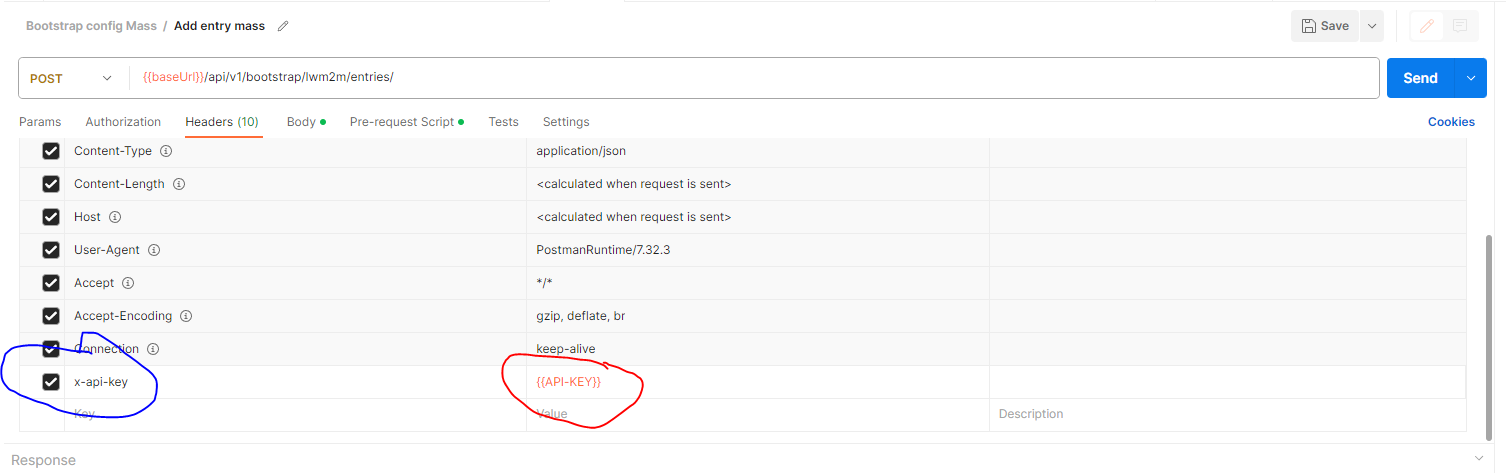
is Create an Api key with "customized" profil + DEVICE_R and DEVICE_W roles : here is the API key configuration requirements, and here is is how to create an API key if you don’t have it.
-
set your Api Key value in the key tab.
-
If you don’t have a bootstrap configuration, create a new one, and save the id.
Build a list of entries under CSV format file
| field | endpointName | pskInfo.identity | pskInfo.secret | bootstrapConfigId | runServers.id | runServers.security.pskInfo.identity | runServers.security.pskInfo.secret |
|---|---|---|---|---|---|---|---|
entry1 |
my_endpointName1 |
pskIdentity1 |
secret1 |
bootstrap_configId |
runServers.id |
runServers.security.pskInfo.identity1 |
runServers.security.pskInfo.secret1 |
entry2 |
my_endpointName2 |
pskIdentity2 |
secret2 |
bootstrap_configId |
runServers.id |
runServers.security.pskInfo.identity2 |
runServers.security.pskInfo.secret2 |
|
Here is a CSV template : to be completed by your device entries. |
| The header column of your CSV should contain the exact field id and it will be instantiated during the script execution in both the script and the endpoint. |
Build and write the postman script
-
We are using this endpoint to create a postman request:
POST api/v1/bootstrap/lwm2m/entries/
-
In postman, put your Api key : in the "Headers" window, add in the KEY cells, the variable x-api-key and set it with the Api key value.
-
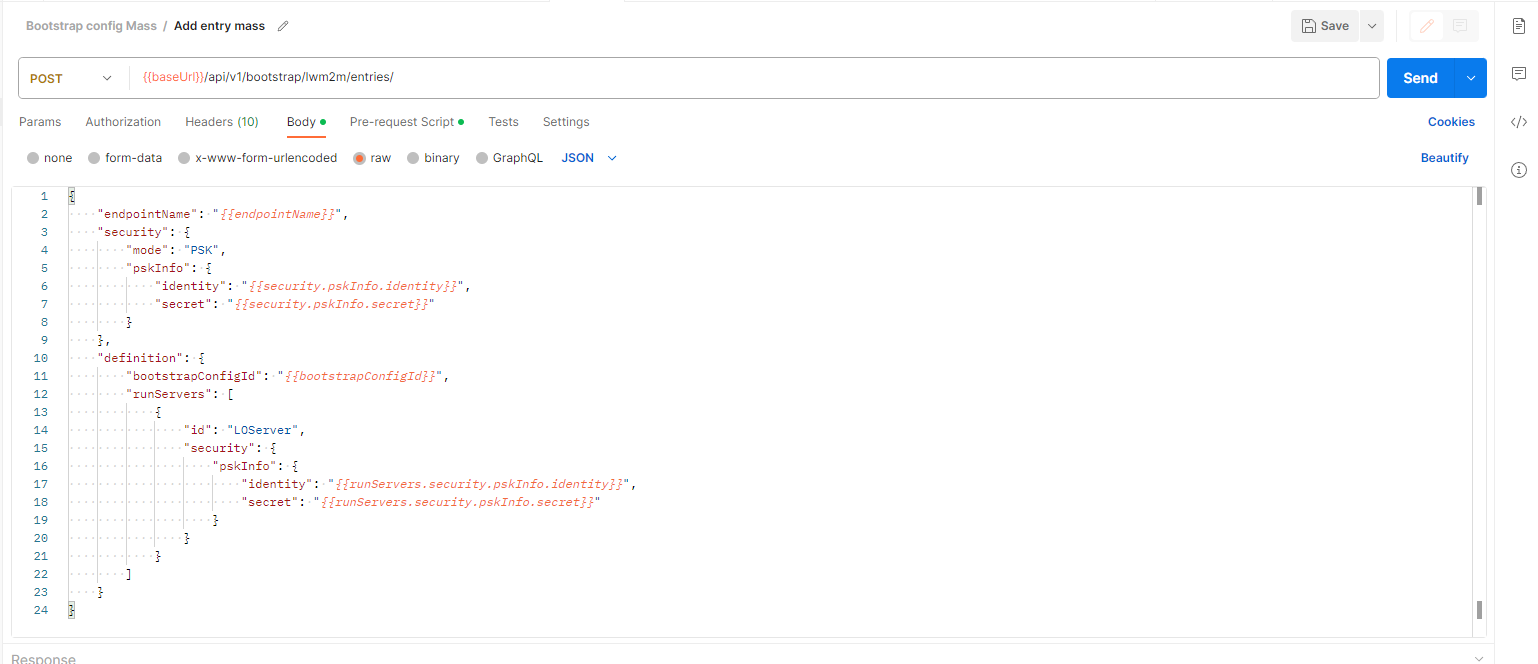
In the "Body" window, set this Json :
{
    "endpointName": "{{endpointName}}",
    "security": {
        "mode": "PSK",
        "pskInfo": {
            "identity": "{{pskInfo.identity}}",
            "secret": "{{pskInfo.secret}}"
        }
    },
    "definition": {
        "bootstrapConfigId": "{{bootstrapConfigId}}",
        "runServers": [
            {
                "id": "{{runServers.id}}",
                "security": {
                    "pskInfo": {
                        "identity": "{{runServers.security.pskInfo.identity}}",
                        "secret": "{{runServers.security.pskInfo.secret}}"
                    }
                }
            }
        ]
    }
}
-
In the "Pre-request Script" cell, report the following script to monitor the operation:
console.log("body contains endpointName" + "->" + data.endpointName)
console.log(pm.response.json())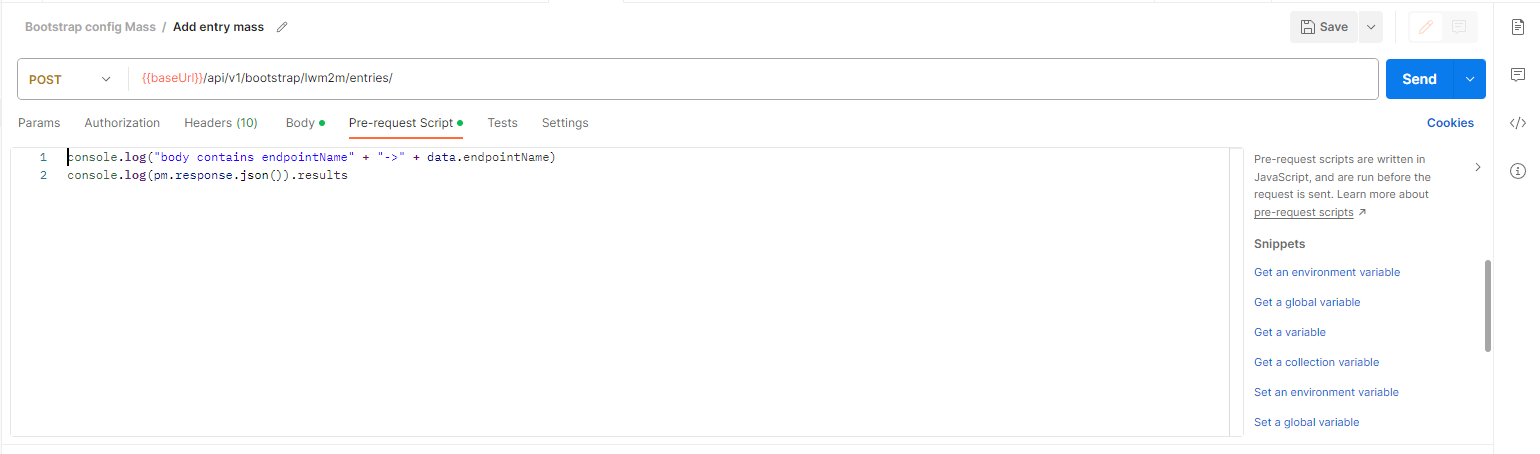 . The script is ready.
|
The Json body format and the fields are described here. |
Script execution
-
Launch the runner (in postman at the bottom right)
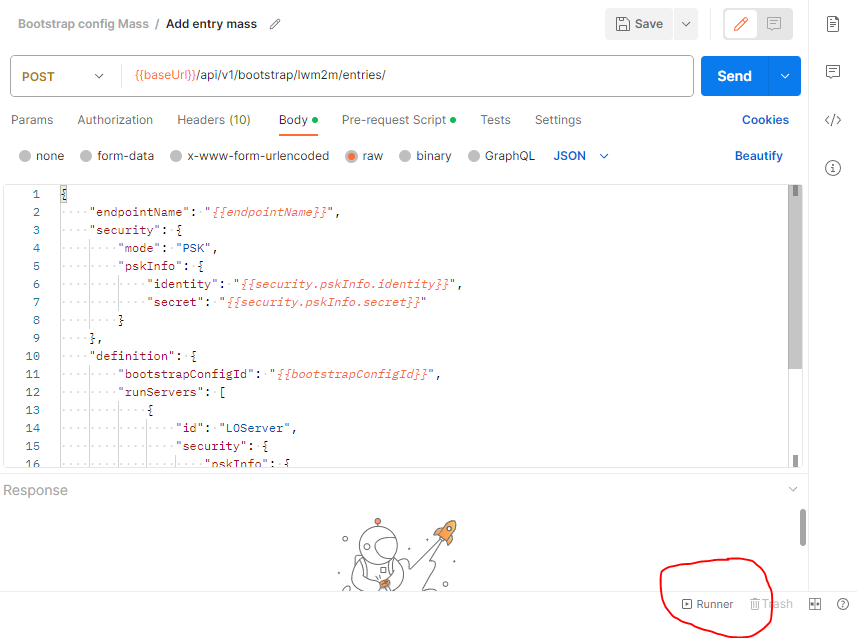
-
Select your CSV entries file
-
Check with preview button : postman must read correctely the data’s (the fields and values must be match).
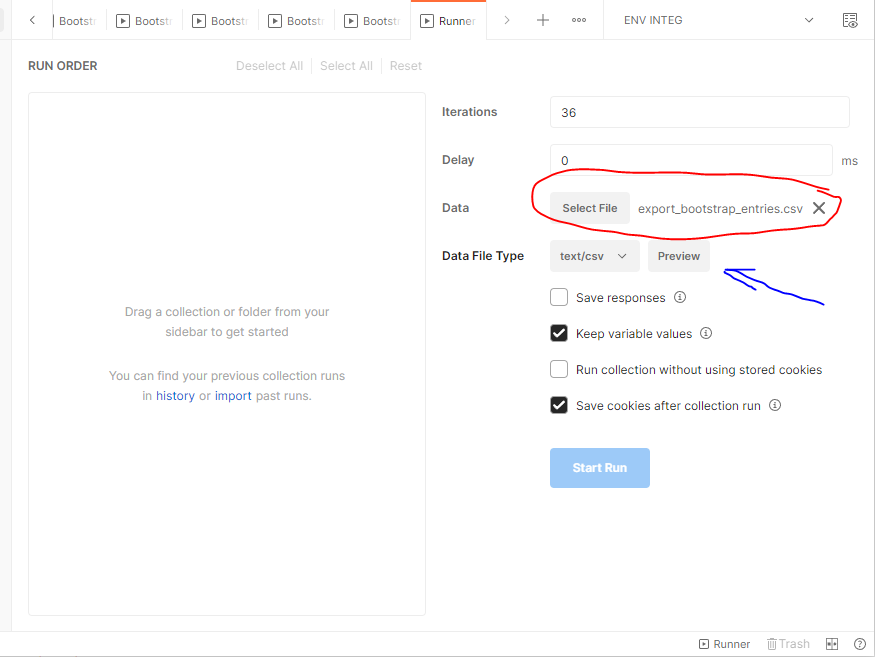
-
Drag and drop your endpoint, in the run order, and select your endpoint for running.
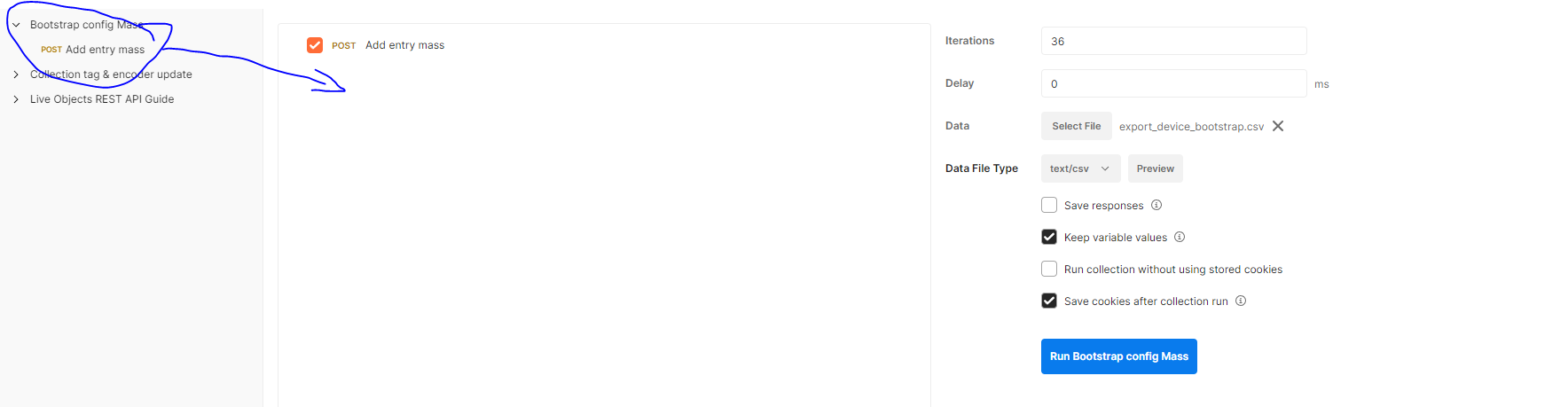
-
Set a delay between 2 requests to avoid consuming the API’s live objects quotas limits : reaching limits of API will be causes some troubles → check the limits.
-
Now the Postman script can be run, queries provision every entry you defined in the CSV file and are now displayed in your portal’s LwM2M bootstrap list.
Principle
The DeviceTwin is a Live Objects service that can collect, update and display the device resources information whether the device is connected to Live Objects or not.The device twin is created when the LwM2M device is created in Live Objects.Because the device twin representation is stored by Live Objects, the service can be collect and report device resources and state from apps and other services.
DeviceTwin feature is a way to define, retrieve or interact with a Twin representation of a device.
The way to define entities supported and instantiated by a device is called a TwinModel, it’s a list of ObjectsDefinitions where each object includes a list of AttributesDefinitions.
Note: LiveObjects TwinModel is compatible with OMA LWM2M model.
Each twin-capable physical device (LWM2M) connected to LiveObjects has an associated DeviceTwin:
-
a
DeviceTwinis a list of supportedObjects, instantiatedObjects, and reportedValues. -
it is possible to send orders (downlink) to a DeviceTwin using commands representation called
TwinOperation.
And when a device reports value changes, LiveObjects could produce an associated data message under certain conditions.
This condition are handled by a tenant DataRule entry.
Use cases
DeviceTwin use cases are
From Customer API
-
reads the Twin Model: ObjectDefinitions, and AttributeDefinitions,
-
reads DeviceTwin supported objects, instantiated objects,
-
reads DeviceTwin detailed object or detailed object instance with their reported attributes values,
-
creates,read operation for a given DeviceTwin.
-
creates,read data rule.
From Device to LiveObjects
-
a device uses Coap + LwM2M to talk to LiveObjects,
-
a device reports the supported and instantiated objects,
-
a device reports the attribute values.
LiveObjects Twin Model is a specification of object definitions.
A Twin Model is a tree of objectDefinitions where each objectDefinition includes attributeDefinitions.
Twin Model is compatible with the OMA LWM2M Specifications.
-
an ObjectDefinition can have 0, 1 or more children,
-
a root ObjectDefinition has no parent,
-
there is one root Object definition for LwM2M model (objectDefinitionId=
urn:oma:lwm2m) -
direct children of
urn:oma:lwm2mare normalized.
Children ObjectDefinition of urn:oma:lwm2m represents LwM2M Objects, where a Twin Model AttributeDefinition represents a LwM2M Object Resource.
For example the Firmware Update LwM2M Object (Object Id=5) has a Resource called PkgName (Id=6):
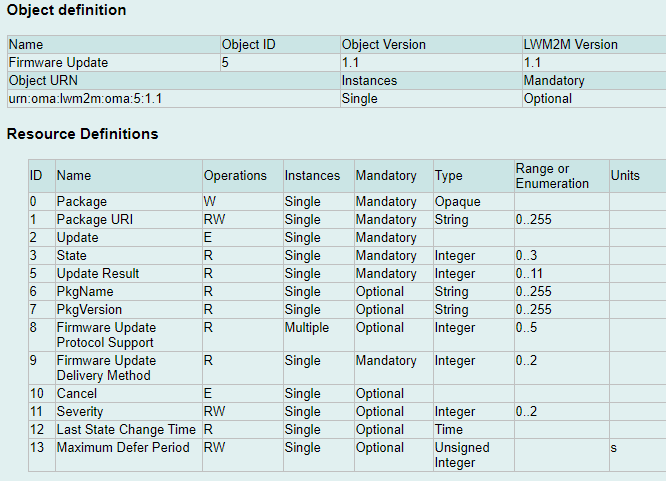
Model - ObjectDefinition
Firmware Update Object is represented by the following ObjectDefinition:
| Field | Value | Comment |
|---|---|---|
owner |
A public definition has no owner. |
|
objectDefinitionId |
urn:oma:lwm2m:5:1.1 |
Object-definition unique identifier. For example, objectDefinitionId |
pathSegment |
5 |
Current segment of the path |
name |
Firmware Update |
Original name |
description |
… |
Description of the object |
minoccurs |
0 |
Minimal occurrence (0 means optional, 1 means mandatory and at least 1 is required) |
maxoccurs |
1 |
Maximal occurrence (0 means infinite instances are allowed (unbounded), 1 means maximum 1 instance is allowed |
type |
OBJECT_MAP |
Type of object. possible values are - - In LwM2M, every object is of type OBJECT_MAP (except the root node) |
operations |
[ "READ", "WRITE" ] |
Array of possible operations on the object.
Possible values are - - |
parent |
urn:oma:lwm2m |
The objectDefinitionId of the parent object.
All LwM2M objects are direct children of |
attributes |
|
A list of AttributeDefinition. For example, list of Firmware Update attributes. |
Model - AttributeDefinition
PkgName Resource is represented by the following AttributeDefinition:
| Field | Value | Comment |
|---|---|---|
pathSegment |
6 |
Current segment of the path |
name |
PkgName |
Original name |
description |
… |
Description of the attribute |
minoccurs |
0 |
Minimal occurrence (0 means optional, 1 means mandatory and at least 1 is required) |
maxoccurs |
1 |
Maximal occurrence (0 means infinite instances are allowed (unbounded), 1 means maximum 1 instance is allowed |
type |
STRING |
Type of attribute.
Supported values are : - - - - - - - |
operations |
[ "READ", "WRITE", "EXECUTE" ] |
Array of possible operations on the attribute.
Possible values are - |
Model management
In the Twin Model, we distinguish two types of models:
-
public models that are defined for the entire LiveObjects platform. For LwM2M, the ObjectIDs can range from 0 to 32768.
-
custom models that are defined per LiveObjects account. For LwM2M, the ObjectIDs are restricted to the 10241 - 42800 range.
|
For a given ID, the custom model takes precedence over the public model if both exist. More details on the different ObjectID classes defined by the OMA for LwM2M can be found in the LwM2M Registry. |
Public model
Objects from public range are managed by LiveObjects.
A (managed) public object definition :
-
has an empty
ownerattribute.
Public object definitions can’t be removed.
Custom model
A customer can extend the model by importing new Custom Object definitions.
This extension is called "Customer defined twin model". This model will apply for all twin devices of the customer account.
Using Twin Model Management API you can import a custom LWM2M OMA compatible XML Files, or delete a given customer model.
See this chapter for examples of Twin Model Management API usage which give you how to manage your custom objects.
Custom model limits
Some limits on custom models apply :
-
The number of custom model per tenant is limited.
Model API
Get Object-Definitions
Read TwinModels by giving an objectDefinitionId :
-
use
urn:oma:lwm2mroot element to list as children all LwM2M ObjectDefinitions. -
use a
urn:oma:lwm2m:oma:<Id>:<Version>format, and replaceId,Versionto get a given LwM2M Object.
For example, urn:oma:lwm2m:oma:5:1.1 will get the Object Id=5 in Version=1.1.
Request
Endpoint:
GET /api/v1/deviceMgt/twin/model/object-definitions/{objectDefinitionId}
The usage is described here : Swagger API documentation.
HTTP Headers:
X-API-Key: <your API key>
Accept: application/json
Example:
GET /api/v1/deviceMgt/twin/model/object-definitions/urn:oma:lwm2m:oma:5:1.1
Response
HTTP Code:
200 OK
Body:
{
  "objectDefinitionId": "urn:oma:lwm2m:oma:5:1.1",
  "pathSegment": "5",
  "name": "Firmware Update",
  "description": "Firmware Update Object",
  "minOccurs": 0,
  "maxOccurs": 1,
  "type": "OBJECT_MAP",
  "operations": [
    "READ",
    "WRITE"
  ],
  "attributes": [
    [.../...]
    {
      "pathSegment": "6",
      "name": "PkgName",
      "description": "Package name",
      "minOccurs": 0,
      "maxOccurs": 1,
      "type": "STRING",
      "operations": [
        "READ"
      ]
    },
    [.../...]
  ],
  "parent": "urn:oma:lwm2m"
}
Post Object-Definitions
Import an ObjectDefinition (a custom Twin Model) :
-
set
LWM2Mformat, -
provide an OMA Compatible XML File,
-
decide whether the definition should be overwritten or not if it already exists.
Request
Endpoint:
POST /api/v1/deviceMgt/twin/model/object-definitions?inputFormat=lwm2m&override=true
The usage is described here : Swagger API documentation.
HTTP Headers:
X-API-Key: <your API key>
Accept: application/json
Body (form-data):
file: <XML File>
Response
HTTP Code:
201 Created
Body:
{
    "objectDefinitionId": "urn:oma:lwm2m:ext:33442",
    "pathSegment": "33442",
    "name": "LwM2M v1.1 Test Object CUSTOM CUSTOM",
    "description": "This object is created by the customer.",
    "minOccurs": 0,
    "maxOccurs": 0,
    [.../...],
    "parent": "urn:oma:lwm2m",
    "owner": "6139d13394f6b376e447ff9d"
}
Notice that the imported model owner attribute is the customer id.
|
Delete Object-Definitions
Remove an ObjectDefinition (a custom Twin Model) :
-
provide an ObjectDefinitionId.
Request
Endpoint:
DELETE /api/v1/deviceMgt/twin/model/object-definitions/{objectDefinitionId}
The usage is described here : Swagger API documentation.
HTTP Headers:
X-API-Key: <your API key>
Accept: application/json
Response
HTTP Code:
LiveObjects DeviceTwin is a Twin representation of the real device:
-
which objects are supported
-
which objects are instantiated
-
which are the instantiated objects last reported attributes values
A DeviceTwin includes :
-
supportedObjectsas a list of objectDefinitionId : list Object definitions supported by the device. -
instantiatedObjectsas a list of Object : list of Object implemented by the device. -
reportedValuesas a list of AttributeValue : list of Attributes values reported by the device
In addition, LiveObjects provides three ways to represents a given DeviceTwin :
-
By RootObject.
-
By Object.
-
By ObjectInstance.
RootObject
RootObject is represented by the following :
| Field | Value | Comment |
|---|---|---|
objectDefinitionId |
urn:oma:lwm2m |
Parent of the ObjectDefinition identifier. |
path |
/ |
Root path |
children |
[] |
Children Object |
Object
Object is represented by the following :
| Field | Value | Comment |
|---|---|---|
objectDefinitionId |
urn:oma:lwm2m:5:1.1 |
ObjectDefinition identifier. |
path |
/5 |
Object path : object (OBJECT_MAP) |
instances |
[] |
List of ObjectInstance |
ObjectInstance
ObjectInstance is represented by the following :
| Field | Value | Comment |
|---|---|---|
objectDefinitionId |
urn:oma:lwm2m:5:1.1 |
ObjectDefinition identifier. |
path |
/5/0 |
Object path : object (OBJECT_MAP) |
attributes |
[] |
List of Attribute |
Attribute
Attribute is represented by the following :
| Field | Value | Comment |
|---|---|---|
path |
|
Attribute path : object |
|
Attribute path : object |
|
content |
|
Single instance attribute |
contents |
|
Multi-instances attributes |
Get supported objects
Read DeviceTwin supported objects.
Request
Endpoint:
GET /api/v1/deviceMgt/devices/{deviceId}/twin/supported-objects
HTTP Headers:
X-API-Key: <your API key>
Accept: application/json
Example:
GET /api/v1/deviceMgt/devices/urn:lo:nsid:lwm2m:mydevice/twin/supported-objects
Response
HTTP Code:
200 OK
Body:
["urn:oma:lwm2m:oma:1", "urn:oma:lwm2m:oma:2", "urn:oma:lwm2m:oma:3", "urn:oma:lwm2m:oma:4", "urn:oma:lwm2m:oma:5:1.1"]This response is the list of supported object definition identifiers for a DeviceTwin.
Get instantiated objects
Read DeviceTwin instantiated objects.
Request
Endpoint:
GET /api/v1/deviceMgt/devices/{deviceId}/twin/objects
Query parameters:
| Name | Description |
|---|---|
expand |
Optional. If 1 then children objects are expanded with their instances. 0 by default |
HTTP Headers:
X-API-Key: <your API key>
Accept: application/json
Example:
GET /api/v1/deviceMgt/devices/urn:lo:nsid:lwm2m:mydevice/twin/objects?expand=1
Response
HTTP Code:
200 OK
Body:
{
    "objectDefinitionId": "urn:oma:lwm2m",
    "path": "/",
    "children": [
        {
            "objectDefinitionId": "urn:oma:lwm2m:oma:1",
            "path": "/1",
            "instances": [
                {
                    "objectDefinitionId": "urn:oma:lwm2m:oma:1",
                    "path": "/1/0"
                },
                {
                    "objectDefinitionId": "urn:oma:lwm2m:oma:1",
                    "path": "/1/1"
                }
            ]
        },
        {
            "objectDefinitionId": "urn:oma:lwm2m:oma:2",
            "path": "/2",
            "instances": [
                {
                    "objectDefinitionId": "urn:oma:lwm2m:oma:2",
                    "path": "/2/0"
                },
                {
                    "objectDefinitionId": "urn:oma:lwm2m:oma:2",
                    "path": "/2/1"
                }
            ]
        },
        {
            "objectDefinitionId": "urn:oma:lwm2m:oma:3",
            "path": "/3",
            "instances": [
                {
                    "objectDefinitionId": "urn:oma:lwm2m:oma:3",
                    "path": "/3/0"
                }
            ]
        }
    ]
}
This response is a RootObject with the list of children objects (instantiated objects) for a DeviceTwin.
Get detailed object
Read DeviceTwin detailed object.
Request
Endpoint:
GET /api/v1/deviceMgt/devices/{deviceId}/twin/objects/{objectId}
Query parameters:
| Name | Description |
|---|---|
expand |
Optional. If 1 then instances are expanded with their attributes having reported values. 0 by default |
HTTP Headers:
X-API-Key: <your API key>
Accept: application/json
Example:
GET /api/v1/deviceMgt/devices/urn:lo:nsid:lwm2m:mydevice/twin/objects/1?expand=1
Response
HTTP Code:
200 OK
Body:
{
    "objectDefinitionId": "urn:oma:lwm2m:oma:1",
    "path": "/1",
    "instances": [
        {
            "objectDefinitionId": "urn:oma:lwm2m:oma:1",
            "path": "/1/0",
            "attributes": [
                {
                    "pathSegment": "5",
                    "path": "/1/0/5",
                    "content": {
                        "reportedValue": "1",
                        "timestamp": "2021-09-30T09:25:06.687Z"
                    }
                },
                {
                    "pathSegment": "25",
                    "path": "/1/0/25",
                    "contents": [
                        {
                            "reportedValue": "v1/1.1.2",
                            "timestamp": "2021-11-15T17:14:06.687Z",
                            "path": "/1/0/25/0"
                        },
                        {
                            "reportedValue": "v1/1.BIS",
                            "timestamp": "2021-11-15T17:14:06.687Z",
                            "path": "/1/0/25/1"
                        }
                    ]
                }
            ]
        },
        {
            "objectDefinitionId": "urn:oma:lwm2m:oma:1",
            "path": "/1/1",
            "attributes": [
                {
                    "pathSegment": "3",
                    "path": "/1/1/3",
                    "content": {
                        "reportedValue": "1",
                        "timestamp": "2021-09-30T09:25:06.687Z"
                    }
                }
            ]
        }
    ]
}
This response is an Object (instantiated objects and reported values) for a DeviceTwin.
Get detailed object instance
Read DeviceTwin detailed object instance.
Request
Endpoint:
GET /api/v1/deviceMgt/devices/{deviceId}/twin/objects/{objectId}/{instanceId}
HTTP Headers:
X-API-Key: <your API key>
Accept: application/json
Example:
GET /api/v1/deviceMgt/devices/urn:lo:nsid:lwm2m:mydevice/twin/objects/1/0
Response
HTTP Code:
200 OK
Body:
{
    "objectDefinitionId": "urn:oma:lwm2m:oma:1",
    "path": "/1/0",
    "attributes": [
        {
            "pathSegment": "5",
            "path": "/1/0/5",
            "content": {
                "reportedValue": "1",
                "timestamp": "2021-09-30T09:25:06.687Z"
            }
        },
        {
            "pathSegment": "25",
            "path": "/1/0/25",
            "contents": [
                {
                    "reportedValue": "v1/1.1.2",
                    "timestamp": "2021-11-15T17:14:06.687Z",
                    "path": "/1/0/25/0"
                },
                {
                    "reportedValue": "v1/1.BIS",
                    "timestamp": "2021-11-15T17:14:06.687Z",
                    "path": "/1/0/25/1"
                }
            ]
        }
    ]
}
This response is an ObjectInstance (instantiated object and reported values) for a DeviceTwin. == Operations
LiveObjects Twin operation is a representation of a real operation on a device:
-
READ- order the device to report some attributes, -
WRITE- update or replace some object attributes values, -
EXECUTE- execute some attributes. -
WRITE-METADATA- update metadata (set, update, reset).
Operation definition
A Twin operation applies to a given device, includes a given type (read,write,execute, write-metadata), with some operation attributes (paths, values, options) and has a unique id (generated by LiveObjects).
Each operation orders a given action (or composite action) on a target device and the result of this action is visible within operation status and operation error attributes.
Example of Twin Operation:
    {
        "id": "b50d094e520a4d58ad367f2fb9afdf6f",
        "type": "READ",
        "paths": [
            "/1/0/0"
        ],
        "status": "OK",
        "created": "2022-03-07T16:03:51.609Z",
        "updated": "2022-03-07T16:04:09.263Z"
    }
This is a success and done READ operation.
| Field | Value | Comment |
|---|---|---|
id |
|
Operation unique id, generated by LiveObjects |
type |
|
Type of the operation. |
paths |
|
Target paths of related device objects or attributes |
values |
|
for WRITE and WRITE-METADATA: Values to set. |
writeMode |
|
for WRITE: mode to set. Possible values : |
contextToken |
|
Free custom tag on the operation |
status |
|
Current status of Twin Operation |
options |
|
Options of Twin Operation, cf. Operation options section. |
policy.attempts |
1 |
Number of attempts allowed for this operation (default value is 1 that means there is no retry). |
error.code |
|
status FAILED only: Error code of Twin Operation. |
error.details |
|
status FAILED only: Error details of Twin Operation. |
error.deviceCode.value |
|
status FAILED, error.code DEVICE_ERROR only: Device error value. |
error.deviceCode.reason |
|
status FAILED, error.code DEVICE_ERROR only: Device error reason. |
created |
|
When the operation were created. |
updated |
|
When the operation were updated. In case of status OK, this is when the device responds. |
Live Objects supports all LwM2M 1.1 notification attributes (named metadata in current chapter).
Those metadata define the conditions when notification on an objet or attribute is sent.
| metadata | Description |
|---|---|
pmin |
The |
pmax |
The |
gt |
This |
lt |
This |
st |
This |
epmin |
The |
epmax |
The |
Operation options
Operation options apply on the following use-cases:
| Scope | Key | Possible values | Comment |
|---|---|---|---|
Lwm2m operation |
|
|
|
Operation examples
| Name | Operation extract | Details |
|---|---|---|
READ all objects |
|
Read all objects |
READ one object |
|
Read object |
READ one object instance |
|
Read object |
READ one attribute |
|
Read object |
READ one multi-instances attribute instance |
|
Read object |
READ composite two objects, and one multi-instances attribute instance |
|
Read objects |
WRITE one attribute in update mode |
|
Write |
WRITE one multi-instances attribute instance in update mode |
|
Write |
WRITE two multi-instances attribute instances in update mode |
|
Write |
WRITE two multi-instances attribute instances in replace mode |
|
Write target |
WRITE multiple attributes on object instance in update mode |
|
Write in update mode |
WRITE multiple attributes on object instance in replace mode |
|
Write |
WRITE composite multiple attributes on different objects in update mode |
|
Write in update mode |
WRITE composite multiple attributes on different object instances |
|
Write in update mode |
EXECUTE execute a given attribute |
|
Execute |
WRITE-METADATA update metadata |
|
Update metadata on A WRITE-METADATA operation requires one and only one path that could identify an object, an object instance, an attribute or an attribute instance. |
Operation lifecycle
A Twin operation is created using API and the result of an operation will be available via API too.
Once created, the operation is executed asynchronous as soon as the device become twin capable (ex. the device connect and his interface become online).
API allow to monitor the status of the operation waiting for a final state by using a given operation id, and polling the GET API.
| status | Comment |
|---|---|
PENDING |
Operation is created and ready to be sent. |
SENT |
Operation has been emitted from Twin Service to the connector then the device. |
RETRYING |
Operation didn’t succeed but the reason of the error allows a retry. |
CANCELLED |
A pending operation has been cancelled by user (via API). It is a final state. |
EXPIRED |
A pending or sent operation has remained in the same state for too long. It is a final state. |
FAILED |
For some reason, the operation didn’t succeed. The reason why it failed is described by |
OK |
Operation succeed. It is a final state. |
The following expiration delay applies:
| origin status | Schema reference | Comment |
|---|---|---|
from PENDING |
|
If a device never registers, a PENDING operation moves to |
from SENT |
|
If a response is not received after |
from RETRYING |
|
If a device never registers, a RETRYING operation moves to |
Operation retry policy
For errors that are considered as unrecoverable (e.g device rejected the request), there will be only one attempt to send an operation.
For other errors there will be additional attempts limited to the number of attempts provided by the end user. For instance, we can mention a 5xx response or a time-out.
The operation is executed asynchronously as soon as the device becomes twin capable (ex. the device connects and its interface becomes online).
Operation limits
Some limits apply in terms of :
-
actives operations per device : operations having
PENDING,SENT,RETRYINGstatus. Other this limit, an operation creation attempt will fail (with403status). -
final operations per device : operations having
UNKNOWN,CANCELLED,EXPIRED,FAILEDorOKstatus. Other this limit, at creation of new operation time, older operations will be removed. == Operations API
This section includes API call examples for the Twin Operations management.
Create an operation
Create a new DeviceTwin operation.
According to the operation lifecycle, this will create a PENDING operation.
Different kinds of Twin operation are described by twin operation definition and twin operation examples.
Example:
POST /api/v1/deviceMgt/devices/urn:lo:nsid:lwm2m:mydevice/twin/operations
{
"type":"READ",
"paths":["/1/0"],
"contextToken" : "this is a simple READ"
}
Response
201 CREATED
{
    "id": "f9b9877c7679454ea56e568b31ee7c48",
    "type": "READ",
    "paths": [
        "/1/0"
    ],
    "contextToken": "this is a simple READ",
    "status": "PENDING",
    "created": "2022-02-25T09:32:55.248Z",
    "updated": "2022-02-25T09:32:55.248Z"
}
A pending DeviceTwin READ instance /1/0 operation has been created.
Cancel a pending operation
Cancel a PENDING DeviceTwin operation.
Example:
PUT /api/v1/deviceMgt/devices/urn:lo:nsid:lwm2m:mydevice/twin/operations/f2ed1637ec10466089064804ed68e351/status
"CANCELED"Response
200 OK
This response confirm that Twin Operation status has been set to CANCELED.
Get an operation
Get one DeviceTwin operation.
Example:
GET /api/v1/deviceMgt/devices/urn:lo:nsid:lwm2m:mydevice/twin/operations/a1ca9551754d48d09e31fd30d36b88d1
Response
200 OK
{
    "id": "a1ca9551754d48d09e31fd30d36b88d1",
    "type": "READ",
    "paths": [
        "/1/0"
    ],
    "contextToken": "ABC123",
    "status": "OK",
    "created": "2022-02-11T16:16:05.073Z",
    "updated": "2022-02-11T16:16:23.492Z"
}
This is a Twin Operation details.
List operations
List DeviceTwin operations.
Some filter could apply to restrict the results :
| parameter | description |
|---|---|
|
<list> restrict to operations having this status |
|
restrict to operations having this contextToken (exact match) |
|
<list> restrict to operations having this type |
|
restrict to operations having at least one time this path in his definition (exact match) |
Number of result is constraint by Twin operations limits.
Example:
GET /api/v1/deviceMgt/devices/urn:lo:nsid:lwm2m:mydevice/twin/operations?status=OK&status=FAILED&status=EXPIRED&type=READ
Response
200 OK
[
    {
        "id": "f2ed1637ec10466089064804ed68e351",
        "type": "READ",
        "paths": [
            "/1/0"
        ],
        "contextToken": "ABC123",
        "status": "OK",
        "created": "2022-02-11T16:16:05.073Z",
        "updated": "2022-02-11T16:16:23.492Z"
    },
    {
        "id": "25a65010ab9b4c38a925c2dc7f16a7c8",
        "type": "READ",
        "paths": [
            "/1/0/200",
            "/1/0/7"
        ],
        "status": "FAILED",
        "error": {
            "code": "OPERATION_INVALID",
            "details": "The details here"
        },
        "created": "2022-02-16T15:20:24.142Z",
        "updated": "2022-02-16T15:20:34.252Z"
    }
 ]
This response is the list of Twin Operations of a DeviceTwin
Observation definition
An Observation allows Live Objects to be notified when some Attributes change on the device. It can target:
-
a specific Attribute
-
an Object Instance
-
all Object Instances of an Object
-
several Attributes (Observation Composite)
Example of an Observation targeting an Object Instance:
{
    "id": "631f1190d4135d0066541e8b",
    "paths": [
        "/6/0"
    ],
    "status": "PENDING",
    "name": "Observation on the location Object",
    "created": "2022-09-12T11:02:29.811Z"
}| Field | Example | Comment |
|---|---|---|
id |
|
Observation unique id, generated by Live Objects |
paths |
|
Target paths of related device objects or attributes to observe |
status |
|
Current status of the Observation among |
name |
|
User-defined name for the Observation |
created |
|
Observation creation date |
Observation Lifecycle
An Observation is created using the API and its status will be available via the API too.
Once created, the Observation is sent immediately if the device is ONLINE or the next time the device sends an Update or Register otherwise.
Depending on the type of error, Observations that have failed can be automatically re-sent at the next Update. The number of attempts is nevertheless limited.
When a LwM2M device goes offline (de-registration or the lifetime of the registration expires), the Observations on Live Objects for this device go back to the PENDING state. They will be automatically re-sent when the device sends a Register, regardless of their status.
An Observation can be cancelled. Upon the user cancellation request, a Cancel Observation operation is sent to the device if it is ONLINE. Otherwise, the cancellation occurs at the next Notify.
| status | Comment |
|---|---|
PENDING |
The Observation has been created and is ready to be sent. |
FAILED |
The Observation has not succeeded after the maximum number of attempts. |
OBSERVING |
The Observation is active on the device. |
Observation retry policy
For errors that are considered as unrecoverable, there will be only one attempt to send an Observation. The following errors fall in this category:
-
The device responded with a 4xx code
-
The device rejected the request
For other errors there will be 5 attempts. For instance, we can mention a 5xx response or a time-out.
Observation configuration
The parameters related to an Observation can be configured by the Write-Metadata operation.
Observation limits
The number of Observations per device is limited regardless of their status. == Observations API
This section includes API call examples for the Observations management.
Create an Observation
Create a new Observation.
According to the Observation lifecycle, this will create a PENDING Observation.
Example:
POST /api/v1/deviceMgt/devices/urn:lo:nsid:lwm2m:mydevice/twin/observations
{
    "paths": [
        "/6/0"
    ],
    "name": "Observation on the location Object"
}
Response
201 CREATED
{
    "id": "631f1190d4135d0066541e8b",
    "paths": [
        "/6/0"
    ],
    "status": "PENDING",
    "name": "Observation on the location Object",
    "created": "2022-09-12T11:02:29.811Z"
}
A pending Observation has been created.
Cancel an Observation
Cancel an Observation.
Example:
DELETE /api/v1/deviceMgt/devices/urn:lo:nsid:lwm2m:mydevice/twin/observations/631f1190d4135d0066541e8b
Response
204 NO CONTENT
This response confirm that the Observation has been removed and will be cancelled on the device.
Get an Observation
Get one Observation.
Example:
GET /api/v1/deviceMgt/devices/urn:lo:nsid:lwm2m:mydevice/twin/observations/631f1190d4135d0066541e8b
Response
200 OK
{
    "id": "631f1190d4135d0066541e8b",
    "paths": [
        "/6/0"
    ],
    "status": "OBSERVING",
    "name": "Observation on the location Object",
    "created": "2022-09-12T11:02:29.811Z"
}
This is an Observation details.
List Observations
List Observations.
The number of result is constraint by Twin Observations limits.
Example:
GET /api/v1/deviceMgt/devices/urn:lo:nsid:lwm2m:mydevice/twin/observations
Response
200 OK
[
    {
        "id": "62d6c3230d0685589727902e",
        "paths": [
            "/3303/0"
        ],
        "status": "FAILED",
        "name": "Observation on the temperature Object",
        "created": "2022-07-19T14:43:47.023Z"
    },
    {
        "id": "631f1190d4135d0066541e8b",
        "paths": [
            "/6/0"
        ],
        "status": "OBSERVING",
        "name": "Observation on the location Object",
        "created": "2022-09-12T11:02:29.811Z"
    }
]
This response is the list of Observations of a DeviceTwin == DataRules
LiveObjects Twin data rule is a representation of a rule that can be used to trigger a new data message from device reported values.
DataRule definition
A Twin data rule applies to a given tenant, includes a given type, with some rule attributes (paths) and has a unique id (generated by LiveObjects).
A tenant data rule presence drives the way twin message will be generated.
Twin data rule type are:
-
PASSTHROUGH- order twin to forward all values that matchpathsas new data message.
Example of Twin data rule:
    {
        "id": "6250072f5297c340e68f7bad",
        "name": "my passthrough",
        "type": "PASSTHROUGH",
        "paths": [
            "/"
        ],
        "created": "2022-04-08T09:58:07.843Z"
    }
This is a PASSTHROUGH data rule that triggers all values (having path starting with /).
| Field | Value | Comment |
|---|---|---|
id |
|
Data rule unique id, generated by LiveObjects |
type |
|
Type of the rule. |
paths |
|
Target paths of related rule |
created |
|
When the rule were created. |
Data rules API
Data rules management API are available at following endpoint: /api/v1/deviceMgt/twin/data/rules and are documented on Swagger.
== Data Message
When a LWM2M device reports value changes, a data message that includes this change is generated by LiveObjects under certain conditions:
-
the report must be at the device initiative (send, or notify but not read response),
-
the report must match a given
data ruleof the tenant.
When all these conditions are met, a message is generated.
Today the generation model used for the message is twin_json.
DataMessage common attributes
A Twin data message as other LiveObjects messages, will embed some common attributes: id, streamId, etc.
The value part of the message will embed the device reported values representation, depending on the model used.
Example of a fill Twin data message having twin_json model:
{
  "id": "6254192e1a52727da422dfdf",
  "streamId": "urn:lo:nsid:lwm2m:simulator",
  "timestamp": "2022-04-11T12:03:58.695Z",
  "model": "twin_json",
  "value": {
    "device": {
      "0": {
        "deviceType": "Demo",
        "utcOffset": "Z",
        "serialNumber": "LT-500-000-0001",
        "timezone": "Etc/UTC",
        "memoryFree": 6278,
        "errorCode": {
          "0": 0
        },
        "supportedBindingAndModes": "U",
        "manufacturer": "Leshan Demo Device",
        "currentTime": "2022-04-11T12:03:58Z",
        "batteryStatus": 6,
        "memoryTotal": 19400,
        "modelNumber": "Model 500",
        "hardwareVersion": "1.0.1",
        "firmwareVersion": "1.0.0",
        "softwareVersion": "1.0.2",
        "batteryLevel": 44
      }
    }
  },
  "tags": [
    "lwm2m-simulator",
  ],
  "extra": {},
  "metadata": {
    "source": "urn:lo:nsid:lwm2m:simulator",
    "group": {
      "id": "root",
      "path": "/"
    },
    "connector": "lwm2m",
    "network": {
      "lwm2m": {
        "ep": "urn:lo:nsid:lwm2m:simulator"
      }
    }
  },
  "created": "2022-04-11T12:03:58.725Z"
}
This message is generated by the urn:lo:nsid:lwm2m:simulator lwm2m endpoint and embed a twin_json representation of some device instance 0 attributes (reported values).
DataMessage TWIN_JSON format
A TWIN_JSON data message is a JSON representation of reported values that include camel case human-readable entity names.
In a TWIN_JSON data message, each value is embedded in an object, plus an attribute container.
Reminder: Object, Attribute definitions are part of the TwinModel.
For a simple attribute the JSON message will be generated according the following design:
-
camel case name of the object,
-
pathSegment id of the object,
-
camel case name of the attribute,
-
reported raw value of the attribute.
For example, for a given [/3/0/1, /3/0/9] reported values, associated twin model definitions are:
-
Object
3:Device- Instance0 -
Attribute
1:Model Number. -
Attribute
9:Battery Value.
Related TWIN_JSON of these values will be:
{
  "device": {
    "0": {
      "modelNumber": "Model 500",
      "batteryLevel": 44
    }
  }
}
DataMessage metadata enrichment
A Twin data message as other LiveObjects messages, may embed some metadata.
They are extracted from reported values.
Currently, extracted metadata are:
| Metadata | Description | Source | Target |
|---|---|---|---|
location |
location of the device |
Object
|
see |