Statistics API
Filter queries
In addition to queries detailed in common filters, the format of a stats query matches the following pattern:
{
    "filters": {
      ...
    },
    "groupBy": {
      ...
    }
}
The global "filters" part retains only a matching subset of devices, and the groupBy clause contains the criteria that will provide the grouping keys for the aggregated sub-counters. When grouping by interface status, a typical response would look like this:
{
    "devices": 100,                     // devices count after applying global filters
    "fieldAggregation": {
        "count": 100,                   // total number of elements in aggregation buckets, here interfaces
        "devices": 100,                 // total number of devices in aggregation buckets
        "buckets": [
            {
                "key": "ONLINE",        // possible value of group key, here "interface status"
                "count": 85,            // elements count in this bucket
                "devices": 85           // devices count in this bucket
            },
            {
                "key": "OFFLINE",
                "count": 15,
                "devices": 15
            }
        ]
    }
}
The response contains several counters at three different levels:
-
global level: a total of all selected devices after filtering
-
aggregation level: the total number of devices and elements in all buckets
-
bucket level: the total number of devices and elements within each bucket
Note that each bucket contains two counters ("count" and "devices") that may hold different values depending on the grouping criterion. "Count" can hold the number of devices, interfaces, properties or activity states. For instance when grouping by interface status, "count" holds the number of interfaces matching the bucket key, while "devices" holds the effective number of devices with matching interfaces. This is because a given device may contain several interfaces, each with its own status. A device with two ONLINE interfaces would therefore contribute to the "devices" counter by 1, and to the "count" counter by 2.
This may happen each time an aggregation is requested on a nested component of the device. When this is not the case, "devices" is always equal to "count".
Global filters
The main filtering use the requests described in common filters chapter. The topmost "filters" clause selects a subset of devices, prior to any further aggregation.
Aggregations
Aggregation types
Two types of aggregations are supported: field aggregations and geolocation aggregations. In a field aggregation,
the values of the bucket keys are taken from the possible values of the selected device’s field.
Field aggregation on tags
{
    "groupBy": {
        "field": "tags"
    }
}
Result
{
    "devices": 100,
    "fieldsAggregation": {
        "count": 100,
        "devices": 100,
        "buckets": [
            {
                "key": "spain",       // A tag value appearing in 25 devices within the fleet
                "count": 25,
                "devices": 25
            },
            ...
        ]
    }
}
A geolocation aggregation creates zone buckets. The size of each zone depend on the requested precision. A location bucket key is a coordinate object that marks the centroid of the bucket, i.e. the mean position of all the devices in the zone.
Geolocation aggregation
{
    "groupBy": {
        "location": {
            "precision": 5
        }
    },
    "options": {
      "includeGeoBoundsInBuckets": true
    }
}
Result
{
    "devices": 100,
    "geoAggregation": {
        "devices": 100,
        "buckets": [
            {
                "geoKey": {                     // centroid of devices positions within this bucket
                    "lat": 48.85418222285807,
                    "lon": 2.346379179507494
                },
                "geoBounds": {                  // if includeGeoBoundsInBuckets, geobound including all devices coordinates of the bucket
                    "topLeft": {
                        "lat": 48.85418226476759,
                        "lon": 2.3463791574827945
                    },
                    "bottomRight": {
                        "lat": 48.85418221085362,
                        "lon": 2.3463792633265257
                    }
                },
                "devices": 50
            },
           ...
        ],
      ...
    }
}
Aggregation levels
The API supports up to two levels of aggregations, which allows to break down the fleet using two different criteria. For instance the devices can be grouped by geographic zones, with interface status information being attached to the average position of each group.
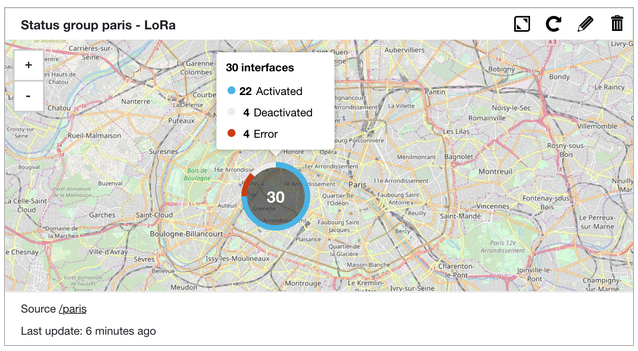
Nested aggregations
{
    "groupBy": {
        "location": {          // Field or geolocation aggregation
            "groupBy": {
                "interfaces": {           // Field aggregation only
                    "field": "status"
                }
            }
        }
    },
    "options": {
      "includeGeoBoundsInBuckets": true
    }
}
Result
{
    "devices": 30,
    "geoAggregation": {             // Top level geolocation aggregation
        "count": 30,
        "devices": 30,
        "buckets": [
            {
                "geoKey": {
                    "lat": 48.85418222285807,
                    "lon": 2.346379179507494
                },
                "geoBounds": {
                    "topLeft": {
                        "lat": 48.85418226476759,
                        "lon": 2.3463791574827945
                    },
                    "bottomRight": {
                        "lat": 48.85418221085362,
                        "lon": 2.3463792633265257
                    }
                },
                "devices": 30,
                "fieldAggregation": {       // Inner aggregation on interfaces status
                    "count": 30,
                    "devices": 30,
                    "buckets": [
                        {
                            "key": "ACTIVATED",
                            "count": 22,
                            "devices": 22
                        },
                        {
                            "key": "DEACTIVATED",
                            "count": 4,
                            "devices": 4
                        },
                        {
                            "key": "CONNECTIVITY_ERROR",
                            "count": 4,
                            "devices": 4
                        }
                    ]
                }
            }
        ],
        ...
    }
}
Note that field aggregations may appear at both levels, while geolocation aggregations may only appear at the topmost level.
Field aggregations
According to the internal model , the following aggregations can be used.
Supported aggregations
Field aggregations are only possible on a subset of the device’s fields, typically when these fields can hold common values among a number of devices.
| Aggregation syntax | Field names |
|---|---|
|
|
|
|
|
interface fields:
|
|
activityState fields:
|
|
property fields:
|
Note than when a field is located in a nested object (such as rule.id or definition.profile), both dot notation and object
notation are supported. For instance, these notations are equally valid:
|
|
Aggregations on lists
A regular field aggregation on a list will result in the creation of one bucket per element in the list. For instance
a field aggregation on tags will build two buckets when processing a device with two tags.
A device with two tags
{
    "id": "urn:lo:nsid:foo:bar",
    "tags": [
        "spain",
        "v2"
    ],
    ...
}
Field aggregation on tags
{
    "groupBy": {
        "field": "tags"
    }
}
Result
{
    "devices": 1,
    "fieldAggregation": {
        "count": 1,
        "devices": 1,
        "buckets": [
            {
                "key": "spain",
                "count": 1,
                "devices": 1
            },
            {
                "key": "v2",
                "count": 1,
                "devices": 1
            }
        ]
    }
}
However, it is sometimes desirable for the buckets to reflect the actual values of devices lists, rather than their
sparsed elements. For instance it should be possible to classify devices according to the combination of their interfaces, in order to
differentiate mono-interfaces devices from multi-interfaces ones.
These composite buckets can be built by setting the "compositeField" property in the field aggregation.
Composite field aggregation on interface connectivities
{
    "groupBy": {
        "compositeField": "connectors"
    }
}
Result
{
    "devices": 7,
    "fieldAggregation": {
        "count": 7,
        "devices": 7,
        "buckets": [
            {
                "key": [
                    "lora"
                ],
                "count": 5,
                "devices": 5
            },
            {
                "key": [
                    "lora",
                    "sms"
                ],
                "count": 1,
                "devices": 1
            },
            {
                "key": [],
                "count": 1,
                "devices": 1
            }
        ]
    }
}
In this case buckets keys are list of values instead of simple strings. Among the 7 devices in the fleet, 5 are pure LoRa devices, 1 is a multi-interfaces LoRa+SMS device, and one has no declared interface so far.
Nested components
Some components of the device structure require a specific treatment within the aggregation API. Interfaces, properties, activityStates
are all lists of objects detained by each device. Elements of these lists are referred to as nested components.
Aggregations on nested components fields
As a user of the aggregation API, one might expect two types of result when requesting an aggregation on a nested component field. For each result bucket, the API can count the number of devices that hold at least one nested component matching the bucket key. Alternatively, for each result bucket, the API can count the number of nested components matching the bucket key. For instance a device with two ONLINE interfaces can be counted once or twice in the aggregation result depending on these expectations. Actually, the inventory API does both, by providing two dedicated counters in its response.
Given the following aggregation:
{
    "groupBy": {
        "interfaces": {
            "field": "status"
        }
    }
}
If the whole fleet contains currently a single device with two ONLINE interfaces, the result would be:
{
    "devices": 1,
    "fieldAggregation": {
        "count": 2,
        "devices": 1,
        "buckets": [
            {
                "key": "ONLINE",
                "count": 2,
                "devices": 1
            }
        ]
    }
}
"count" is related to the number of interfaces, while "devices" is the effective number of devices.
The same pattern applies to all other nested components.
Filters and nested components
Filters on nested components (interfaces, properties, activityStates, see global filters section)
can be applied globally through queryString. When applied globally, these filters select
all devices holding at least one matching nested component. If a device is selected, all its nested components contribute
to the construction of response buckets, even if they dont match the filter individually.
Device with multiple properties
{
    "id": "urn:lo:nsid:foo:bar",
    "name": "my device",
    "properties": [
        {
            "key": "prop1",
            "value": "val1"
        },
        {
            "key": "prop2",
            "value": "val2"
        }
    ],
  ...
}
Using a global filter on a matching property key selects this device and all its properties.
Global filter on property key
{
    "filters": {
        "queryString": "properties.k==prop1"
    },
    "groupBy": {
        "properties": {
            "field": "value"
        }
    }
}
Aggregation response after global filtering
{
    "devices": 1,
    "fieldAggregation": {
        "count": 2,
        "devices": 1,
        "buckets": [
            {
                "key": "val1",
                "count": 1,
                "devices": 1
            },
            {
                "key": "val2",
                "count": 1,
                "devices": 1
            }
        ]
    }
}
The device is selected because one of its properties matches the filter, but all of them appear in the aggregation response.
The count values account for both device’s properties. In order to keep only the matching properties in the response, the filter
must be moved at nested components level.
Nested level filter on property key
{
    "groupBy": {
        "properties": {
            "field": "value",
            "filter": {
                "key": "prop1"
            }
        }
    }
}
Aggregation response after nested filtering
{
    "devices": 1,
    "fieldAggregation": {
        "count": 1,
        "devices": 1,
        "buckets": [
            {
                "key": "texttest",
                "count": 1,
                "devices": 1
            }
        ]
    }
}
Nested level filter on property value
{
    "groupBy": {
        "properties": {
            "field": "key",
            "filter": {
                "value": "val1"
            }
        }
    }
}
Aggregation response after nested filtering
{
    "devices": 10639,
    "fieldAggregation": {
        "count": 2,
        "devices": 2,
        "buckets": [
            {
                "key": "111",
                "count": 1,
                "devices": 1
            },
            {
                "key": "test",
                "count": 1,
                "devices": 1
            }
        ]
    }
}
The aggregation response contains a single bucket, accounting for the matching property only.
This pattern applies to all nested components. In short, global filtering applies to devices, while nested filtering applies to nested components.
Select all devices with at least a LoRa interface.
Nested level filter on interfaces connectivity
{
    "groupBy": {
        "interfaces": {
            "field": "status",
            "filter": {
                "connector": "lora"
            }
        }
    }
}
Aggregation response after nested filtering
{
    "devices": 10639,
    "fieldAggregation": {
        "count": 264,
        "devices": 259,
        "buckets": [
            {
                "key": "DEACTIVATED",
                "count": 205,
                "devices": 202
            },
            {
                "key": "REGISTERED",
                "count": 34,
                "devices": 34
            },
            {
                "key": "REACTIVATED",
                "count": 22,
                "devices": 20
            },
            {
                "key": "ACTIVATED",
                "count": 2,
                "devices": 2
            },
            {
                "key": "INITIALIZED",
                "count": 1,
                "devices": 1
            }
        ]
    }
}
Select all devices with at least an interface with the requested status.
Nested level filter on interfaces status
{
    "groupBy": {
        "interfaces": {
            "field": "connector",
            "filter": {
                "status": "ONLINE"
            }
        }
    }
}
Aggregation response after nested filtering
{
    "devices": 10639,
    "fieldAggregation": {
        "count": 68,
        "devices": 68,
        "buckets": [
            {
                "key": "sms",
                "count": 57,
                "devices": 57
            },
            {
                "key": "x-connector",
                "count": 9,
                "devices": 9
            },
            {
                "key": "mqtt",
                "count": 2,
                "devices": 2
            }
        ]
    }
}
Select all devices with at least an interface which definition contains the requested profile.
Nested level filter on interfaces definitions
{
    "groupBy": {
        "interfaces": {
            "field": "status",
            "filter": {
               "definition": {
                    "profile": "myProfile"
                }
            }
        }
    }
}
Aggregation response after nested filtering
{
    "devices": 10639,
    "fieldAggregation": {
        "count": 49,
        "devices": 49,
        "buckets": [
            {
                "key": "DEACTIVATED",
                "count": 40,
                "devices": 40
            },
            {
                "key": "REACTIVATED",
                "count": 7,
                "devices": 7
            },
            {
                "key": "REGISTERED",
                "count": 2,
                "devices": 2
            }
        ]
    }
}
Select all devices with a "SILENT" or "UNKNOWN" activity state.
Nested level filter on activity states
{
    "groupBy": {
        "activityStates": {
            "field": "state",
            "filter": {
                "states": ["SILENT", "UNKNOWN"]
            }
        }
    }
}
Aggregation response after nested filtering
{
    "devices": 40,
    "fieldAggregation": {
        "count": 53,
        "devices": 40,
        "buckets": [
            {
                "key": "SILENT",
                "count": 42,
                "devices": 31
            },
           {
                "key": "UNKNOWN",
                "count": 11,
                "devices": 9
            }
        ]
    }
}
Select all devices with an activity state related to the requested activity rule.
Nested level filter on activity states using triggering rule id
{
    "groupBy": {
        "activityStates": {
            "field": "rule.id",
            "filter": {
                "rule": {
                    "id": "myRuleId"
                }
            }
        }
    }
}
Aggregation response after nested filtering
{
    "devices": 40,
    "fieldAggregation": {
        "count": 40,
        "devices": 40,
        "buckets": [
            {
                "key": "myRuleId",
                "count": 40,
                "devices": 40
            }
        ]
    }
}
Geolocation aggregations
A geolocation aggregation is calculated from the values of the devices location fields. The set of response buckets divide
space into a number of areas. The cells of this underlying grid are indexed using geoHash
codes, which length depend on the requested precision. Precision is expressed as a number in a range of 1 to 12.
Correspondance between precision and effective cells size is approximated below. Note that the cell width reduces moving away from the equator, up to 0 at the poles.
| Geohash length | Cell width | Cell height |
|---|---|---|
1 |
5000 km |
5000 km |
2 |
1250 km |
625 km |
3 |
156 km |
156 km |
4 |
39.1 km |
19.5 km |
5 |
4.9 km |
4.9 km |
6 |
1.2 km |
0.61 km |
7 |
153 m |
153 m |
8 |
38.2 m |
19.1 m |
9 |
4.8 m |
4.8 m |
10 |
1.2 m |
0.596 m |
11 |
14.9 cm |
14.9 cm |
12 |
3.7 cm |
1.9 cm |
Location aggregation
{
    "groupBy": {
      "location": {
          "precision": 3      // optional precision, defaults to 5.
      }
    },
    "options": {
      "includeGeoBoundsInBuckets": true
    }
}
Result
{
    "devices": 10,
    "geoAggregation": {
        "count": 10,
        "devices": 10,
        "buckets": [
            {
                "geoKey": {                       // weighted mean position of devices in this bucket
                    "lat": 48.85418222285807,
                    "lon": 2.346379179507494
                },
                "geoBounds": {                   // coordinates of the smallest enclosing window for all devices of the bucket
                    "topLeft": {
                        "lat": 48.85418226476759,
                        "lon": 2.3463791574827945
                    },
                    "bottomRight": {
                        "lat": 48.85418221085362,
                        "lon": 2.3463792633265257
                    }
                },
                "devices": 8
            },
            {
                "geoKey": {
                    "lat": 44.840204967185855,
                    "lon": -0.560115147382021
                },
                "geoBounds": {
                    "topLeft": {
                        "lat": 44.840204967185855,
                        "lon": -0.560115147382021
                    },
                    "bottomRight": {
                        "lat": 44.840204967185855,
                        "lon": -0.560115147382021
                    }
                },
                "devices": 2
            }
        ],
        "geoBounds": {                          // coordinates of the smallest enclosing window for all devices (for all buckets)
            "topLeft": {
                "lat": 48.85418226476759,
                "lon": -0.5601150635629892
            },
            "bottomRight": {
                "lat": 44.840204967185855,
                "lon": 2.3463792633265257
            }
        }
    }
}
The "geoKey" property is the bucket’s key, showing the weighted mean position (centroid)
of all devices in the bucket. More over, for each bucket a "geoBounds" property defines a minimal enclosing box for its devices.
Additionally, the response provides a "geoBounds" property that defines a minimal enclosing box for all devices appearing in response
buckets.
Query options
Total number of buckets
A stats response can contain up to 50 buckets, shown in descending order of the number of devices in the bucket. Thus, if there are more than 50 buckets,
the response contains only the ones that have the most devices.
In this case, a client can request a count of the total number of buckets, by setting the "includeTotalKeys" option.
Field aggregation on tags
{
    "groupBy": {
        "field": "tags"
    },
    "options": {
        "includeTotalKeys": true
    }
}
The result contains an additional information showing the total number of bucket keys, including the ones that did not make it to the response.
Result
{
    "devices": 1000,
    "fieldAggregation": {
        "count": 1000,
        "devices": 1000,
        "buckets": [
          ...               // contains the first 50 buckets
        ],
        "keys": 120         // Total number of bucket keys (distinct tag values)
    }
}
Missing devices
When a device has no value related to the requested aggregation key, it does not appear in any bucket of the response.
In order to track the number of all missing devices, an "includeMissingDevicesCount" option is available.
Field aggregation on tags
{
    "groupBy": {
        "field": "tags"
    },
    "options": {
        "includeMissingDevicesCount": true
    }
}
Result
{
    "devices": 6,
    "fieldAggregation": {
        "count": 6,
        "devices": 6,
        "buckets": [
            {
                "key": "spain",
                "count": 5,
                "devices": 5
            }
        ],
        "missing": 1            // 1 device without any tag
    }
}
Among the 6 devices in the fleet, 5 hold the same tag, while a single one has no tag at all.
In nested components, the missing field does not count devices with no nested component (properties, interfaces or activityStates) as they are filtered out.
It only counts devices that hold the requested nested component without the requested aggregation key, as shown in the example below.
Field aggregation on interface profiles
{
    "groupBy": {
        "interfaces": {
            "definition": {
                "field": "profile"
            }
        }
    },
    "options": {
        "includeMissingDevicesCount": true
    }
}
Result
{
    "devices": 10,
    "fieldAggregation": {
        "count": 8,
        "devices": 6,
        "buckets": [
            {
                "key": "Generic_classA_RX2SF12",
                "count": 4,
                "devices": 4
            }
        ],
        "missing": 2
    }
}
There are 10 devices in the fleet, and 6 of them have at least one interface, for a total of 8 interfaces. Among them, 4 interfaces have the same profile, meaning they are LoRa interfaces, and 2 devices have no profile at all, meaning they are not LoRa interfaces.
Apart from interfaces profiles, all other supported nested aggregation keys are mandatory, so the missing value is always 0.
Include GeoBounds in buckets
For a location based aggregation:
Location aggregation
{
    "groupBy": {
      "location": {
          "precision": 3
      }
    },
    "options": {
      "includeGeoBoundsInBuckets": true
    }
}
each result bucket will include weighted mean position of devices in this bucket (under geoKey).
Bucket centroid is always returned
       "geoKey": { // weighted mean position of devices in this bucket
           "lat": 48.85418222285807,
           "lon": 2.346379179507494
       },
If includeGeoBoundsInBuckets option is set to true,
then location based aggregation result buckets will include coordinates
of the smallest enclosing window for all devices of the bucket (under geoBounds).
Bucket GeoBounds is returned when "includeGeoBoundsInBuckets"
        "geoBounds": { // coordinates of the smallest enclosing window for all devices of the bucket
            "topLeft": {
                "lat": 48.85418226476759,
                "lon": -0.5601150635629892
            },
            "bottomRight": {
                "lat": 44.840204967185855,
                "lon": 2.3463792633265257
            }
        }