Use case 2: geozone supervision of a tracker
|
Pre-requisites:
|
Use case description: tracking of package between the shipment zone, transportation zone and delivery zone.
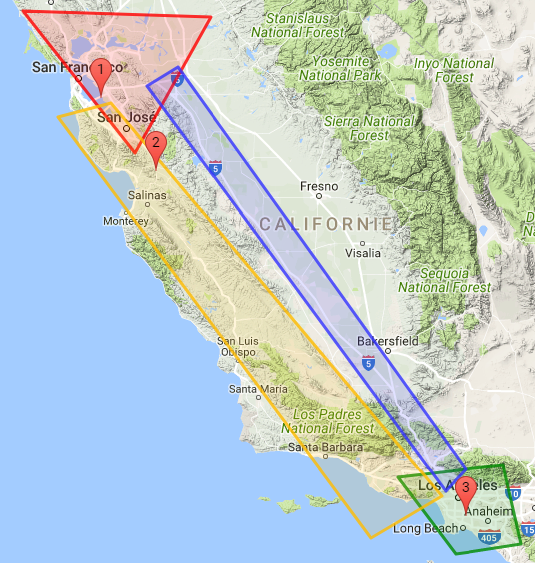
A truck leaves San Francisco with its shipment. A tracker is embedded in the shipment. The truck may take Highway 101 or Route 5 to Los Angeles. A state change event will be sent when the tracker changes of zone.
-
Shipment zone (red) = San Francisco GPS polygon (lat, lon): (38.358596, -123.019952) (38.306889, -120.954523) (37.124990, -121.789484)
-
Delivery zone (green) = LA GPS polygon: (34.238622, -118.909873) (34.346562, -117.747086) (33.620728, -117.551111) (33.533648, -118.269687)
-
Transportation zone 1 (yellow) = 101 Highway: (37.561997, -122.05261237) (34.059617, -118.154639) (34.102708, -119.203276) (37.440666, -122.641996)
-
Transportation zone 2 (blue) = Route 5: (37.8705177, -121.3220217) (34.309766, -118.027739) (33.679366, -118.377685) (37.714244, -121.662597)
Steps
First you need to create the 4 geozones you would like to monitor.
|
PUT liveobjects.orange-business.com/api/v0/eventprocessing/geozones/san-francisco
In the request body:
{
  "description": "San Francisco zone",
  "geometry": {
    "coordinates": [[
        [-123.019952, 38.358596],[-120.954523, 38.306889],
        [-121.789484, 37.124990],[-123.019952, 38.358596]
    ]],
    "type": "Polygon"
  },
  "tags": [
    "SF-area", "shipment"
  ]
}
PUT liveobjects.orange-business.com/api/v0/eventprocessing/geozones/los-angeles
{
  "description": "Los Angeles zone",
  "geometry": {
    "coordinates": [[
      [-118.909873, 34.238622],[-117.747086, 34.346562],
      [-117.551111, 33.620728],[-118.269687, 33.533648],[-118.909873, 34.238622]
    ]],
    "type": "Polygon"
  },
  "tags": [
    "LA-area", "delivery"
  ]
}
PUT liveobjects.orange-business.com/api/v0/eventprocessing/geozones/transportation1
{
  "description": "Transportation zone Highway 101",
  "geometry": {
    "coordinates": [[
      [-122.05261237, 37.561997],[-118.154639, 34.059617],
      [-119.203276, 34.102708],[-122.641996, 37.440666],[-122.05261237, 37.561997]
    ]],
    "type": "Polygon"
  },
  "tags": [
    "transportation"
  ]
}
PUT liveobjects.orange-business.com/api/v0/eventprocessing/geozones/transportation2
{
  "description": "Transportation zone Route 5",
  "geometry": {
    "coordinates": [[
      [-121.3220217, 37.8705177],[-118.027739, 34.309766],
      [-118.377685, 33.679366],[-121.662597, 37.714244],[-121.3220217, 37.8705177]
    ]],
    "type": "Polygon"
  },
  "tags": [
    "transportation"
  ]
}
Once the geozones are provisioned, they are available in your user context and can be referenced in your rules.
-
There are 2 transportation zones. You can group them into a single transportation context which will be used in your rule.
-
If you want to apply the rule only to a specific tracking device (the one present in the truck), you can create a device-group context containing the device identifier.
-
You can use the geozones san-francisco and los-angeles in your rule definition. But you probably do not want to reference directly the city names in the rule in order to be able to change the shipment and delivery zones without modifying the rule. Hence, you create an indirection in the context (san-francisco→shipment; los-angeles→delivery).
PUT liveobjects.orange-business.com/api/v0/eventprocessing/context/transportation
{
  "contextData": ["transportation1","transportation2"],
  "tags": [
    "transportation","zone","california"
  ]
}
PUT liveobjects.orange-business.com/api/v0/eventprocessing/context/device-group
{
  "contextData": ["urn:lo:nsid:lora:0020B20000000101"],
  "tags": [
    "device","truck"
  ]
}
PUT liveobjects.orange-business.com/api/v0/eventprocessing/context/shipment
{
  "contextData": "san-francisco",
  "tags": [
    "geozone"
  ]
}
PUT liveobjects.orange-business.com/api/v0/eventprocessing/context/delivery
{
  "contextData": "los-angeles",
  "tags": [
    "geozone"
  ]
}
-
This example is aimed at detecting a change in the device state, so you have to create a state processing rule which will be applied only to the monitored device (in the truck).
-
An event will be raised when the truck moves from one zone to the next one (shipment→transportation or transportation→delivery).
Before provisioning the state processing rule, it is useful to run the state processing function on a test data message.
POST liveobjects.orange-business.com/api/v0/eventprocessing/stateprocessing-rule/test
{
  "currentState": {},
  "data": {
    "metadata": {
      "connector": "http",
      "source": "urn:lo:nsid:lora:0020B20000000101"
   },
   "streamId": "urn:lo:nsid:lora:0020B20000000101",
    "location": {
      "provider": "lora",
      "accuracy": 10,
      "lon": -122.169846,
      "lat": 37.602902
   },
   "model": "lora_v0",
   "value": {
      "payload": "ae2109000cf3"
   }
  },
  "stateProcessingFunction": {
    "if": [
      {
        "inside": [
          {
            "var": "location.lon"
          },
          {
            "var": "location.lat"
          },
          {
            "ctx": {"ctx":"shipment"}
          }
        ]
      },
      "shipment_zone",
      {
        "inside": [
          {
            "var": "location.lon"
          },
          {
            "var": "location.lat"
          },
          {
            "ctx": {"ctx":["transportation"]}
          }
        ]
      },
      "transportation_zone",
      {
        "inside": [
          {
            "var": "location.lon"
          },
          {
            "var": "location.lat"
          },
          {
            "ctx": {"ctx":"delivery"}
          }
        ]
      },
      "delivery_zone",
      "unknown_zone"
    ]
  }
}
Response:
{
    "stateFunctionValid": true,
    "dataValid": true,
    "stateFunctionResult": "shipment_zone"
}
Now that the state function is tested, you can provision the state processing rule.
Geo tracking state processing rule:
POST liveobjects.orange-business.com/api/v0/eventprocessing/stateprocessing-rule
{
  "name": "geo tracking", (1)
  "enabled": true,
  "stateFunction": { (2)
    "if": [
      {
        "inside": [
          {"var": "location.lon"},
          {"var": "location.lat"},
          {"ctx": {"ctx":"shipment"}}
        ]
      },
      "shipment_zone",
      {
        "inside": [
          {"var": "location.lon"},
          {"var": "location.lat"},
          {"ctx": {"ctx":["transportation"]}}
        ]
      },
      "transportation_zone",
      {
        "inside": [
          {"var": "location.lon"},
          {"var": "location.lat"},
          {"ctx": {"ctx":"delivery"}}
        ]
      },
      "delivery_zone",
      "unknown_zone"
    ]
  },
  "filterPredicate": {
    "in": [ (3)
      {"var": "metadata.source"},
      {"ctx": "device-group"}
    ]
  },
  "stateKeyPath": "metadata.source" (4)
}| 1 | state rule name |
| 2 | state processing function in Jsonlogic format |
| 3 | the rule will be used only on the devices defined in the device-group |
| 4 | the current state will be stored using the "metadata.source" field. |
You can simulate, with the Live Objects REST API, the data messages sent by the tracker.
POST liveobjects.orange-business.com/api/v0/data/streams/urn:lo:nsid:lora:0020B20000000101
{
  "metadata": {
    "connector": "http",
    "source": "urn:lo:nsid:lora:0020B20000000101"
  },
  "location": {
    "provider": "lora",
    "accuracy": 10,
    "lon": -122.169846,
    "lat": 37.602902
  },
  "model": "lora_v0",
  "value": {
    "payload": "ae2109000cf3"
  },
  "timestamp": "2017-07-26T08:32:44.034Z",
  "tags": [
    "San Francisco", "Tracker"
  ]
}
The first data message in the SF area will generate an event with no previous state.
{
  "stateProcessingRuleId": "78063026-51e2-4c3e-aaf5-99efc4ee0255",
  "data": {
    "metadata": {
      "connector": "http",
      "source": "urn:lo:nsid:lora:0020B20000000101"
    },
    "streamId": "urn:lo:nsid:lora:0020B20000000101",
    "location": {
      "provider": "lora",
      "accuracy": 10,
      "lon": -121.562765,
      "lat": 36.969311
    },
    "model": "lora_v0",
    "value": {
      "payload": "ae2109000cf3"
    },
    "timestamp": "2017-07-26T08:32:44.034Z",
    "tags": [
      "Highway 101",
      "Tracker"
    ]
  },
  "tenantId": "5c0a6fb49a927971342aea06",
  "newState": "transportation_zone",
  "stateKey": "urn:lo:nsid:lora:0020B20000000101",
  "previousState": "null",
  "timestamp": "2021-06-17T13:57:36.637Z",
  "stateProcessingRule": {
    "stateKeyPath": "metadata.source",
    "name": "geo tracking",
    "stateFunction": "{\"if\":[{\"inside\":[{\"var\":\"location.lon\"},{\"var\":\"location.lat\"},{\"ctx\":{\"ctx\":\"shipment\"}}]},\"shipment_zone\",{\"inside\":[{\"var\":\"location.lon\"},{\"var\":\"location.lat\"},{\"ctx\":{\"ctx\":[\"transportation\"]}}]},\"transportation_zone\",{\"inside\":[{\"var\":\"location.lon\"},{\"var\":\"location.lat\"},{\"ctx\":{\"ctx\":\"delivery\"}}]},\"delivery_zone\",\"unknown_zone\"]}",
    "id": "78063026-51e2-4c3e-aaf5-99efc4ee0255",
    "enabled": true,
    "filterPredicate": "{\"in\":[{\"var\":\"metadata.source\"},{\"ctx\":\"device-group\"}]}"
  }
}
Any other message in SF area will not generate event, because the state would remain unchanged.
Now, you can send a second data message, located this time on Highway 101.
POST liveobjects.orange-business.com/api/v0/data/streams/urn:lo:nsid:lora:0020B20000000101
{
  "metadata": {
    "connector": "http",
    "source": "urn:lo:nsid:lora:0020B20000000101"
  },
  "location": {
    "provider": "lora",
    "accuracy": 10,
    "lon": -121.562765,
    "lat": 36.969311},
  "model": "lora_v0",
  "value": {
    "payload": "ae2109000cf3"
  },
  "timestamp": "2017-07-26T08:32:44.034Z",
  "tags": [
    "Highway 101", "Tracker"
  ]
}
The message in Highway 101 area will generate the following event. Any other message in Highway 101 area would not generate event because state would be unchanged.
{
  "stateProcessingRuleId": "78063026-51e2-4c3e-aaf5-99efc4ee0255",
  "data": {
    "metadata": {
      "connector": "http",
      "source": "urn:lo:nsid:lora:0020B20000000101"
    },
    "streamId": "urn:lo:nsid:lora:0020B20000000101",
    "location": {
      "provider": "lora",
      "accuracy": 10,
      "lon": -121.562765,
      "lat": 36.969311
    },
    "model": "lora_v0",
    "value": {
      "payload": "ae2109000cf3"
    },
    "timestamp": "2017-07-26T08:32:44.034Z",
    "tags": [
      "Highway 101",
      "Tracker"
    ]
  },
  "tenantId": "5c0a6fb49a927971342aea06",
  "newState": "transportation_zone",
  "stateKey": "urn:lo:nsid:lora:0020B20000000101",
  "previousState": "null",
  "timestamp": "2021-06-17T13:57:36.637Z",
  "stateProcessingRule": {
    "stateKeyPath": "metadata.source",
    "name": "geo tracking",
    "stateFunction": "{\"if\":[{\"inside\":[{\"var\":\"location.lon\"},{\"var\":\"location.lat\"},{\"ctx\":{\"ctx\":\"shipment\"}}]},\"shipment_zone\",{\"inside\":[{\"var\":\"location.lon\"},{\"var\":\"location.lat\"},{\"ctx\":{\"ctx\":[\"transportation\"]}}]},\"transportation_zone\",{\"inside\":[{\"var\":\"location.lon\"},{\"var\":\"location.lat\"},{\"ctx\":{\"ctx\":\"delivery\"}}]},\"delivery_zone\",\"unknown_zone\"]}",
    "id": "78063026-51e2-4c3e-aaf5-99efc4ee0255",
    "enabled": true,
    "filterPredicate": "{\"in\":[{\"var\":\"metadata.source\"},{\"ctx\":\"device-group\"}]}"
  }
}POST liveobjects.orange-business.com/api/v0/data/streams/urn:lo:nsid:lora:0020B20000000101
{
  "metadata": {
    "connector": "http",
    "source": "urn:lo:nsid:lora:0020B20000000101"
  },
  "location": {
    "provider": "lora",
    "accuracy": 10,
    "lon": -118.154555,
    "lat": 33.881571},
  "model": "lora_v0",
  "value": {
    "payload": "ae2109000cf3"
  },
  "timestamp": "2017-07-26T08:32:44.034Z",
  "tags": ["Los Angeles", "Tracker"]
}
The third message in LA area will generate the following event. Any other message in LA area would not generate event because state would remain unchanged.
{
  "stateProcessingRuleId": "78063026-51e2-4c3e-aaf5-99efc4ee0255",
  "data": {
    "metadata": {
      "connector": "http",
      "source": "urn:lo:nsid:lora:0020B20000000101"
    },
    "streamId": "urn:lo:nsid:lora:0020B20000000101",
    "location": {
      "provider": "lora",
      "accuracy": 10,
      "lon": -118.154555,
      "lat": 33.881571
    },
    "model": "lora_v0",
    "value": {
      "payload": "ae2109000cf3"
    },
    "timestamp": "2017-07-26T08:32:44.034Z",
    "tags": [
      "Los Angeles",
      "Tracker"
    ]
  },
  "tenantId": "5c0a6fb49a927971342aea06",
  "newState": "delivery_zone",
  "stateKey": "urn:lo:nsid:lora:0020B20000000101",
  "previousState": "transportation_zone",
  "timestamp": "2021-06-17T14:01:48.004Z",
  "stateProcessingRule": {
    "stateKeyPath": "metadata.source",
    "name": "geo tracking",
    "stateFunction": "{\"if\":[{\"inside\":[{\"var\":\"location.lon\"},{\"var\":\"location.lat\"},{\"ctx\":{\"ctx\":\"shipment\"}}]},\"shipment_zone\",{\"inside\":[{\"var\":\"location.lon\"},{\"var\":\"location.lat\"},{\"ctx\":{\"ctx\":[\"transportation\"]}}]},\"transportation_zone\",{\"inside\":[{\"var\":\"location.lon\"},{\"var\":\"location.lat\"},{\"ctx\":{\"ctx\":\"delivery\"}}]},\"delivery_zone\",\"unknown_zone\"]}",
    "id": "78063026-51e2-4c3e-aaf5-99efc4ee0255",
    "enabled": true,
    "filterPredicate": "{\"in\":[{\"var\":\"metadata.source\"},{\"ctx\":\"device-group\"}]}"
  }
}