LwM2M bootstrap
Principle
The Bootstrap is used to provision essential information (like LwM2M server URIs, credentials to authenticate to the LwM2M servers, etc.) into the LwM2M Client to enable it to register with one or more LwM2M Servers. This Bootstrap information is retrieved from the LwM2M Bootstrap Server.
For more information, please refer to the LwM2M specification.
Bootstrap Configuration
A Bootstrap Configuration defines the bootstrap strategy for a set of Bootstrap Entry:
-
RunServers
-
Run’s key management policy
-
Optionally, additional write operations to bootstrap objects other than /0, /1, /2 and /21.
Example of a Bootstrap Config:
{
"id": "637d00aedca4b9489573de68",
"name": "BootstrapConfig",
"description": "This is a bootstrap config",
"runServers": [
{
"id": "myServer",
"useLiveObjects": false,
"lwm2mDefinition": {
"security": {
"shortServerId": 1,
"lwm2mServerUri": "coaps://myserver:5684",
"securityMode": 1
},
"server": {
"shortServerId": 1,
"lifetime": 200,
"binding": "S"
}
}
}
],
"additionalOperations": {
"externalConfigServer": {
"url": "https://lwm2m.myserver.com/bootstrapconfig/",
"headers": [
"applicationName": ["LiveObjects"],
"myServerApiKey": ["azertyuiop"]
]
},
"objectVersionUrns": [
"urn:oma:lwm2m:ext:3300:1.1",
"urn:oma:lwm2m:ext:36050:1.0"
],
"writeOperations": [
{
"path": "/3300/1/5750",
"value": "VOC Index"
},
{
"path": "/3300/1/5602",
"value": "0.0"
},
{
"path": "/36050/0/0",
"value": "192837465"
}
]
}
"created": "2022-11-22T17:02:38.944Z",
"updated": "2022-11-22T17:02:38.944Z"
}
| Field | Description |
|---|---|
id |
(mandatory) Generated Bootstrap configuration unique identifier. Is used to link the configuration to a Bootstrap Entry. |
name |
(mandatory) User-defined name for the bootstrap config, must not be empty. |
description |
(optional) User-defined description for the bootstrap config. |
runServers |
(mandatory) The run servers configuration. |
runServers.id |
(mandatory) Run server unique identifier. Will be used also in Bootstrap Entry |
runServers.useLiveObjects |
(optional) If true, the LiveObjects LwM2M URI will be used as lwm2mServerUri and PSK as the securityMode. If false, they have to be defined. (default: false) |
runServers.renewSecurityOnBootstrap |
(optional) If true, new credentials (e.g. the PSK identity and secret) will be generated at each Bootstrap. Can be set only if useLiveObjects is true. (default: false) |
runServers.autoProvisionDeviceOnBootstrap.enabled |
(optional) If true, the LwM2M device will be automatically created or updated in the Device Inventory on bootstrap, based on its Entry definition, even if it has not been provisioned beforehand. Can be set only if useLiveObjects is true. (default: false) |
runServers.lwm2mDefinition |
(mandatory) The LwM2M configuration. |
runServers.lwm2mDefinition.security |
(mandatory) The configuration for the |
runServers.lwm2mDefinition.security.settings |
(optional) Settings for this Security Object (for example, on which instance to write it). |
runServers.lwm2mDefinition.security.settings.objectInstanceId |
(optional) The instance ID that will be used for this Object. If not specified, the ID is automatically assigned incrementally from 0 for the first Run Server in the list. The Security Object instance used for the Bootstrap Server is avoided (a Discover operation is performed to identify the ID used). |
runServers.lwm2mDefinition.security.lwm2mServerUri |
(mandatory if useLiveObjects is false) Uniquely identifies the LwM2M Server or LwM2M Bootstrap-Server. Present if and only if useLiveObjects is false. |
runServers.lwm2mDefinition.security.securityMode |
(mandatory if useLiveObjects is false) Determines what credentials are being used by the LwM2M Client and the LwM2M Server. Present if and only if useLiveObjects is false. Allowed values : - - - - - |
runServers.lwm2mDefinition.security.serverPublicKey |
(optional) Stores the LwM2M Server’s, respectively LwM2M Bootstrap-Server’s, certificate, public key (RPK mode) or trust anchor. The Certificate Mode Resource determines the content of this resource. Present if and only if useLiveObjects is false. |
runServers.lwm2mDefinition.security.smsSecurityMode |
(optional) Determines which SMS security mode is used: - - - - - - - |
runServers.lwm2mDefinition.security.lwm2mServerSmsNumber |
(optional) MSISDN used by the LwM2M Client to send messages to the LwM2M Server via the SMS binding. |
runServers.lwm2mDefinition.security.shortServerId |
(mandatory) This identifier uniquely identifies each LwM2M Server configured for the LwM2M Client. |
runServers.lwm2mDefinition.security.clientHoldOffTime |
(optional) The number of seconds to wait before initiating a Client Initiated Bootstrap once the LwM2M Client has determined it should initiate this bootstrap mode. |
runServers.lwm2mDefinition.security.bootstrapServerAccountTimeout |
(optional) The LwM2M Client MUST purge the LwM2M Bootstrap-Server Account after the timeout value given by this resource. |
runServers.lwm2mDefinition.security.matchingType |
(optional) The Matching Type Resource specifies how the certificate or raw public key in the Server Public Key is presented. Four values are currently defined: - - - - |
runServers.lwm2mDefinition.security.sni |
(optional) This resource holds the value of the Server Name Indication (SNI) value to be used during the TLS handshake. When this resource is present then the LwM2M Server URI acts as the address of the service while the SNI value is used for matching a presented certificate, or PSK identity. |
runServers.lwm2mDefinition.security.certificateUsage |
(optional) The Certificate Usage Resource specifies the semantic of the certificate or raw public key stored in the Server Public Key Resource, which is used to match the certificate presented in the TLS/DTLS handshake. The currently defined values are 0 for "CA constraint", 1 for "service certificate constraint", 2 for "trust anchor assertion", and 3 for "domain-issued certificate". When this resource is absent, value (3) for domain issued certificate mode is assumed. More details about the semantic of each value can be found in the security consideration section of the LwM2M specification. Present if and only if useLiveObjects is false. |
runServers.lwm2mDefinition.security.dtlsTlsCiphersuite |
(optional) When this resource is present it instructs the TLS/DTLS client to propose the indicated ciphersuite(s) in the ClientHello of the handshake. A ciphersuite is indicated as a 32-bit integer value. The IANA TLS ciphersuite registry is maintained at https://www.iana.org/assignments/tls-parameters/tls-parameters.xhtml. As an example, the TLS_PSK_WITH_AES_128_CCM_8 ciphersuite is represented with the following string "0xC0,0xA8". To form an integer value the two values are concatenated. In this example, the value is 0xc0a8 or 49320. |
runServers.lwm2mDefinition.server |
(mandatory) The configuration for the |
runServers.lwm2mDefinition.server.settings |
(optional) Settings for this Server Object (for example, on which instance to write it). |
runServers.lwm2mDefinition.server.settings.objectInstanceId |
(optional) The instance ID that will be used for this Object. If not specified, the ID is automatically assigned incrementally from 0 for the first Run Server in the list. |
runServers.lwm2mDefinition.server.shortServerId |
(mandatory) Used as link to associate server Object Instance. |
runServers.lwm2mDefinition.server.lifetime |
(optional) Specify the lifetime of the registration in seconds. |
runServers.lwm2mDefinition.server.defaultMinimumPeriod |
(optional) The default value the LwM2M Client should use for the Minimum Period of an Observation |
runServers.lwm2mDefinition.server.defaultMaximumPeriod |
(optional) The default value the LwM2M Client should use for the Maximum Period of an Observation |
runServers.lwm2mDefinition.server.disableTimeout |
(optional) A period to disable the Server. After this period, the LwM2M Client MUST perform registration process to the Server. |
runServers.lwm2mDefinition.server.notificationStoringWhenDisabledOrOffline |
(optional) If true, the LwM2M Client stores “Notify” operations to the LwM2M Server while the LwM2M Server account is disabled or the LwM2M Client is offline |
runServers.lwm2mDefinition.server.binding |
(optional) Defines the transport binding configured for the LwM2M Client. It is a list composed of the following elements: - - - - - |
runServers.lwm2mDefinition.server.apnLink |
(optional) If this resource is defined, it provides a link to the APN connection profile Object Instance (OMNA registered Object ID:11) to be used to communicate with this server. The instance id must be provided. |
runServers.lwm2mDefinition.server.registrationPriorityOrder |
(optional) The LwM2M Client sequences the LwM2M Server registrations in increasing order of this value. If this value is not defined, registration attempts to this server are not impacted by other server registrations. |
runServers.lwm2mDefinition.server.initialRegistrationDelayTimer |
(optional) The delay before registration is attempted for this LwM2M Server based upon the completion of registration of the previous LwM2M Server in the registration order. This is only applied until the first successful registration after a successful bootstrapping sequence. |
runServers.lwm2mDefinition.server.registrationFailureBlock |
(optional) When set to true and registration to this LwM2M server fails, the LwM2M Client blocks registration to other servers in the order. When set to false, the LwM2M Client proceeds with registration to the next server in the order. |
runServers.lwm2mDefinition.server.bootstrapOnRegistrationFailure |
(optional) If set to true, this indicates that the LwM2M Client should re-bootstrap when either registration is explicitly rejected by the LwM2M Server or registration is considered as failing as dictated by the other resource settings. If set to false, the LwM2M Client will continue with the registration attempts as dictated by the other resource settings. |
runServers.lwm2mDefinition.server.communicationRetryCount |
(optional) The number of successive communication attempts before which a communication sequence is considered as failed. |
runServers.lwm2mDefinition.server.communicationRetryTimer |
(optional) The delay between successive communication attempts in a communication sequence. This value is multiplied by two to the power of the communication retry attempt minus one (2**(retry attempt-1)) to create an exponential back-off. |
runServers.lwm2mDefinition.server.communicationSequenceDelayTimer |
(optional) The delay between successive communication sequences. A communication sequence is defined as the exhaustion of the Communication Retry Count and Communication Retry Timer values. A communication sequence can be applied to server registrations or bootstrapping attempts. MAX_VALUE means do not perform another communication sequence. |
runServers.lwm2mDefinition.server.communicationSequenceRetryCount |
(optional) The number of successive communication sequences before which a registration attempt is considered as failed. |
runServers.lwm2mDefinition.server.trigger |
(optional) Using the Trigger Resource a LwM2M Client can indicate whether it is reachable over SMS (value set to 'true') or not (value set to 'false') |
runServers.lwm2mDefinition.server.preferredTransport |
(optional) Only a single transport binding SHALL be present. When the LwM2M client supports multiple transports, it MAY use this transport to initiate a connection. This resource can also be used to switch between multiple transports e.g. a non-IP device can switch to UDP transport to perform firmware updates. |
runServers.lwm2mDefinition.server.muteSend |
(optional) If true or the Resource is not present, the LwM2M Client Send command capability is de-activated. If false, the LwM2M Client Send Command capability is activated. |
additionalOperations.objectVersionUrns |
(optional) The list of objects versions, in urn format. The version of all objects used in writeOperations must be declared here. |
additionalOperations.writeOperations.path |
(optional) The path of the write operation. They must not target /0, /1, /2 or /21. |
additionalOperations.writeOperations.value |
(optional) The value of the write operation. |
additionalOperations.externalConfigServer.url |
(optional) The url of an external server that will be called to provide additional write operations (restricted to port 443). See Bootstrap Config External Server. |
additionalOperations.externalConfigServer.headers |
(optional) The headers that will be put in the HTTP request toward the external server. |
Note : runServers.lwm2mDefinition.security.shortServerId and runServers.lwm2mDefinition.server.shortServerId must be equal.
Bootstrap Configuration with External Server
If your use case needs it, you can define an external server that will be called to add Bootstrap Configuration operations on each device bootstrap (whose entry is linked to this config).
In that case, Live Objects will make a POST HTTP call toward the url and with the headers defined.
The expected response is similar to the operations field of Bootstrap Configuration.
If the server returns an invalid response body, or other than a 2xx response code, then the device bootstrap will fail.
{
"tenantId": "637d00aedca4b9489573de68",
"endpointName": "my_endpoint",
"bootstrapConfigId": "637d00cfdca4b9489573de69"
}
| Field | Description |
|---|---|
tenantId |
(mandatory) Your account identifier. |
endpointName |
(mandatory) The endpoint client name that is bootstraping. |
bootstrapConfigId |
(mandatory) The identifier of the Bootstrap Config that was setup with this server url. |
{
"objectVersionUrns": [
"urn:oma:lwm2m:ext:3300:1.1",
"urn:oma:lwm2m:ext:36050:1.0"
],
"writeOperations": [
{
"path": "/3300/1/5750",
"value": "VOC Index"
},
{
"path": "/3300/1/5602",
"value": "0.0"
},
{
"path": "/36050/0/0",
"value": "192837465"
}
]
}
| Field | Description |
|---|---|
objectVersionUrns |
(mandatory) the list of objects versions, in urn format. The version of all objects used in writeOperations must be declared here. |
writeOperations.path |
(mandatory) The path of the write operation. |
writeOperations.value |
(mandatory) The value of the write operation. |
|
All objects used in writeOperations will first be deleted before applying the write operation. |
|
If other writeOperations have been setup in the operations field of the Bootstrap Config, then all the writeOperations will be merged, with priority to the ones returned by the external server. |
Bootstrap Entry
A Bootstrap Entry is link to a Bootstrap Config and contains:
-
the credentials used to authenticate to the LwM2M Bootstrap server
-
the parameters of the Bootstrap Config specific to an endpoint, namely the credentials used to authenticate to the LwM2M Run server
-
information about past Bootstrap sessions
Example of a Bootstrap Entry:
{
"endpointName": "my_endpoint",
"security": {
"mode": "PSK",
"pskInfo": {
"identity": "my_endpoint",
"secret": "0123456789ABCDEF0123456789ABCDEF"
}
},
"definition": {
"bootstrapConfigId": "637d00cfdca4b9489573de69",
"runServers": [
{
"id": "LOServer",
"security": {
"pskInfo": {
"identity": "my_endpoint",
"secret": "0123456789ABCDEF0123456789ABCDEF"
}
}
}
]
},
"activity": {
"status": "FINISHED",
"endpointBootstrapConfig": {
"runServers": [
{
"security": {
"shortServerId": 1,
"lwm2mServerUri": "coaps://lwm2m.liveobjects.orange-business.com:5684",
"securityMode": 0,
"publicKeyOrIdentity": "urn:imei:000000000000000",
"secretKey": "***",
"clientHoldOffTime": 0,
"bootstrapServerAccountTimeout": 0
},
"server": {
"shortServerId": 1,
"lifetime": 3600,
"defaultMinimumPeriod": 0,
"defaultMaximumPeriod": 500,
"disableTimeout": 0,
"notificationStoringWhenDisabledOrOffline": true,
"binding": "U"
}
}
]
},
"bootstrapRequestCount": 6,
"lastBootstrapRequestDate": "2023-01-13T11:50:28.086Z",
"bootstrapFinishCount": 4,
"lastBootstrapFinishDate": "2023-01-13T11:50:36.221Z"
},
"created": "2023-01-11T17:53:57.021Z",
"updated": "2023-01-13T11:50:36.227Z"
}
| Field | Description |
|---|---|
endpointName |
(mandatory) The endpoint client name. |
security |
(mandatory) The security information to authenticate to the LwM2M Bootstrap server. |
security.mode |
(mandatory) The security mode used to authenticate to the LwM2M Bootstrap server. |
security.pskInfo |
(mandatory) The Pre-Shared Key (PSK) information to authenticate to the LwM2M Bootstrap server. |
security.pskInfo.identity |
(mandatory) The "bootstrap" PSK Identity. |
security.pskInfo.secret |
(mandatory) The "bootstrap" PSK secret key. |
masterEntry |
(optional) Information about the linked Bootstrap Master Entry. Present only if the Bootstrap Entry was created automatically via a Bootstrap Master Entry. |
masterEntry.id |
(optional) The Bootstrap Master Entry identifier. |
definition |
(optional) The Bootstrap Config parameters for the endpoint (must be defined for the Bootstrap to work). |
definition.bootstrapConfigId |
(optional) The identifier of the Bootstrap Config to use for the endpoint (must be defined for the Bootstrap to work). |
definition.runServers |
(optional) The parameters for the runServers defined in Bootstrap Config (depending on the Bootstrap config it can be required for the Bootstrap to work). |
definition.runServers.id |
(mandatory) The identifier of the runServer defined in Bootstrap Config. |
definition.runServers.security |
(optional) The security information to authenticate to the LwM2M Run server (depending on the Bootstrap config it can be required for the Bootstrap to work). |
definition.runServers.security.pskInfo |
(mandatory) The Pre-Shared Key (PSK) information to authenticate to this LwM2M Run server. |
definition.runServers.security.pskInfo.identity |
(optional) The "run" PSK Identity. If it is not defined, the Identity of the PSK used to authenticate to the LwM2M Bootstrap server is used. |
definition.runServers.security.pskInfo.secret |
(mandatory) The "run" PSK secret key. |
activity |
(read only) Information about past Bootstrap session. |
activity.status |
(read only) status regarding the Bootstrap |
activity.endpointBootstrapConfig |
(read only) The last Bootstrap configuration that was sent to the LwM2M client. Refer to the Bootstrap Config for the description of each parameter except for publicKeyOrIdentity and secretKey described below. |
activity.endpointBootstrapConfig.publicKeyOrIdentity |
(read only) The LwM2M Client’s certificate, public key (RPK mode) or PSK Identity (PSK mode). |
activity.endpointBootstrapConfig.secretKey |
(read only) The secret key (PSK mode) or private key (RPK or certificate mode). |
activity.bootstrapRequestCount |
(read only) The number of times a Bootstrap sequence has been initiated (a Bootstrap-Request has been received by the LwM2M server). |
activity.lastBootstrapRequestDate |
(read only) The last time a Bootstrap sequence was initiated (a Bootstrap-Request has been received by the LwM2M server). |
activity.bootstrapFinishCount |
(read only) The number of times a Bootstrap sequence has been successfully completed (a Bootstrap-Finish has been sent by the LwM2M server). |
activity.lastBootstrapFinishDate |
(read only) The last time a Bootstrap sequence has been successfully completed (a Bootstrap-Finish has been sent by the LwM2M server). |
created |
(read only) Date on which the Bootstrap Entry was created. |
updated |
(read only) Date on which the Bootstrap Entry was last updated. |
Bootstrap Master Entry
Bootstrap Master Entries are an extension of Bootstrap Entries that can be used for a set of endpoints without having to provision credentials for each endpoint. They contain:
-
An ID to be used in the psk identity (see Endpoint Credentials)
-
The master secret from which the secrets used by endpoints to authenticate to the LwM2M Bootstrap server are derived (see Endpoint Credentials)
-
A link to a Bootstrap Config. The config must have useLiveObjects, renewSecurityOnBootstrap, and autoProvisionDeviceOnBootstrap.enabled set to true.
-
Information about past Bootstrap sessions of endpoints using this Bootstrap Master Entry
When an endpoint bootstraps using a Bootstrap Master Entry, a Bootstrap Entry is automatically created for that endpoint. See the bootstrap sequence for more information.
Example of a Bootstrap Master Entry:
{
"id": "Kl77BbLBwh",
"name": "My Master Entry",
"security": {
"mode": "PSK",
"pskInfo": {
"secret": "5adc592c900f4dae08dc7d68984bd262689f931c0329ceffe3ad374368f20708"
}
},
"definition": {
"bootstrapConfigId": "686287c6babc0e5f6fe43e8a"
},
"activity": {
"bootstrapRequestCount": 1,
"lastBootstrapRequestDate": "2025-06-30T12:56:44.182Z",
"bootstrapFinishCount": 1,
"lastBootstrapFinishDate": "2025-06-30T12:56:46.604Z"
},
"created": "2025-06-30T12:49:16.794Z",
"updated": "2025-06-30T12:56:46.606Z"
}
| Field | Description |
|---|---|
id |
(mandatory) The Bootstrap Master Entry ID. It is generated and must be used in endpoints PSK identity, see Endpoint Credentials. |
name |
(mandatory) The Bootstrap Master Entry name. It is user-defined. |
security |
(mandatory) The security information to authenticate to the LwM2M Bootstrap server. |
security.mode |
(mandatory) The security mode used to authenticate to the LwM2M Bootstrap server. PSK (Pre-Shared Key) is the only mode available currently. |
security.pskInfo |
(mandatory) The master Pre-Shared Key (PSK) information to authenticate to the LwM2M Bootstrap server. The endpoint PSK secret is derived from it, see Endpoint Credentials. |
security.pskInfo.secret |
(mandatory) The PSK master secret key, as a hex-encoded string. It is generated. See Endpoint Credentials |
definition |
(optional) The Bootstrap Config parameters for the endpoints (must be defined for the Bootstrap to work). |
definition.bootstrapConfigId |
(optional) The identifier of the Bootstrap Config to use for the endpoints (must be defined for the Bootstrap to work). |
activity |
(read only) Information about past Bootstrap sessions of endpoints using this Bootstrap Master Entry. |
activity.bootstrapRequestCount |
(read only) The number of times a Bootstrap sequence has been initiated (a Bootstrap-Request has been received by the LwM2M server). |
activity.lastBootstrapRequestDate |
(read only) The last time a Bootstrap sequence was initiated (a Bootstrap-Request has been received by the LwM2M server). |
activity.bootstrapFinishCount |
(read only) The number of times a Bootstrap sequence has been successfully completed (a Bootstrap-Finish has been sent by the LwM2M server). |
activity.lastBootstrapFinishDate |
(read only) The last time a Bootstrap sequence has been successfully completed (a Bootstrap-Finish has been sent by the LwM2M server). |
created |
(read only) Date on which the Bootstrap Master Entry was created. |
updated |
(read only) Date on which the Bootstrap Master Entry was last updated. |
Endpoint credentials
The PSK identity must have the following format:
<endpointName>@<masterEntryId>
Where:
-
endpointName: The endpoint name used in the Bootstrap Request. -
masterEntryId: The Bootstrap Master Entry ID.
Replace <endpointName> and <masterEntryId> with your actual values (do not include the angle brackets).
|
Only alphanumeric characters (a-z, A-Z, 0-9) and special characters among : - _ are allowed in the endpointName.
|
The PSK secret is derived from the master secret and the endpoint name using HMAC-SHA256.
openssl:# ==================
# Linux
# ==================
endpointName=urn:android:device:9774d56d682e549c
masterSecret=efd9a6f6b82b9ecf8ef32cd08f681274e1cd17bfd2adc830d41d2d36d261b270
echo -n $endpointName | openssl dgst -sha256 -mac HMAC -macopt hexkey:$masterSecret
# ==================
# Windows (Commands)
# ==================
(echo|set /p="urn:android:device:9774d56d682e549c") | openssl dgst -sha256 -mac HMAC -macopt hexkey:efd9a6f6b82b9ecf8ef32cd08f681274e1cd17bfd2adc830d41d2d36d261b270
# Replace urn:android:device:9774d56d682e549c and efd9a6f6b82b9ecf8ef32cd08f681274e1cd17bfd2adc830d41d2d36d261b270 with your actual values
The derived secret with the example input values (in hexadecimal format):
e9a6992bd98f629d31cd12980fa1adaed011220cec2d81c2f59ae5ff07037f29
Where:
-
endpointName: The endpoint name used in the Bootstrap Request. -
masterSecret: The Bootstrap Master Entry PSK secret, in hexadecimal format.
Bootstrap Sequence
General case
Before being able to bootstrap a device, it is necessary to provision a Bootstrap Entry for the device and link it to a Bootstrap Config.
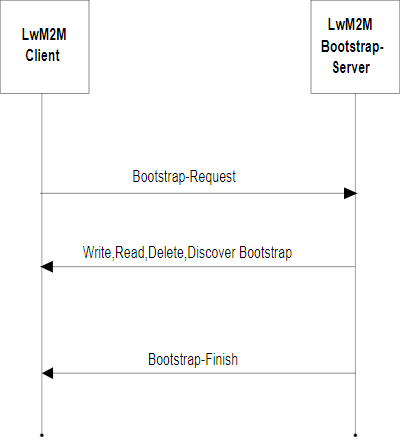
The Bootstrap sequence starts with the device sending a Bootstrap-Request (preceded by a DTLS Handshake). If the instance IDs to use for the Security Objects are not defined in the Bootstrap Config, a Bootstrap-Discover is sent by LiveObjects to be able to know which Security Object instance holds the Bootstrap server information and avoid it. The Security, Server and OSCORE Objects are deleted. The Security and Server Objects are then written using the parameters defined in the Bootstrap Config and the credentials defined in the Bootstrap Entry.
The Bootstrap sequence ends with LiveObjects sending a Bootstrap-Finish. The device can then register to the LwM2M Run servers.
The Bootstrap status is visible in the Bootstrap Entry. The status evolves as follows during the Bootstrap sequence:
Using LiveObjects as Run Server
To use LiveObjects as Run Server, the Bootstrap Config must be created with the parameter useLiveObjects set to true. Refer to this Bootstrap Config creation example.
|
A device must be created in your account (with the same endpoint name as the Bootstrap Entry) before the bootstrap takes place. However, if you use the autoProvisionDeviceOnBootstrap.enabled=true setting in the config.RunServer definition, you can skip this device pre-provisioning: the device will be automatically created in the device inventory of the Bootstrap Entry’s customer account. |
The device can be declared as being managed by the LiveObjects Bootstrap Server (bootstrap.managed = true and w/o security info) or not (bootstrap.managed = false and w/ security info). Refer to: LwM2M Device or LwM2M Device managed by Bootstrap creation examples.
If the device is created with bootstrap.managed = true (and in the same tenant as the Entry), the security info will be automatically provisioned in the LiveObjects device representation upon bootstrapping. Otherwise, they must be provisioned manually during the device creation, and they will be checked during bootstrap (i.e., do they match the security info that was provisioned in the Bootstrap Entry, and that will be set on the physical device).
If an error occurs during the automatic provisioning of the security info or if there is a security info mismatch, the Bootstrap sequence will fail. After a successful Bootstrap sequence, the device will register with the LiveObjects LwM2M Run server.
With credentials generated at Bootstrap time
The following diagram describes the sequence when the run credentials are generated at Bootstrap time.
The Bootstrap Config has to be created with the renewSecurityOnBootstrap parameter set to true. Refer to this Bootstrap Config creation example. The Bootstrap Entry should be created without Run credentials (otherwise they will just be ignored).
If the Bootstrap Config does not set autoProvisionDeviceOnBootstrap.enabled=true, a device must be created on LiveObjects with the bootstrap.managed parameter set to true (and with the same endpoint name and on the same account as the Bootstrap Entry). Refer to this Device creation example.
At each Bootstrap new credential will be generated and automatically provisioned in the LiveObjects device representation. If an error occurs during the credentials provisioning, the Bootstrap sequence will fail. After a successful Bootstrap sequence, the device will register with the LiveObjects LwM2M Run server using the generated credentials.
Using a Bootstrap Master Entry
The following diagram describes the sequence when using a Bootstrap Master Entry.
A Bootstrap Master Entry must be created to get a Bootstrap Master Entry ID and a master PSK secret, from which the PSK identity and secret for each endpoint are derived (the key derivation is of course not done by the device, which must not know the master secret).
The Bootstrap Config must be created with the following parameters set to true: useLiveObjects, renewSecurityOnBootstrap, and autoProvisionDeviceOnBootstrap.enabled.
A Bootstrap Entry and a LwM2M device will be automatically created or updated for each endpoint using the Bootstrap Master Entry, (i.e., for each endpoint whose credentials are derived from it) during the Bootstrap sequence. For more details about how credentials are derived for each endpoint, refer to Endpoint Credentials.