Alarm configuration
To configure your event rules and process data message of your streams, you must configure :
-
Your context repositoy to set a data which can met the criteria of your rules.
-
Your matching and firing rules or your state processing rules or your activity processing rules.
-
Your action policies (your triggers and associated actions), when the alarm occurred the service run your chosen action (notification).
Context repository
Definition
The context repository is a database that allows storing user data that could be useful in the event rules definition and not present in the data messages. The context may include, for instance, thresholds definition, geographical zones, a list of device identifiers, a user preference, a group of contexts. The context has a key-value format. The key is a string and the value can be a primitive (string, numeric…), a JSON object or an array. Optional tags are available to ease the search among the tenant contexts.
| for geographical zones, a dedicated geozone database is provided. Once the user has provisioned his geozones, they are automatically available in the user context. |
Context provisioning
The Live Objects API to manage context provisioning are described in the swagger documentation (Event processing - Context section) : https://liveobjects.orange-business.com/swagger-ui/index.html.
See a simple context example.
Context groups
A context value may reference other context keys. Instead of referencing each context individually, the rule can then reference the context group.
Example: See a context groups example.
|
extract context key
A context key is not necessarily hard coded in your rule. For instance, it can be extracted from your data message (using tags or device identifier). Here, the context key is generated with the concatenation of the value.streamId field and a string.
Here, the context key is extracted from the value.tags field.
|
Geozone repository
Definition
The Geozone repository is a database that allows the user to save his geographical sites/zones of interest. The geozones are stored as polygons (array of geopoints coordinates in decimal degrees). Meta information like a description and tags can be stored with the geozone.
|
Format:
Example of polygon : |
Provisioning
The Live Objects API to manage geozone provisioning are described in the swagger documentation (Event processing - Geozone section) : https://liveobjects.orange-business.com/swagger-ui/index.html.
Example:
PUT liveobjects.orange-business.com/api/v0/eventprocessing/geozones/grand-orleans
{
  "description": "my geozone grand Orleans",
  "geometry": {
    "coordinates": [[
        [1.780892, 48.091452],
        [2.301382, 48.000565],
        [2.281961, 47.509630],
        [1.252634, 47.729556],
        [1.780892, 48.091452]
        ]],
    "type": "Polygon"
  },
  "tags": ["zone-nord"]
}-
Once a geozone is provisioned, it is available in the user context. Hence, it can be referenced in event processing rules or in groups of context.
-
When a geozone is updated, the modifications are immediately taken into account by the contexts or rules referencing the geozone.
Rules and JsonLogic syntax
A rule is a function applied on a data message in order to detect any significant change in the data (exceeding threshold, state modification, change of location). The rules in Simple Event Processsing and State Processing are defined within Live Objects plateform with the JsonLogic syntax.
| the JsonLogic log operator has been deactivated. |
Additional operators
In addition to the existing JsonLogic operators (logic and boolean operators, numeric operators, string operators, array operators), Live Objects provides geographic operators (distance, inside, insideindex, closeto, closetoindex), context operator (ctx) and miscellaneous operators (get, currentstate).
| Name |
|---|
distance |
Description |
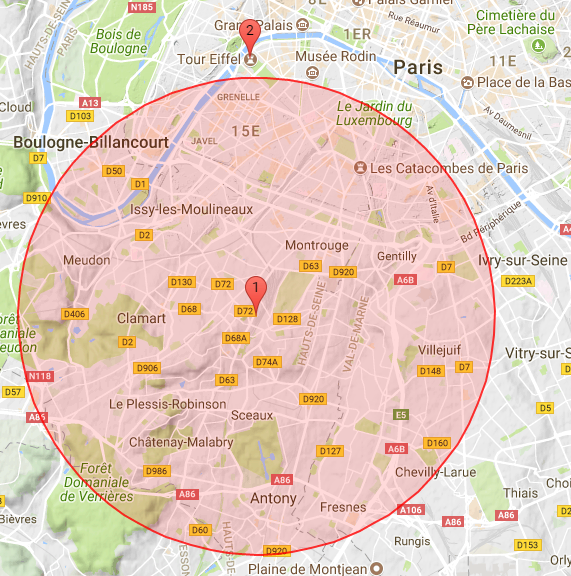
Geographical operator. Returns the distance in meters between two points, given their latitude and longitude in decimal degrees. |
Parameters |
lon1, lat1, lon2, lat2 in decimal degrees |
Logic |
|
Data |
Eiffel Tower |
|
Result |
|
| Name |
|---|
ctx |
Description |
Retrieve, from the context repository, one or several values using a key or an array of keys. Several ctx operators can be nested (group of contexts). |
Parameters |
key or array of keys |
Context |
In the following example, "freezingThreshold" and "liquidThreshold" must have been provisioned in the tenant context before being used. |
Logic |
|
Pre-requisite |
Data |
|
Result |
|
| Name |
|---|
currentstate |
Description |
Retrieve the current state of a device when applying a stateProcessing function. For state processing rules only. In the following example, current state can be "cold", "normal" or "hot". The example following logic function is an hysteresis : if current state is not hot, transition to hot if value.temp > 100 if current state is hot, transition to normal if value.temp < 80 if value.temp < 0 transition to cold |
Logic |
|
Data |
|
Result |
|
| Name |
|---|
get |
Description |
Returns the element at the specified position in an array. |
Parameters |
array, index in the array |
Context |
In the following example, an array containing latitude and longitude values must have been provisioned in the tenant context : |
Logic |
|
Data |
|
Result |
|
| Name |
|---|
inside |
Description |
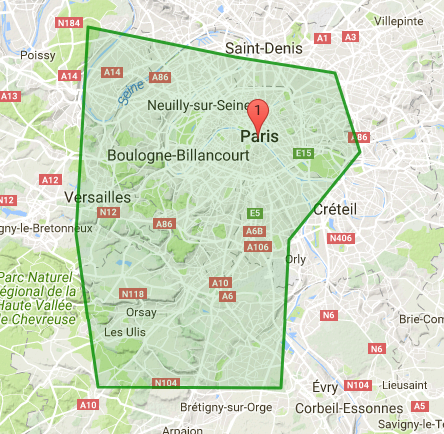
Checks if a point defined by its latitude and longitude is inside a polygon (or at least one polygon if an array of polygons is provided as input parameter). |
Parameters |
longitude, latitude in decimal degrees for the point to be tested, polygon(s) defined by the coordinates of their vertices (lon, lat in decimal degrees). |
Logic |
|
Data |
|
|
Result |
|
| Name |
|---|
insideindex |
Description |
Checks if a point is inside an array of polygons. Returns the index of the first matching polygon. Returns -1 if no matching was found. This operator is usually in conjunction with the "get" operator which will return the matching polygon. |
Parameters |
longitude, latitude in decimal degrees for the point to be tested, array of polygons defined by the coordinates of their vertices (lon, lat in decimal degrees). |
Context |
In the example, an array containing latitude and longitude values must have been provisioned in the tenant context : |
Logic |
|
Data |
|
Result |
|
| Name |
|---|
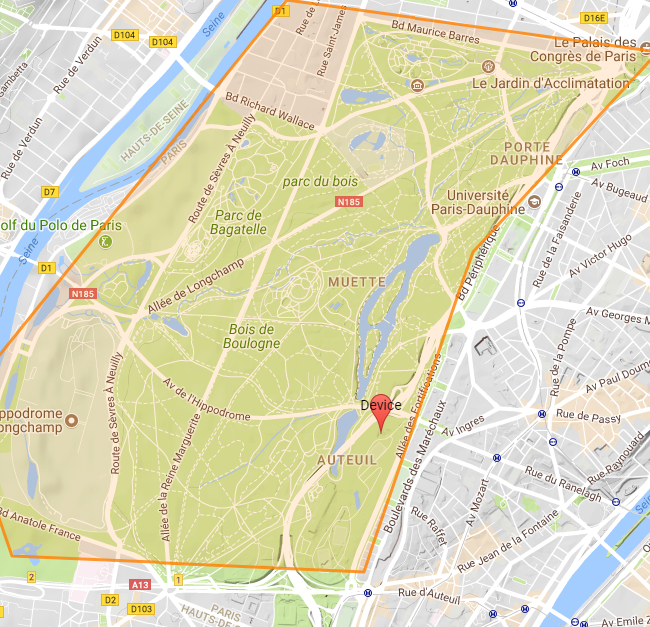
closeto |
Description |
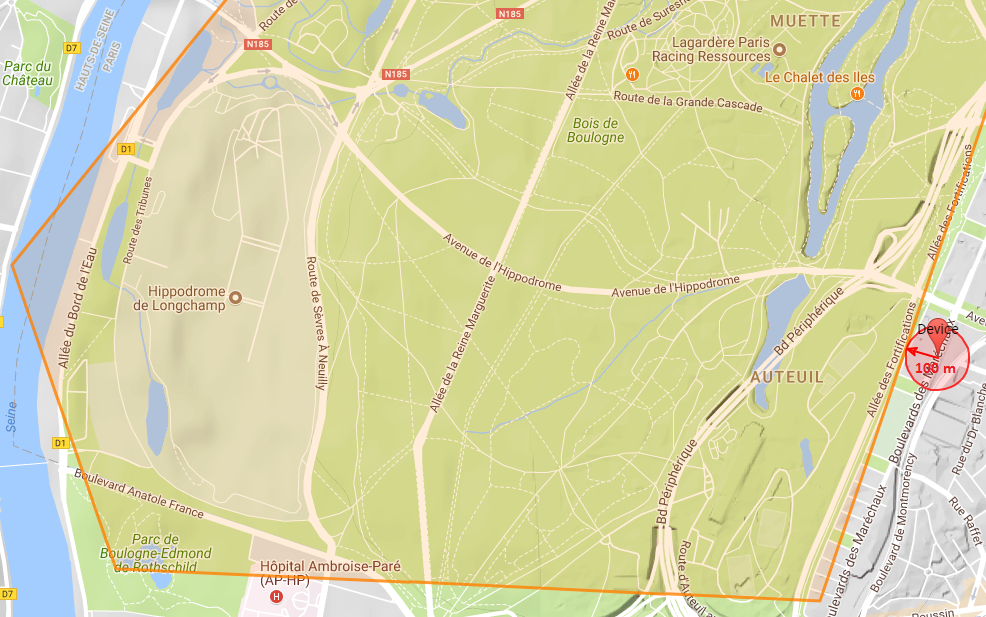
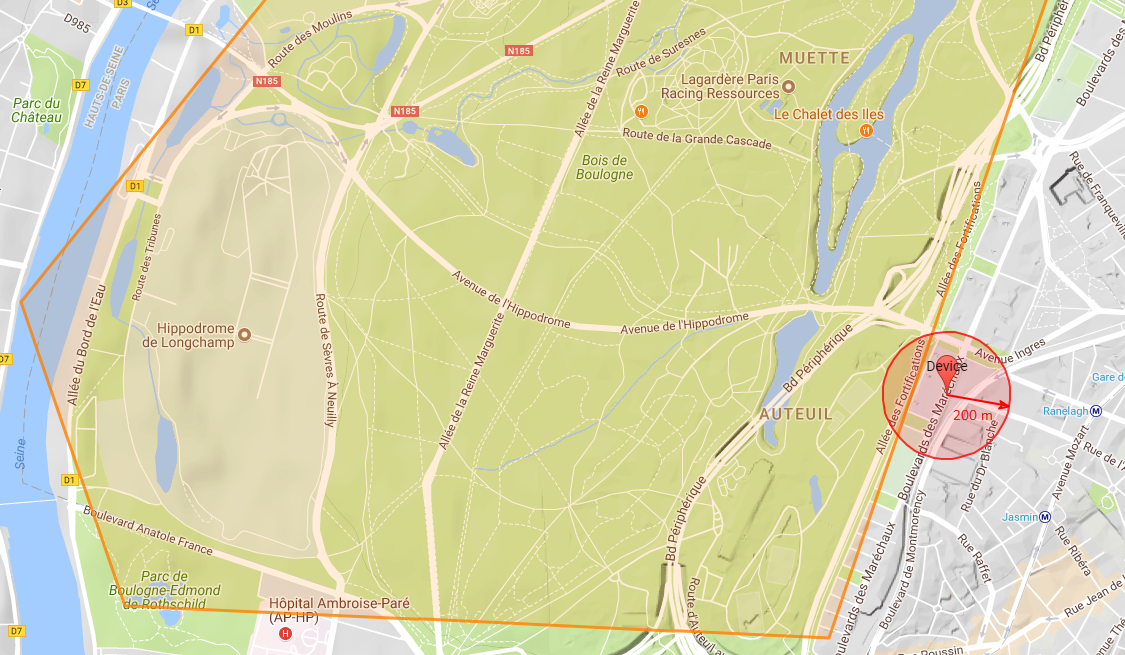
Checks if a circle is close to a polygon or at least one of the polygons (polygon array). |
Parameters |
longitude, latitude (in decimal degrees for the circle center), circle radius, polygon or array of polygons |
Logic |
|
Data1 : circle center outside polygons, the circle does not intersect any polygon. |
|
|
Result1 |
|
Data2 : circle center outside polygons, the circle intersects one polygon. |
|
|
Result2 |
|
Data3 : a point inside one of the polygons. |
|
Result3 |
|
| Name |
|---|
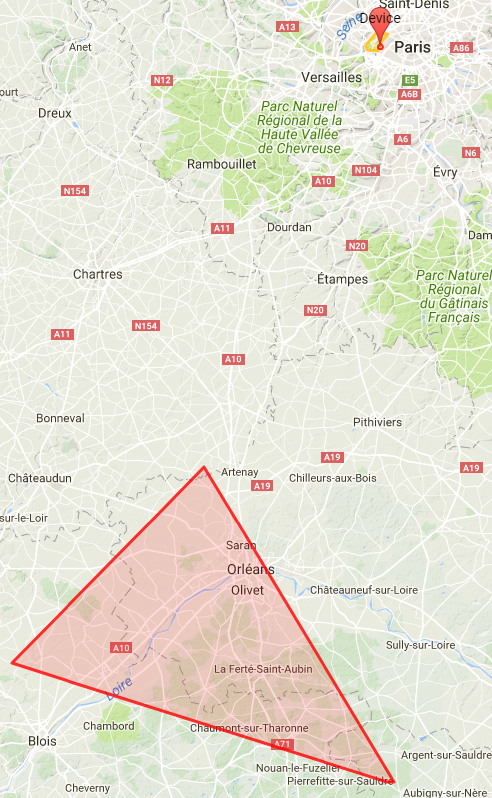
closetoindex |
Description |
Checks if a circle is close to an array of polygons. Returns the index of the first matching polygon (first index in the array is 0). Returns -1 if no matching was found. |
Parameters |
longitude, latitude (in decimal degrees for the circle center), circle radius, array of polygons |
Logic |
N.B.: first polygon in the array is the Orleans area; 2nd polygon is the Paris area. |
Data |
|
|
Result |
|
| Name |
|---|
now_utc |
Description |
Returns the processing time as ISO 8601 string. Similar to javaScript new Date().toISOString() |
Parameters |
none |
Logic |
|
Data |
|
Result |
true if processing hour is between 0 and 12 |
| Name |
|---|
get_utc_hours |
Description |
Returns the hour of the ISO 8601 provided parameter . Similar to javaScript new Date(param).getUTCHours() |
Parameters |
ISO 8601 String |
Logic |
|
Data |
|
Result |
13 |
| Name |
|---|
|
Description |
Returns the minutes of the ISO 8601 provided parameter . Similar to javaScript new Date(param).getUTCMinutes() |
Parameters |
ISO 8601 String |
Logic |
|
Data |
|
Result |
1 |
| Name |
|---|
|
Description |
Returns the day of the week of the ISO 8601 provided parameter . Similar to javaScript new Date(param).getUTCDay() |
Parameters |
ISO 8601 String |
Logic |
|
Data |
|
Result |
4 |
| Name |
|---|
|
Description |
Returns the day of the month of the ISO 8601 provided parameter . Similar to javaScript new Date(a).getUTCDate() |
Parameters |
ISO 8601 String |
Logic |
|
Data |
|
Result |
15 |
| Name |
|---|
|
Description |
Returns epoch (milliseconds) of the ISO 8601 provided parameter . Similar to javaScript new Date(a).getTime() |
Parameters |
ISO 8601 String |
Logic |
|
Data |
|
Result |
1516021237290.0 |
Action policy
Events related to the alarming on device activity/state change/event processing can be notified by email or sms. The notification triggering and actions are defined in an action policy, provisioned in Live Objects.
Provisioning
Please see the dedicated action policy swagger
To create a new action policy linked with an event rule :
Endpoint:
POST /api/v1/event2action/actionPolicies
{
    "id": "6c95837b-251d-41d8-95f1-42facdf8e71e"
    "name": "name-aea80c1d-5777-4e20-822c-5e6871f428e5",
    "enabled": true,
    "triggers": {
        "stateChange": {
            "version": 1,
            "filter": {
                "ruleIds": ["state-change-event-3422c5ac-de95-4727-855a-39d43902b7b3"]
            }
       }
    },
    "actions:" {
        "emails": [{
           "to": ["notification@orange.com"],
           "cc": ["cc@orange.com"],
           "cci": ["cci@orange.com"],
           "subjectTemplate": "State change for {{stateKey}}",
           "contentTemplate": "{{stateKey}} change from state {{previousState}} to state {{newState}} at {{timestamp}}"
        }],
        "sms": [{
            "destinationPhoneNumbers": ["+33601234567"],
            "contentTemplate": "{{stateKey}} new state {{newState}} at {{timestamp}}"
        }],
        "httpPush": [{
            "webhookUrl": "https://hooks.myservice.com/services/SOMEWEBHOOKREFERENCE",
            "headers": {"authorization": ["Bearer 00000000-0000-0000-0000-000000000000"]},
            "retryOnFailure": true,
            "content": "{\"text\": \"Devices {{deviceIds}} activity change triggered by activity rule: {{ruleIds}} : at {{timestamp}}\"}"
        }],
        "fifoPublish": [{
            "fifoName": "myFifo",
            "noRetention": false
        }],
        "azureEventHubs":[{
            "eventHubsNamespace": "myEventHubsNamespace",
            "eventHubName":"myEventHubName",
            "sharedAccessKeyName":"mySharedAccessKeyName",
            "sharedAccessKey":"mySharedAccessKey",
            "content":"{\"text\": \"Devices {{deviceIds}} activity change triggered by activity rule: {{ruleIds}} : at {{timestamp}}\"}",
            "retryOnFailure":false
        }]
      }
    }
}
The field id is auto generated by Live Objects and added in the POST response object.
| field name | is required | description |
|---|---|---|
name |
optional |
Defines a user friendly name for the action policy |
enable |
required |
Enables or disables the action policy |
triggers |
required |
Defines the type of trigger that will start an action. It can be one of the following :
Note: triggers object should have exactly one trigger defined. |
actions |
required |
Object that defines the action that will be started upon a trigger activation |
actions.emails |
optional |
A collection of Email actions (see Email notification section) |
actions.sms |
optional |
A collection of SMS actions (see SMS notification section) |
actions.httpPush |
optional |
A collection of HTTP push actions (see HTTP Push notification section) |
actions.fifoPublish |
optional |
A collection of FIFO publish actions (see FIFO notification section) |
actions.azureEventHubs |
optional |
A collection of Azure Event Hubs actions (see Azure Event Hubs notification section) |
To retrieve your action policy:
Endpoint:
GET /api/v1/event2action/actionPolicies/{policyId}
Triggers
There are three kinds of rule event based triggers. You can either trigger an action on a fired event, a state changed event or a device activity event. This allows you to write complex matching, filtering, state or activity processing rules on your data and route chosen data to the desired actions.
An event trigger is represented by the id of the rule that will emit the corresponding event. You can specify multiple rule identifiers as trigger for one action policy.
Format
| Type | Triggered | Filtering criteria |
|---|---|---|
deviceActivity |
on device activity event (example : activity state transition from "SILENT" to "ACTIVE") |
"deviceIds": a list of device identifiers (as String) to be monitored, |
matchingFired |
on simple event processing firing event |
"ruleIds": a list of firing rule identifiers (as String) |
stateChange |
on state change event |
"ruleIds": a list of state processing rule identifiers (as String) |
| When several criterias are present in a filter, they are combined with a AND boolean logic. OR operator is applied between each elements inside filter’s list. |
Examples
{
    "id": "6c95837b-251d-41d8-95f1-42facdf8e71e",
    "name": "some_user_friendly_name",
    "enabled": true,
    "triggers": {
        "deviceActivity": {
            "version": 1,
            "filter": {
                "deviceIds" :["device_identifier"],
                "ruleIds": ["activity-change-event-e64528bd-490e-405f-9c7f-0b80eda62ce5"]
            }
        }
    },
    "actions": {
        "emails": [{
            "to": ["to@orange.com"],
            "contentTemplate": "Event for Rule {{activityRule.name}} and device {{deviceAdditionalInfo.deviceName}}"
        }],
        "sms": [],
        "httpPush": [],
        "fifoPublish": []
    }
}{
"type": "deviceActivity",
"version": 1,
"deviceId": "device_identifier",
"deviceAdditionalInfo": {
"deviceName": "deviceName",
"groupPath": "groupPath"
},
"activityRule": {
"id": "activity-change-event-e64528bd-490e-405f-9c7f-0b80eda62ce5",
"name": "name"
},
"state": "SILENT",
"timestamp": "2019-08-26T00:00:00.000Z",
"numberOfAlarmReminders": 0
}{
"id": "6c95837b-251d-41d8-95f1-42facdf8e71e",
"name": "some_user_friendly_name",
"enabled": true,
"triggers": {
"stateChange": {
"version": 1,
"filter": {
"ruleIds": ["state-change-event-6a9a1b48-72da-4405-a65e-7e482abbe826"]
}
},
"actions": {
...
}
}{
"type": "stateChange",
"version": 1
"tenantId": "it-2f2ab8e7-bd58-4423-adc1-efcba36faaa8",
"stateKey": "stateKey",
"previousState": "previousState",
"newState": "newState",
"timestamp": "2019-09-02T14:08:04.337Z",
"stateProcessingRuleId": "state-change-event-6a9a1b48-72da-4405-a65e-7e482abbe826",
"data": {
"streamId": "streamId",
"timestamp": "2019-09-02T14:08:04.334Z",
"value": {
"string": "input",
"integer": 0
},
"type": "dataMessage",
"version": 1
}
}{
"id": "6c95837b-251d-41d8-95f1-42facdf8e71e",
"name": "some_user_friendly_name",
"enabled": true,
"triggers": {
"matchingFired": {
"version": 1,
"filter": {
"ruleIds": [
"firing-event-961a4bb5-c244-4df8-88cd-80c4e03c42b9", "10000000-0000-0000-0000-000000000001"
]
}
},
"actions": {
...
}
}{
"type": "matchingFired",
"version": 1,
"tenantId": "it-cbe67009-7653-4c5e-9762-58b2afe0240d",
"timestamp": "2019-09-02T13:55:17.433Z",
"firingRule": {
"id": "firing-event-961a4bb5-c244-4df8-88cd-80c4e03c42b9"
},
"matchingContext": {
"tenantId": "it-cbe67009-7653-4c5e-9762-58b2afe0240d",
"timestamp": "2019-09-02T13:55:17.433Z",
"matchingRule": {
"id": "cc76a37a-1b18-45f9-8356-7733d9ccbc3b"
},
"data": {
"streamId": "streamId",
"timestamp": "2019-09-02T13:55:17.426Z",
"value": {
"string": "debug",
"integer": 100
},
"type": "dataMessage",
"version": 1
}
}
}Actions
An action, within an action policy, will define what to do upon trigger activation. An action is always passed the data message or the event that triggered it as datacontext for templating purpose or cherry picking a particular field within that data. Some actions give you the ability to template their output. The templating language used is Mustache. You can use fields of your triggering data (event or message) by leveraging the mustache variable mechanism.
Email notification
This action serves the purpose of sending email to one or multiple recipients when a trigger is activated.
{
    "to": [] of String,
    "cc": [] of String,
    "cci": [] of String,
    "subjectTemplate": String,
    "contentTemplate": String
}
to |
A List of String each representing a valid email |
cc |
A List of String each representing a valid email |
cci |
A List of String each representing a valid email |
subjectTemplate |
A string representing a Mustache template. This will be use to render the email subject. |
contentTemplate |
A string representing a Mustache template. This will to render the email content. |
{
    "id": "6c95837b-251d-41d8-95f1-42facdf8e71e",
    "name": "some_user_friendly_name",
    "enabled": true,
    "triggers": {
        "stateChange": {
            "filter": {
                "ruleIds": ["22222222-2222-2222-2222-222222222222"]
            },
            "version": 1
        }
    },
    "actions":
    {
        "emails": [{
            "to": ["notification@orange.com"],
            "cc": ["cc@orange.com"],
            "cci": ["cci@orange.com"],
            "subjectTemplate": "State change for {{stateKey}}",
            "contentTemplate": "{{stateKey}} change from state {{previousState}} to state {{newState}} at {{timestamp}}"
    }
}
In this example, the fields stateKey, previousState, newState, timestamp are referencing the event message which generates the notification. The event message is available in the data context of the notification process.
SMS notification
This action serves the purpose of sending sms to one or multiple recipients (MSISDNs) when a trigger is activated.
{
    "destinationPhoneNumbers": [] of String,
    "contentTemplate": String
}
destinationPhoneNumbers |
a collection of string representing each a recipient msisdn |
contentTemplate |
A string representing a Mustache template. It will be rendered as the sms content. |
{
    "id": "6c95837b-251d-41d8-95f1-42facdf8e71e",
    "name": "some_user_friendly_name",
    "enabled": true,
    "triggers": {
        "matchingFired": {
            "filter": {
                "ruleIds": ["22222222-2222-2222-2222-222222222222"]
            },
            "version": 1
        }
    },
    "actions":
    {
        "sms": [{
                "destinationPhoneNumbers": ["+33123456789"],
                "contentTemplate": "Event fired at {{timestamp}} with value : {{value}}"
            }]
    }
}
HTTP Push notification
This action serves the purpose of sending a message to a webhook server when a trigger is activated.
{
    "id": "6c95837b-251d-41d8-95f1-42facdf8e71e",
    "name": "some_user_friendly_name",
    "enabled": true,
    "triggers": {
        "deviceActivity": {
            "filter": {
                "deviceIds": ["urn:lo:nsid:sensor:temp001"],
                "ruleIds": ["22222222-2222-2222-2222-222222222222"]
            },
            "version": 1
        }
    },
    "actions": {
        "httpPush": [{
            "webhookUrl": "https://hooks.myservice.com/services/SOMEWEBHOOKREFERENCE",
            "headers": {"authorization": ["Bearer 00000000-0000-0000-0000-000000000000"]},
            "retryOnFailure": true,
            "content": "{\"text\": \"Devices {{deviceIds}} activity change triggered by activity rule: {{ruleIds}} : at {{timestamp}}\"}"
        }]
    }
}
FIFO notification
This action serves the purpose of sending a message to a FIFO when a trigger is activated.
{
    "fifoName": String,
    "noRetention": Boolean
}
fifoName |
Name of the FIFO to send the message to. See FIFO usage to consume messages |
noRetention |
If true, messages will be immediately dropped if there is no active subscription to the FIFO at the time of message publication. If false, messages will be persisted on disk until consumed or expired based on the expiration delay defined in your offer settings. |
{
    "id": "6c95837b-251d-41d8-95f1-42facdf8e71e",
    "name": "some_user_friendly_name",
    "enabled": true,
    "triggers": {
       "deviceStatus": {
          "version": 1,
          "filter": {
             "connectors": ["mqtt"],
             "groupPaths": [{"path": "/lyon", "includeSubPath": true}]
          }
       }
    },
    "actions": {
        "fifoPublish": [{
            "fifoName": "myFifo",
            "noRetention": false
        }]
    }
}
Azure Event Hubs notification
This action serves the purpose of sending a message to an Azure Event Hub instance when a trigger is activated.
{
   "name": "some_user_friendly_name",
   "enabled": true,
   "triggers": {
      "dataMessage": {
         "version": 1
      }
   },
   "actions": {
      "azureEventHubs": [
         {
            "eventHubsNamespace": "myEventHubsNamespace",
            "eventHubName": "myEventHubName",
            "sharedAccessKeyName": "mySharedAccessKeyName",
            "sharedAccessKey": "mySharedAccessKey",
            "content": "{\"text\": \"new message sent by device {{metadata.source}} at {{timestamp}}\"}",
            "retryOnFailure": false
         }
      ]
   }
}