LwM2M device Twin
LiveObjects Twin Model is a specification of object definitions.
A Twin Model is a tree of objectDefinitions where each objectDefinition includes attributeDefinitions.
Twin Model is compatible with the OMA LWM2M Specifications.
@startuml

scale 0.8
skinparam ArrowColor #B22222

' --- Flèches ---
skinparam ArrowColor #B22222
skinparam ArrowFontColor darkblue
skinparam ArrowFontStyle bold
skinparam ArrowFontSize 10

' --- Classes ---
skinparam ClassFontStyle bold
skinparam ClassFontSize 11
skinparam ClassAttributeFontSize 11

class ObjectDefinition #LightYellow {
    **owner** : //String//
    **objectDefinitionId** : //String//

    **pathSegment** : //String//
    **name** : //string//
    **description** : //String//
    **minOccurs** : //Integer//
    **maxOccurs** : //Integer//
    **type** : //ObjectType//
    **operations** : //List//
    **attributes** : //List//
    **parent** : //String//
    **children** : //List//
}

enum ObjectType #LightYellow{
    OBJECT,
    OBJECT_MAP
}

enum ObjectOperation #LightYellow {
   READ,
   WRITE
}

class AttributeDefinition #LightYellow{
    **pathSegment** : //String//
    **name** : //String//
    **description** : //String//
    **minOccurs** : //Integer//
    **maxOccurs** : //Integer//
    **type** : //AttributeType//
    **operations** : //List//
}

enum AttributeType #LightYellow{
    STRING,
    INTEGER,
    UNSIGNED_INTEGER,
    BOOLEAN,
    FLOAT,
    BASE_64,
    DATE_TIME
}

enum AttributeOperation #LightYellow{
   READ,
   WRITE,
   EXECUTE
}

ObjectDefinition <-- ObjectDefinition : parent
ObjectDefinition <-- "*" ObjectDefinition : children
ObjectDefinition "1" *-- "1" ObjectType
ObjectDefinition "1" *-- "*" ObjectOperation
ObjectDefinition "1" *-- "*" AttributeDefinition

AttributeDefinition "1" *-- "1" AttributeType
AttributeDefinition "1" *-- "*" AttributeOperation

@enduml
-
an ObjectDefinition can have 0, 1 or more children,
-
a root ObjectDefinition has no parent,
-
there is one root Object definition for LwM2M model (objectDefinitionId=
urn:oma:lwm2m) -
direct children of
urn:oma:lwm2mare normalized.
Children ObjectDefinition of urn:oma:lwm2m represents LwM2M Objects, where a Twin Model AttributeDefinition represents a LwM2M Object Resource.
For example the Firmware Update LwM2M Object (Object Id=5) has a Resource called PkgName (Id=6):
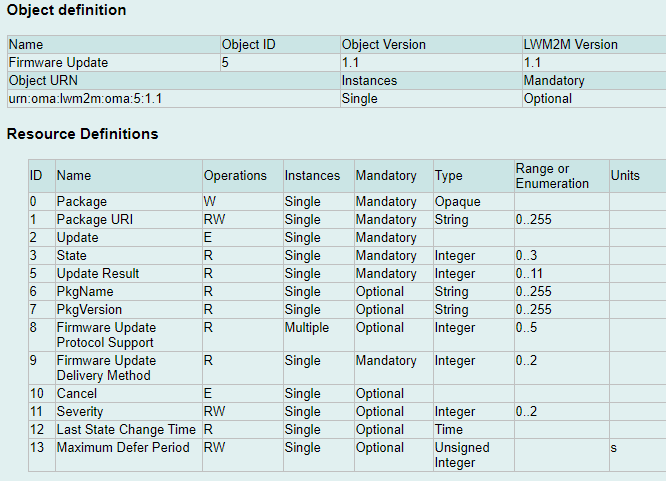
Model - ObjectDefinition
Firmware Update Object is represented by the following ObjectDefinition:
| Field | Value | Comment |
|---|---|---|
owner |
A public definition has no owner. |
|
objectDefinitionId |
urn:oma:lwm2m:5:1.1 |
Object-definition unique identifier. For example, objectDefinitionId |
pathSegment |
5 |
Current segment of the path |
name |
Firmware Update |
Original name |
description |
… |
Description of the object |
minoccurs |
0 |
Minimal occurrence (0 means optional, 1 means mandatory and at least 1 is required) |
maxoccurs |
1 |
Maximal occurrence (0 means infinite instances are allowed (unbounded), 1 means maximum 1 instance is allowed |
type |
OBJECT_MAP |
Type of object. possible values are - - In LwM2M, every object is of type OBJECT_MAP (except the root node) |
operations |
[ "READ", "WRITE" ] |
Array of possible operations on the object.
Possible values are - - |
parent |
urn:oma:lwm2m |
The objectDefinitionId of the parent object.
All LwM2M objects are direct children of |
attributes |
|
A list of AttributeDefinition. For example, list of Firmware Update attributes. |
Model - AttributeDefinition
PkgName Resource is represented by the following AttributeDefinition:
| Field | Value | Comment |
|---|---|---|
pathSegment |
6 |
Current segment of the path |
name |
PkgName |
Original name |
description |
… |
Description of the attribute |
minoccurs |
0 |
Minimal occurrence (0 means optional, 1 means mandatory and at least 1 is required) |
maxoccurs |
1 |
Maximal occurrence (0 means infinite instances are allowed (unbounded), 1 means maximum 1 instance is allowed |
type |
STRING |
Type of attribute.
Supported values are : - - - - - - - |
operations |
[ "READ", "WRITE", "EXECUTE" ] |
Array of possible operations on the attribute.
Possible values are - |
Model management
In the Twin Model, we distinguish two types of models:
-
public models that are defined for the entire LiveObjects platform. For LwM2M, the ObjectIDs can range from 0 to 32768.
-
custom models that are defined per LiveObjects account. For LwM2M, the ObjectIDs are restricted to the 10241 - 42800 range.
|
For a given ID, the custom model takes precedence over the public model if both exist. More details on the different ObjectID classes defined by the OMA for LwM2M can be found in the LwM2M Registry. |
Public model
Objects from public range are managed by LiveObjects.
A (managed) public object definition :
-
has an empty
ownerattribute.
Public object definitions can’t be removed.
Custom model
A customer can extend the model by importing new Custom Object definitions.
This extension is called "Customer defined twin model". This model will apply for all twin devices of the customer account.
Using Twin Model Management API you can import a custom LWM2M OMA compatible XML Files, or delete a given customer model.
See this chapter for examples of Twin Model Management API usage which give you how to manage your custom objects.
Custom model limits
Some limits on custom models apply :
-
The number of custom model per tenant is limited.
Model API
Get Object-Definitions
Read TwinModels by giving an objectDefinitionId :
-
use
urn:oma:lwm2mroot element to list as children all LwM2M ObjectDefinitions. -
use a
urn:oma:lwm2m:oma:<Id>:<Version>format, and replaceId,Versionto get a given LwM2M Object.
For example, urn:oma:lwm2m:oma:5:1.1 will get the Object Id=5 in Version=1.1.
Request
Endpoint:
GET /api/v1/deviceMgt/twin/model/object-definitions/{objectDefinitionId}
The usage is described here : Swagger API documentation.
HTTP Headers:
X-API-Key: <your API key>
Accept: application/json
Example:
GET /api/v1/deviceMgt/twin/model/object-definitions/urn:oma:lwm2m:oma:5:1.1
Response
HTTP Code:
200 OK
Body:
{
  "objectDefinitionId": "urn:oma:lwm2m:oma:5:1.1",
  "pathSegment": "5",
  "name": "Firmware Update",
  "description": "Firmware Update Object",
  "minOccurs": 0,
  "maxOccurs": 1,
  "type": "OBJECT_MAP",
  "operations": [
    "READ",
    "WRITE"
  ],
  "attributes": [
    [.../...]
    {
      "pathSegment": "6",
      "name": "PkgName",
      "description": "Package name",
      "minOccurs": 0,
      "maxOccurs": 1,
      "type": "STRING",
      "operations": [
        "READ"
      ]
    },
    [.../...]
  ],
  "parent": "urn:oma:lwm2m"
}
Post Object-Definitions
Import an ObjectDefinition (a custom Twin Model) :
-
set
LWM2Mformat, -
provide an OMA Compatible XML File,
-
decide whether the definition should be overwritten or not if it already exists.
Request
Endpoint:
POST /api/v1/deviceMgt/twin/model/object-definitions?inputFormat=lwm2m&override=true
The usage is described here : Swagger API documentation.
HTTP Headers:
X-API-Key: <your API key>
Accept: application/json
Body (form-data):
file: <XML File>
Response
HTTP Code:
201 Created
Body:
{
    "objectDefinitionId": "urn:oma:lwm2m:ext:33442",
    "pathSegment": "33442",
    "name": "LwM2M v1.1 Test Object CUSTOM CUSTOM",
    "description": "This object is created by the customer.",
    "minOccurs": 0,
    "maxOccurs": 0,
    [.../...],
    "parent": "urn:oma:lwm2m",
    "owner": "6139d13394f6b376e447ff9d"
}
Notice that the imported model owner attribute is the customer id.
|
Delete Object-Definitions
Remove an ObjectDefinition (a custom Twin Model) :
-
provide an ObjectDefinitionId.
Request
Endpoint:
DELETE /api/v1/deviceMgt/twin/model/object-definitions/{objectDefinitionId}
The usage is described here : Swagger API documentation.
HTTP Headers:
X-API-Key: <your API key>
Accept: application/json
Response
HTTP Code:
LiveObjects DeviceTwin is a Twin representation of the real device:
-
which objects are supported
-
which objects are instantiated
-
which are the instantiated objects last reported attributes values
@startuml

' --- Flèches ---
skinparam ArrowColor #B22222
skinparam ArrowFontColor darkblue
skinparam ArrowFontStyle bold
skinparam ArrowFontSize 10

' --- Classes ---
skinparam ClassFontStyle bold
skinparam ClassFontSize 11
skinparam ClassAttributeFontSize 11

class TwinDevice #LightYellow {
    //String deviceId//
    //Set supportedObjects//
    //Set instantiatedObjects//
    //Set reportedValues//
}

class InstantiatedObject #LightYellow{
    //String path//
    //String objectDefinitionId//
}

class ReportedValue #LightYellow{
    //String path//
    //String value//
    //OffsetDateTime timestamp//
}

TwinDevice "1" *-- "*" InstantiatedObject : instantiatedObjects
TwinDevice "1" *-- "*" ReportedValue : reportedValues

@enduml
A DeviceTwin includes :
-
supportedObjectsas a list of objectDefinitionId : list Object definitions supported by the device. -
instantiatedObjectsas a list of Object : list of Object implemented by the device. -
reportedValuesas a list of AttributeValue : list of Attributes values reported by the device
In addition, LiveObjects provides three ways to represents a given DeviceTwin :
-
By RootObject.
-
By Object.
-
By ObjectInstance.
RootObject
RootObject is represented by the following :
| Field | Value | Comment |
|---|---|---|
objectDefinitionId |
urn:oma:lwm2m |
Parent of the ObjectDefinition identifier. |
path |
/ |
Root path |
children |
[] |
Children Object |
Object
Object is represented by the following :
| Field | Value | Comment |
|---|---|---|
objectDefinitionId |
urn:oma:lwm2m:5:1.1 |
ObjectDefinition identifier. |
path |
/5 |
Object path : object (OBJECT_MAP) |
instances |
[] |
List of ObjectInstance |
ObjectInstance
ObjectInstance is represented by the following :
| Field | Value | Comment |
|---|---|---|
objectDefinitionId |
urn:oma:lwm2m:5:1.1 |
ObjectDefinition identifier. |
path |
/5/0 |
Object path : object (OBJECT_MAP) |
attributes |
[] |
List of Attribute |
Attribute
Attribute is represented by the following :
| Field | Value | Comment |
|---|---|---|
path |
|
Attribute path : object |
|
Attribute path : object |
|
content |
|
Single instance attribute |
contents |
|
Multi-instances attributes |
When an attribute is a single-instance attribute, his value is reported as content, whereas a multi-instances attribute is reported as contents.
== Get supported objects
Read DeviceTwin supported objects.
Request
Endpoint:
GET /api/v1/deviceMgt/devices/{deviceId}/twin/supported-objects
HTTP Headers:
X-API-Key: <your API key>
Accept: application/json
Example:
GET /api/v1/deviceMgt/devices/urn:lo:nsid:lwm2m:mydevice/twin/supported-objects
Response
HTTP Code:
200 OK
Body:
["urn:oma:lwm2m:oma:1", "urn:oma:lwm2m:oma:2", "urn:oma:lwm2m:oma:3", "urn:oma:lwm2m:oma:4", "urn:oma:lwm2m:oma:5:1.1"]This response is the list of supported object definition identifiers for a DeviceTwin.
Get instantiated objects
Read DeviceTwin instantiated objects.
Request
Endpoint:
GET /api/v1/deviceMgt/devices/{deviceId}/twin/objects
Query parameters:
| Name | Description |
|---|---|
expand |
Optional. If 1 then children objects are expanded with their instances. 0 by default |
HTTP Headers:
X-API-Key: <your API key>
Accept: application/json
Example:
GET /api/v1/deviceMgt/devices/urn:lo:nsid:lwm2m:mydevice/twin/objects?expand=1
Response
HTTP Code:
200 OK
Body:
{
    "objectDefinitionId": "urn:oma:lwm2m",
    "path": "/",
    "children": [
        {
            "objectDefinitionId": "urn:oma:lwm2m:oma:1",
            "path": "/1",
            "instances": [
                {
                    "objectDefinitionId": "urn:oma:lwm2m:oma:1",
                    "path": "/1/0"
                },
                {
                    "objectDefinitionId": "urn:oma:lwm2m:oma:1",
                    "path": "/1/1"
                }
            ]
        },
        {
            "objectDefinitionId": "urn:oma:lwm2m:oma:2",
            "path": "/2",
            "instances": [
                {
                    "objectDefinitionId": "urn:oma:lwm2m:oma:2",
                    "path": "/2/0"
                },
                {
                    "objectDefinitionId": "urn:oma:lwm2m:oma:2",
                    "path": "/2/1"
                }
            ]
        },
        {
            "objectDefinitionId": "urn:oma:lwm2m:oma:3",
            "path": "/3",
            "instances": [
                {
                    "objectDefinitionId": "urn:oma:lwm2m:oma:3",
                    "path": "/3/0"
                }
            ]
        }
    ]
}
This response is a RootObject with the list of children objects (instantiated objects) for a DeviceTwin.
Get detailed object
Read DeviceTwin detailed object.
Request
Endpoint:
GET /api/v1/deviceMgt/devices/{deviceId}/twin/objects/{objectId}
Query parameters:
| Name | Description |
|---|---|
expand |
Optional. If 1 then instances are expanded with their attributes having reported values. 0 by default |
HTTP Headers:
X-API-Key: <your API key>
Accept: application/json
Example:
GET /api/v1/deviceMgt/devices/urn:lo:nsid:lwm2m:mydevice/twin/objects/1?expand=1
Response
HTTP Code:
200 OK
Body:
{
    "objectDefinitionId": "urn:oma:lwm2m:oma:1",
    "path": "/1",
    "instances": [
        {
            "objectDefinitionId": "urn:oma:lwm2m:oma:1",
            "path": "/1/0",
            "attributes": [
                {
                    "pathSegment": "5",
                    "path": "/1/0/5",
                    "content": {
                        "reportedValue": "1",
                        "timestamp": "2021-09-30T09:25:06.687Z"
                    }
                },
                {
                    "pathSegment": "25",
                    "path": "/1/0/25",
                    "contents": [
                        {
                            "reportedValue": "v1/1.1.2",
                            "timestamp": "2021-11-15T17:14:06.687Z",
                            "path": "/1/0/25/0"
                        },
                        {
                            "reportedValue": "v1/1.BIS",
                            "timestamp": "2021-11-15T17:14:06.687Z",
                            "path": "/1/0/25/1"
                        }
                    ]
                }
            ]
        },
        {
            "objectDefinitionId": "urn:oma:lwm2m:oma:1",
            "path": "/1/1",
            "attributes": [
                {
                    "pathSegment": "3",
                    "path": "/1/1/3",
                    "content": {
                        "reportedValue": "1",
                        "timestamp": "2021-09-30T09:25:06.687Z"
                    }
                }
            ]
        }
    ]
}
This response is an Object (instantiated objects and reported values) for a DeviceTwin.
Get detailed object instance
Read DeviceTwin detailed object instance.
Request
Endpoint:
GET /api/v1/deviceMgt/devices/{deviceId}/twin/objects/{objectId}/{instanceId}
HTTP Headers:
X-API-Key: <your API key>
Accept: application/json
Example:
GET /api/v1/deviceMgt/devices/urn:lo:nsid:lwm2m:mydevice/twin/objects/1/0
Response
HTTP Code:
200 OK
Body:
{
    "objectDefinitionId": "urn:oma:lwm2m:oma:1",
    "path": "/1/0",
    "attributes": [
        {
            "pathSegment": "5",
            "path": "/1/0/5",
            "content": {
                "reportedValue": "1",
                "timestamp": "2021-09-30T09:25:06.687Z"
            }
        },
        {
            "pathSegment": "25",
            "path": "/1/0/25",
            "contents": [
                {
                    "reportedValue": "v1/1.1.2",
                    "timestamp": "2021-11-15T17:14:06.687Z",
                    "path": "/1/0/25/0"
                },
                {
                    "reportedValue": "v1/1.BIS",
                    "timestamp": "2021-11-15T17:14:06.687Z",
                    "path": "/1/0/25/1"
                }
            ]
        }
    ]
}
This response is an ObjectInstance (instantiated object and reported values) for a DeviceTwin. == Operations
LiveObjects Twin operation is a representation of a real operation on a device:
-
READ- order the device to report some attributes, -
WRITE- update or replace some object attributes values, -
EXECUTE- execute some attributes. -
WRITE-METADATA- update metadata (set, update, reset).
Operation definition
A Twin operation applies to a given device, includes a given type (read,write,execute, write-metadata), with some operation attributes (paths, values, options) and has a unique id (generated by LiveObjects).
Each operation orders a given action (or composite action) on a target device and the result of this action is visible within operation status and operation error attributes.
Example of Twin Operation:
    {
        "id": "b50d094e520a4d58ad367f2fb9afdf6f",
        "type": "READ",
        "paths": [
            "/1/0/0"
        ],
        "status": "OK",
        "created": "2022-03-07T16:03:51.609Z",
        "updated": "2022-03-07T16:04:09.263Z"
    }
This is a success and done READ operation.
| Field | Value | Comment |
|---|---|---|
id |
|
Operation unique id, generated by LiveObjects |
type |
|
Type of the operation. |
paths |
|
Target paths of related device objects or attributes |
values |
|
for WRITE and WRITE-METADATA: Values to set. |
writeMode |
|
for WRITE: mode to set. Possible values : |
contextToken |
|
Free custom tag on the operation |
status |
|
Current status of Twin Operation |
options |
|
Options of Twin Operation, cf. Operation options section. |
policy.attempts |
1 |
Number of attempts allowed for this operation (default value is 1 that means there is no retry). |
error.code |
|
status FAILED only: Error code of Twin Operation. |
error.details |
|
status FAILED only: Error details of Twin Operation. |
error.deviceCode.value |
|
status FAILED, error.code DEVICE_ERROR only: Device error value. |
error.deviceCode.reason |
|
status FAILED, error.code DEVICE_ERROR only: Device error reason. |
created |
|
When the operation were created. |
updated |
|
When the operation were updated. In case of status OK, this is when the device responds. |
Live Objects supports all LwM2M 1.1 notification attributes (named metadata in current chapter).
Those metadata define the conditions when notification on an objet or attribute is sent.
| metadata | Description |
|---|---|
pmin |
The |
pmax |
The |
gt |
This |
lt |
This |
st |
This |
epmin |
The |
epmax |
The |
Operation options
Operation options apply on the following use-cases:
| Scope | Key | Possible values | Comment |
|---|---|---|---|
Lwm2m operation |
|
|
|
Operation examples
| Name | Operation extract | Details |
|---|---|---|
READ all objects |
|
Read all objects |
READ one object |
|
Read object |
READ one object instance |
|
Read object |
READ one attribute |
|
Read object |
READ one multi-instances attribute instance |
|
Read object |
READ composite two objects, and one multi-instances attribute instance |
|
Read objects |
WRITE one attribute in update mode |
|
Write |
WRITE one multi-instances attribute instance in update mode |
|
Write |
WRITE two multi-instances attribute instances in update mode |
|
Write |
WRITE two multi-instances attribute instances in replace mode |
|
Write target |
WRITE multiple attributes on object instance in update mode |
|
Write in update mode |
WRITE multiple attributes on object instance in replace mode |
|
Write |
WRITE composite multiple attributes on different objects in update mode |
|
Write in update mode |
WRITE composite multiple attributes on different object instances |
|
Write in update mode |
EXECUTE execute a given attribute |
|
Execute |
WRITE-METADATA update metadata |
|
Update metadata on A WRITE-METADATA operation requires one and only one path that could identify an object, an object instance, an attribute or an attribute instance. |
Operation lifecycle
A Twin operation is created using API and the result of an operation will be available via API too.
Once created, the operation is executed asynchronous as soon as the device become twin capable (ex. the device connect and his interface become online).
@startuml UC1

scale 0.8
skinparam style strictuml

participant CUSTOMER #LightGreen
participant "LiveObjects" as LO
participant "Device" as DEV


activate LO
note over CUSTOMER
Create a new operation
end note
CUSTOMER -> LO : POST /api/v1/deviceMgt/devices/{deviceId}/twin/operations
note over LO
Validate and store PENDING operation
end note
LO -> CUSTOMER :

== Device is now here ==
activate DEV
DEV -> LO : lwm2m: register
note over LO
update PENDING device operation(s) to SENT
end note
LO -> DEV : send operation(s)
DEV -> LO : Op1 response
note over LO
update Op1 to OK
end note
DEV -> LO : Op2 response FAILED event (not retryable case or max attempts reached))
note over LO
update Op2 to FAILED
end note
DEV -> LO : Op3 response FAILED event (retryable case)
note over LO
update Op3 to RETRYING
end note

CUSTOMER -> LO : GET /api/v1/deviceMgt/devices/{deviceId}/twin/operations
LO -> CUSTOMER :


deactivate LO
deactivate DEV

@enduml
API allow to monitor the status of the operation waiting for a final state by using a given operation id, and polling the GET API.
@startuml TwinOperationsStatus

scale 0.8
title Twin Operations Status

[*] --> PENDING : user creation (north API)

state PENDING {
  PENDING : Device is not listening yet
  PENDING : Waiting for Capability=TRUE
}

PENDING --> EXPIRED : timeout (x days)
PENDING --> CANCELLED : user cancellation
PENDING --> SENT : Twin Capability goes TRUE

state SENT {
  SENT : Connector is processing
  SENT : the operation
}

SENT --> OK : Successful response
SENT --> IS_RETRYABLE : Error response
SENT --> IS_TIMEOUT_RETRYABLE : timeout (y minutes)

state IS_RETRYABLE <>
state IS_TIMEOUT_RETRYABLE <>

IS_RETRYABLE --> RETRYING : retryable and\nmax attempts not reached
IS_RETRYABLE --> FAILED : else

IS_TIMEOUT_RETRYABLE --> RETRYING : max attempts\nnot reached
IS_TIMEOUT_RETRYABLE --> EXPIRED : else

RETRYING --> SENT : Twin Capability\ngoes TRUE
RETRYING --> EXPIRED : timeout (x days)

state CANCELLED #Pink
state EXPIRED #Pink
state FAILED #Pink
state OK #PaleGreen
state RETRYING #Orange

@enduml
| status | Comment |
|---|---|
PENDING |
Operation is created and ready to be sent. |
SENT |
Operation has been emitted from Twin Service to the connector then the device. |
RETRYING |
Operation didn’t succeed but the reason of the error allows a retry. |
CANCELLED |
A pending operation has been cancelled by user (via API). It is a final state. |
EXPIRED |
A pending or sent operation has remained in the same state for too long. It is a final state. |
FAILED |
For some reason, the operation didn’t succeed. The reason why it failed is described by |
OK |
Operation succeed. It is a final state. |
The following expiration delay applies:
| origin status | Schema reference | Comment |
|---|---|---|
from PENDING |
|
If a device never registers, a PENDING operation moves to |
from SENT |
|
If a response is not received after |
from RETRYING |
|
If a device never registers, a RETRYING operation moves to |
Operation retry policy
For errors that are considered as unrecoverable (e.g device rejected the request), there will be only one attempt to send an operation.
For other errors there will be additional attempts limited to the number of attempts provided by the end user. For instance, we can mention a 5xx response or a time-out.
The operation is executed asynchronously as soon as the device becomes twin capable (ex. the device connects and its interface becomes online).
@startuml UC1
skinparam style strictuml

scale 0.8
participant CUSTOMER #LightGreen
participant "DeviceTwin Service" as TWIN
participant "DM Inventory Service" as DM
participant "LWM2M Service" as LW

activate TWIN
activate DM
activate LW
note over TWIN
Operation(s) has been previously in RETRYING status
end note
== Device is now here ==
LW -> DM : node status ONLINE
DM -> TWIN : twin capability=true
TWIN -> TWIN : onCapabilityUpdated
note over TWIN
update RETRYING device operation(s) to SENT
end note
TWIN -> LW : send operation(s)
LW -> TWIN : operation Op1 response OK event
note over TWIN
update Op1 to OK
end note
LW -> TWIN : operation Op2 response FAILED event (not retryable case or max attempts reached)
note over TWIN
update Op2 to FAILED
end note
LW -> TWIN : operation Op3 response FAILED event (retryable case) and max attempts not reached)
note over TWIN
update Op3 to RETRYING
end note

deactivate TWIN
deactivate LW
deactivate DM

@enduml
Operation limits
Some limits apply in terms of :
-
actives operations per device : operations having
PENDING,SENT,RETRYINGstatus. Other this limit, an operation creation attempt will fail (with403status). -
final operations per device : operations having
UNKNOWN,CANCELLED,EXPIRED,FAILEDorOKstatus. Other this limit, at creation of new operation time, older operations will be removed. == Operations API
This section includes API call examples for the Twin Operations management.
Create an operation
Create a new DeviceTwin operation.
According to the operation lifecycle, this will create a PENDING operation.
Different kinds of Twin operation are described by twin operation definition and twin operation examples.
Example:
POST /api/v1/deviceMgt/devices/urn:lo:nsid:lwm2m:mydevice/twin/operations
{
"type":"READ",
"paths":["/1/0"],
"contextToken" : "this is a simple READ"
}
Response
201 CREATED
{
    "id": "f9b9877c7679454ea56e568b31ee7c48",
    "type": "READ",
    "paths": [
        "/1/0"
    ],
    "contextToken": "this is a simple READ",
    "status": "PENDING",
    "created": "2022-02-25T09:32:55.248Z",
    "updated": "2022-02-25T09:32:55.248Z"
}
A pending DeviceTwin READ instance /1/0 operation has been created.
Cancel a pending operation
Cancel a PENDING DeviceTwin operation.
Example:
PUT /api/v1/deviceMgt/devices/urn:lo:nsid:lwm2m:mydevice/twin/operations/f2ed1637ec10466089064804ed68e351/status
"CANCELED"Response
200 OK
This response confirm that Twin Operation status has been set to CANCELED.
Get an operation
Get one DeviceTwin operation.
Example:
GET /api/v1/deviceMgt/devices/urn:lo:nsid:lwm2m:mydevice/twin/operations/a1ca9551754d48d09e31fd30d36b88d1
Response
200 OK
{
    "id": "a1ca9551754d48d09e31fd30d36b88d1",
    "type": "READ",
    "paths": [
        "/1/0"
    ],
    "contextToken": "ABC123",
    "status": "OK",
    "created": "2022-02-11T16:16:05.073Z",
    "updated": "2022-02-11T16:16:23.492Z"
}
This is a Twin Operation details.
List operations
List DeviceTwin operations.
Some filter could apply to restrict the results :
| parameter | description |
|---|---|
|
<list> restrict to operations having this status |
|
restrict to operations having this contextToken (exact match) |
|
<list> restrict to operations having this type |
|
restrict to operations having at least one time this path in his definition (exact match) |
Number of result is constraint by Twin operations limits.
Example:
GET /api/v1/deviceMgt/devices/urn:lo:nsid:lwm2m:mydevice/twin/operations?status=OK&status=FAILED&status=EXPIRED&type=READ
Response
200 OK
[
    {
        "id": "f2ed1637ec10466089064804ed68e351",
        "type": "READ",
        "paths": [
            "/1/0"
        ],
        "contextToken": "ABC123",
        "status": "OK",
        "created": "2022-02-11T16:16:05.073Z",
        "updated": "2022-02-11T16:16:23.492Z"
    },
    {
        "id": "25a65010ab9b4c38a925c2dc7f16a7c8",
        "type": "READ",
        "paths": [
            "/1/0/200",
            "/1/0/7"
        ],
        "status": "FAILED",
        "error": {
            "code": "OPERATION_INVALID",
            "details": "The details here"
        },
        "created": "2022-02-16T15:20:24.142Z",
        "updated": "2022-02-16T15:20:34.252Z"
    }
 ]
This response is the list of Twin Operations of a DeviceTwin
Observation definition
An Observation allows Live Objects to be notified when some Attributes change on the device. It can target:
-
a specific Attribute
-
an Object Instance
-
all Object Instances of an Object
-
several Attributes (Observation Composite)
Example of an Observation targeting an Object Instance:
{
    "id": "631f1190d4135d0066541e8b",
    "paths": [
        "/6/0"
    ],
    "status": "PENDING",
    "name": "Observation on the location Object",
    "created": "2022-09-12T11:02:29.811Z"
}| Field | Example | Comment |
|---|---|---|
id |
|
Observation unique id, generated by Live Objects |
paths |
|
Target paths of related device objects or attributes to observe |
status |
|
Current status of the Observation among |
name |
|
User-defined name for the Observation |
created |
|
Observation creation date |
Observation Lifecycle
An Observation is created using the API and its status will be available via the API too.
Once created, the Observation is sent immediately if the device is ONLINE or the next time the device sends an Update or Register otherwise.
Depending on the type of error, Observations that have failed can be automatically re-sent at the next Update. The number of attempts is nevertheless limited.
When a LwM2M device goes offline (de-registration or the lifetime of the registration expires), the Observations on Live Objects for this device go back to the PENDING state. They will be automatically re-sent when the device sends a Register, regardless of their status.
An Observation can be cancelled. Upon the user cancellation request, a Cancel Observation operation is sent to the device if it is ONLINE. Otherwise, the cancellation occurs at the next Notify.
@startuml UC1
skinparam style strictuml

scale 0.7
participant CUSTOMER #LightGreen
participant "LiveObjects" as LO
participant "Device" as DEV


activate LO
note over CUSTOMER
    Create a new Observation
end note
CUSTOMER -> LO : POST /api/v1/deviceMgt/devices/{deviceId}/twin/observations
note over LO
    Validate and store the Observation
end note
LO -> CUSTOMER :
note left
    The observation is in status PENDING
end note

activate DEV
alt the device is ONLINE
    LO -> DEV : send the Observation
else the device is SLEEPING
    DEV -> LO : lwm2m: update
    LO -> DEV : send the Observation
else the device is OFFLINE
    DEV -> LO : lwm2m: register
    LO -> DEV : send the Observation
end

alt the Observation succeeds
    DEV -> LO : response success
    note over LO
        the Observation is active
    end note
    CUSTOMER -> LO : GET /api/v1/deviceMgt/devices/{deviceId}/twin/observations/{observationId}
    LO -> CUSTOMER :
    note left
        The observation is in status OBSERVING
    end note
    DEV -> LO : notify
    note over LO
        store the new values
    end note

else the Observation fails
    DEV -> LO : response error
    CUSTOMER -> LO : GET /api/v1/deviceMgt/devices/{deviceId}/twin/observations/{observationId}
    LO -> CUSTOMER :
    note left
        The observation is in status PENDING
    end note

    opt the error can be recovered
        DEV -> LO : lwm2m: update
        LO -> DEV : send the Observation
    end
    opt the maximum number of attempts has been reached
        CUSTOMER -> LO : GET /api/v1/deviceMgt/devices/{deviceId}/twin/observations/{observationId}
        LO -> CUSTOMER :
        note left
            The observation is in status FAILED
        end note
    end
end

== On new Register ==
DEV -> LO : lwm2m: register
LO -> DEV : send all Observations

== Cancellation ==
CUSTOMER -> LO : DELETE /api/v1/deviceMgt/devices/{deviceId}/twin/observations/{observationId}
LO -> CUSTOMER : OK
alt the device is ONLINE
    LO -> DEV : cancel the Observation
    DEV -> LO : OK
else
    DEV -> LO : notify
    LO -> DEV : cancel the Observation
end

@enduml
@startuml TwinObservationsStatus

scale 0.8
title Twin Observations Status

state PENDING : The observation is not active yet
state OBSERVING #PaleGreen : The observation is active
state FAILED #Pink

[*] --> PENDING : user creation (north API)
PENDING -[#green,bold]-> OBSERVING : Observation success

PENDING -[#red,bold]-> PENDING : Observation failure
PENDING -[#red,bold]-> FAILED : maximum number of \n attempts reached

OBSERVING --> PENDING : De-registration \n or Registration expiration \n or new Registration
FAILED --> PENDING : De-registration \n or Registration expiration \n or new Registration

PENDING --> [*] : user cancellation
OBSERVING --> [*] : user cancellation
FAILED --> [*] : user cancellation

@enduml
| status | Comment |
|---|---|
PENDING |
The Observation has been created and is ready to be sent. |
FAILED |
The Observation has not succeeded after the maximum number of attempts. |
OBSERVING |
The Observation is active on the device. |
Observation retry policy
For errors that are considered as unrecoverable, there will be only one attempt to send an Observation. The following errors fall in this category:
-
The device responded with a 4xx code
-
The device rejected the request
For other errors there will be 5 attempts. For instance, we can mention a 5xx response or a time-out.
Observation configuration
The parameters related to an Observation can be configured by the Write-Metadata operation.
Observation limits
The number of Observations per device is limited regardless of their status. == Observations API
This section includes API call examples for the Observations management.
Create an Observation
Create a new Observation.
According to the Observation lifecycle, this will create a PENDING Observation.
Example:
POST /api/v1/deviceMgt/devices/urn:lo:nsid:lwm2m:mydevice/twin/observations
{
    "paths": [
        "/6/0"
    ],
    "name": "Observation on the location Object"
}
Response
201 CREATED
{
    "id": "631f1190d4135d0066541e8b",
    "paths": [
        "/6/0"
    ],
    "status": "PENDING",
    "name": "Observation on the location Object",
    "created": "2022-09-12T11:02:29.811Z"
}
A pending Observation has been created.
Cancel an Observation
Cancel an Observation.
Example:
DELETE /api/v1/deviceMgt/devices/urn:lo:nsid:lwm2m:mydevice/twin/observations/631f1190d4135d0066541e8b
Response
204 NO CONTENT
This response confirm that the Observation has been removed and will be cancelled on the device.
Get an Observation
Get one Observation.
Example:
GET /api/v1/deviceMgt/devices/urn:lo:nsid:lwm2m:mydevice/twin/observations/631f1190d4135d0066541e8b
Response
200 OK
{
    "id": "631f1190d4135d0066541e8b",
    "paths": [
        "/6/0"
    ],
    "status": "OBSERVING",
    "name": "Observation on the location Object",
    "created": "2022-09-12T11:02:29.811Z"
}
This is an Observation details.
List Observations
List Observations.
The number of result is constraint by Twin Observations limits.
Example:
GET /api/v1/deviceMgt/devices/urn:lo:nsid:lwm2m:mydevice/twin/observations
Response
200 OK
[
    {
        "id": "62d6c3230d0685589727902e",
        "paths": [
            "/3303/0"
        ],
        "status": "FAILED",
        "name": "Observation on the temperature Object",
        "created": "2022-07-19T14:43:47.023Z"
    },
    {
        "id": "631f1190d4135d0066541e8b",
        "paths": [
            "/6/0"
        ],
        "status": "OBSERVING",
        "name": "Observation on the location Object",
        "created": "2022-09-12T11:02:29.811Z"
    }
]
This response is the list of Observations of a DeviceTwin == DataRules
LiveObjects Twin data rule is a representation of a rule that can be used to trigger a new data message from device reported values.
DataRule definition
A Twin data rule applies to a given tenant, includes a given type, with some rule attributes (paths) and has a unique id (generated by LiveObjects).
A tenant data rule presence drives the way twin message will be generated.
Twin data rule type are:
-
PASSTHROUGH- order twin to forward all values that matchpathsas new data message.
Example of Twin data rule:
    {
        "id": "6250072f5297c340e68f7bad",
        "name": "my passthrough",
        "type": "PASSTHROUGH",
        "paths": [
            "/"
        ],
        "created": "2022-04-08T09:58:07.843Z"
    }
This is a PASSTHROUGH data rule that triggers all values (having path starting with /).
| Field | Value | Comment |
|---|---|---|
id |
|
Data rule unique id, generated by LiveObjects |
type |
|
Type of the rule. |
paths |
|
Target paths of related rule |
created |
|
When the rule were created. |